
For Windows administrators, the immediate risk is a familiar governance failure. A developer or employee sees a desktop AI client, hears that it uses a sandbox, and treats the tool as though it were a contained local utility. In practice, many of these products are cloud services with a local client, a remote inference path, optional connectors, local caches, and sometimes an isolated runtime. The sandbox may be doing its job perfectly while sensitive data still travels through systems that need their own contractual, retention, access-control, eDiscovery, and endpoint-security review.
The useful correction is simple: a sandbox is an execution boundary, not a privacy policy.
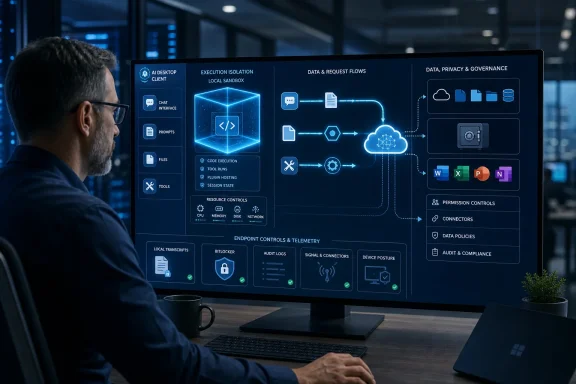 Execution isolation answers a narrower security question
In the security sense, a sandbox is a constrained environment: a container, virtual machine, low-privilege process, or other isolated runtime used to handle untrusted files, run code, browse, or carry out agent actions. Good implementations limit filesystem access, credentials, network egress, resource use, and access to other tenants.
Those controls matter. A coding agent allowed to execute a script in a throwaway environment is safer than one running it directly on an administrator’s Windows workstation with access to mapped drives, browser sessions, SSH keys, and corporate tokens. Likewise, isolating an uploaded spreadsheet or document reduces the chance that malicious content reaches the user’s normal desktop environment.
But this control starts with a narrower threat model: what can the code do after it is received? It does not settle what happens to the data that arrived before execution begins. A provider can parse an attachment, build context from it, generate logs, retain conversation records, scan for abuse, or process it through a model without any contradiction to the claim that the runtime itself is sandboxed.
That is why the phrase “your files are sandboxed” is incomplete in an enterprise procurement review. The unanswered questions are still the important ones:
- Is the file transmitted off the endpoint, and if so, to which service boundary and region?
- Are prompts, outputs, and tool transcripts retained, and for how long?
- Which administrators, support staff, contractors, or automated abuse-detection systems can access the stored data?
- Does a local client leave readable transcripts, caches, temporary files, logs, or authentication material on the Windows device?
- Can the agent call external tools, model-context-protocol servers, web services, or enterprise connectors that create additional copies of the data?
A sandbox can materially lower the likelihood of a hostile document taking over a PC. It cannot, by itself, establish that the document is private from the service processing it.
“Not used for training” does not mean “not stored”
This is the distinction organizations most often blur. Training is one possible use of data; processing and retention are others.
OpenAI says it does not use inputs or outputs from ChatGPT Business, Enterprise, Edu, and its API platform for model training by default. Its enterprise privacy material also says API inputs and outputs may be retained for up to 30 days for service delivery and abuse monitoring unless a qualifying customer uses a zero-data-retention arrangement. The company’s recent zero-data-retention offering reinforces the point: the no-training commitment and the no-retention commitment are separate promises with different eligibility and implementation requirements.
Anthropic draws a similar line. Its Privacy Center says consumer Claude chats and coding sessions may be used to improve models when users permit it, when conversations are flagged for safety review, or when a user has otherwise opted in. Commercial products have different terms, and Claude Enterprise offers custom retention controls. Those are meaningful protections, but they are not an assertion that customer content is never processed or never retained.
Microsoft’s documentation is especially relevant to Windows-centric organizations because Microsoft 365 Copilot is frequently described as being “inside the tenant.” Microsoft says Microsoft 365 Copilot and Copilot Chat prompts, responses, and Microsoft Graph data used for grounding are not used to train foundation models. It also says the products honor applicable Microsoft 365 permissions, sensitivity labels, retention policies, audit controls, and administrative settings.
That is a strong commercial-data posture, but it is not equivalent to “nothing is stored.” Microsoft Purview documentation explicitly covers retention and deletion of prompts and responses from Microsoft 365 Copilot and other AI applications. In some compliance scenarios, copied interaction data is stored through Exchange Online mailboxes. That can be exactly what a regulated organization needs for legal hold, records management, investigation, and audit—but it proves why “no training” is only one item on a data-governance checklist.
For IT teams, the decisive question is not whether a provider has a favorable training pledge. It is whether the organization understands the entire data lifecycle: collection, processing, storage, access, retention, export, deletion, and legal preservation.
Desktop AI clients create a second privacy boundary: the endpoint
Levin’s strongest practical point is that a desktop client can feel local while still creating cloud and endpoint exposure at the same time. A Windows app may transmit a prompt to a remote model, invoke local tools, write logs into the user profile, cache files for resumable sessions, retain OAuth tokens, and expose data to whichever endpoint telemetry and backup controls cover that device.
Anthropic’s own Claude Code documentation supplies a concrete example. Claude Code stores session transcripts locally in plaintext under its project data directory for 30 days by default to support session resumption. Anthropic also documents a configuration setting that changes the cleanup period, and says zero data retention is available for Claude Code under Claude for Enterprise on a per-organization basis.
The important operational detail is that those are different layers. Even where a commercial account has a provider-side no-training default, a developer’s endpoint can still hold a readable record of the session. If the developer pasted a connection string, private key, customer data extract, internal incident log, or unreleased source code into the conversation, that content may now exist outside the repository and outside the controls teams normally use to scan commits and CI artifacts.
On Windows, that shifts the review from an AI purchasing exercise into ordinary endpoint management:
- Endpoint detection and data-loss-prevention policies should cover AI-client data directories and temporary storage, not only source repositories and browser downloads.
- Device encryption, BitLocker recovery-key handling, local administrator rights, profile-redirection policies, and backup exclusions can determine who can retrieve a transcript after the original session is over.
- Help-desk and incident-response teams need to know whether an AI client stores conversations locally before instructing a user to collect logs or migrate a profile.
- Secret-scanning programs should assume that developers may paste credentials into prompt windows, terminal sessions, uploaded configuration files, and agent tool output.
The local transcript issue does not make Claude Code uniquely unsafe. It demonstrates why product labels are inadequate. A service can have a well-designed sandbox and a reasonable commercial data policy while its local client still creates a new category of sensitive files on managed endpoints.
Microsoft 365 Copilot needs a governance review, not a sandbox verdict
Microsoft 365 Copilot’s enterprise data protections are designed around Microsoft 365 identity, permissions, compliance, and the service boundary. That makes it substantially different from a consumer chatbot used with a personal account, especially when an organization has configured Purview, conditional access, sensitivity labels, auditing, and retention policies.
Yet Copilot’s ability to ground responses in organizational content is itself a reason to assess it carefully. Microsoft says Copilot respects existing user permissions, which reduces the risk of a user seeing content they could not otherwise access. But the tool can still retrieve and process emails, meetings, SharePoint content, OneDrive files, chats, and connected-app data that the user is authorized to use. An organization with years of permissive SharePoint sharing does not solve that underlying permissions problem by adding Copilot.
The same applies to connectors and agents. A sandbox around model execution will not correct an overbroad connector, an agent granted access to a sensitive site, a user with excessive membership in a Microsoft 365 group, or a web-grounding setting that conflicts with a team’s data-handling policy. Those are identity and governance decisions.
Administrators should therefore evaluate Microsoft 365 Copilot through the controls that actually govern exposure: permissions hygiene, SharePoint and OneDrive sharing, Purview sensitivity labeling, data loss prevention, audit logging, retention, agent permissions, connector inventory, and conditional access. Sandboxing may be relevant to a particular feature or runtime, but it is not the control that answers whether the organization’s data is handled appropriately.
The review process needs four separate workstreams
Organizations can avoid the category mistake by refusing to accept a single “secure” or “sandboxed” label as the conclusion of an AI review. Security teams should ask for evidence in four distinct areas.
First, document the execution boundary. Determine which commands can run, what local files and credentials the agent can access, whether it can reach the network, whether it can install software, and whether the workload is isolated from other users and tenants.
Second, document the provider-data boundary. Identify the account tier, region, training defaults, retention periods, human-review conditions, data residency options, zero-retention eligibility, subprocessors, and deletion mechanics. “Enterprise” is a commercial label, not a standardized security control.
Third, document the endpoint boundary. Inventory what the Windows client leaves behind: transcripts, logs, temporary files, crash reports, browser data, cached attachments, and credential tokens. Then determine whether those locations are encrypted, scanned, excluded from backups, available to other local processes, or collected by remote-support tooling.
Finally, document the connected-data boundary. Review what the AI tool can retrieve through Microsoft Graph, SharePoint, OneDrive, Git repositories, ticketing systems, MCP servers, databases, web search, and automation platforms. The most consequential data exposure may occur through a connector long after the original prompt has been sent.
A sandbox remains a valuable security measure, particularly for code execution and agentic tools. But it is valuable because it limits execution risk—not because it erases the need to know where corporate data goes. The practical consequence for Windows and Microsoft 365 administrators is to treat every AI client as a service, an endpoint application, and a potentially privileged connector at the same time.