
CyberPress framed the research as newly disclosed on August 7, but the underlying work is not a fresh August 2026 vulnerability announcement. Security researcher Dirk-jan Mollema presented the relevant Windows Hello abuse research publicly before then; slides from his “Windows Hello abuse – The sequel” presentation carry a December 2, 2025 status date and include proof-of-concept references. Microsoft’s current Windows Hello for Business documentation also describes the central behavior: after a user unlocks the Windows Hello credential, applications can request particular cryptographic operations through Windows APIs without a new PIN or biometric gesture every time.
That timing matters for defenders. There is no newly assigned CVE, no August Windows update identified as a fix, and no public evidence in the available reporting that this chain is being exploited in the wild. What has changed is the visibility of a long-standing design boundary that many organizations may have misunderstood: a TPM protects a key from extraction; it does not automatically prevent a process in the authenticated user’s session from requesting an allowed signing operation.
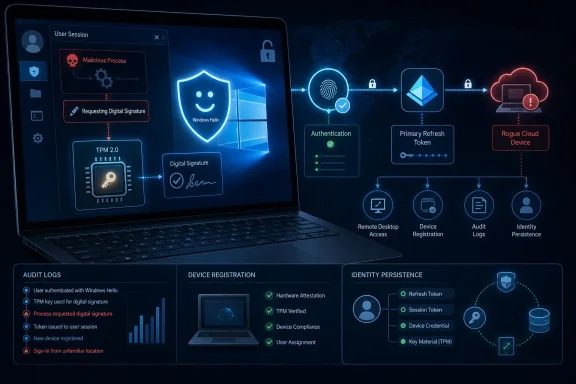 The PIN is a key-release gesture, not a per-request approval
Windows Hello for Business is designed around a device-bound asymmetric key pair. The PIN or biometric gesture unlocks use of the private key locally; neither the PIN nor biometric data is transmitted to Microsoft Entra ID. Microsoft’s own technical documentation says that, once the Hello container is unlocked, applications can use specified APIs to request signing, encryption, or decryption operations, while the key material itself remains unavailable to the application.
That design is necessary for normal Windows single sign-on. If Outlook, Edge, Teams, and other Entra-integrated clients demanded a face scan or PIN for every token request, Windows Hello would be unusable as a desktop authentication system. Windows therefore maintains an authenticated session state in which the platform can service permitted cryptographic requests.
Mollema’s research shows that a malicious process running under the victim’s account can use the Microsoft Passport Key Storage Provider and native Windows cryptographic interfaces to request a signature from the user’s Windows Hello for Business key. The process does not need local administrator rights, the user’s PIN, a biometric scan, or an export of the TPM-backed key.
The key remains inside TPM-backed storage. The attacker is borrowing its signing capability from the live Windows session.
That is an important distinction for incident response. A threat actor who merely steals a device but cannot sign in is in a substantially different position from one who has deployed malware under a user’s account on an unlocked machine. Endpoint compromise is the prerequisite; Windows Hello is then used to extend that local foothold into the identity plane.
The valuable target is a Primary Refresh Token
The immediate prize in this chain is not the Hello key itself but a Primary Refresh Token, or PRT. On Microsoft Entra joined and hybrid joined Windows devices, the PRT is the foundation for single sign-on. It lets Windows and compatible apps obtain access tokens for Entra-connected resources, and it carries user and device context used by Conditional Access.
Microsoft documents that a PRT can remain valid for 90 days while in use and is renewed during active use. That does not mean an attacker receives an unbounded, unrevocable token: PRTs are revocable, and account disablement, session revocation, device disablement, and Conditional Access changes still matter. But it does mean defenders should treat a suspiciously issued PRT as an identity-persistence problem rather than a short-lived browser-session problem.
The research’s central attack flow uses a Hello-backed assertion to request a PRT associated with another device context. Mollema’s presentation describes how Windows Hello authentication can be used across a Remote Desktop scenario: the victim-side session produces the signature, while an attacker-controlled endpoint receives a PRT. In the remaining scenario described by the researcher, the attacker does not need to export the original machine’s TPM key or crack the victim’s PIN.
This is where a common shorthand—“Windows Hello keys bypass PINs”—can obscure more than it explains. The PIN is not being guessed or bypassed at initial logon. It was already used to unlock the key for the victim’s legitimate session. The attacker abuses the post-unlock authorization path that Windows exposes for normal single sign-on behavior.
Microsoft’s documentation supports the architectural premise. It explains that Windows Hello for Business keys are used to sign Entra authentication requests and that Windows creates a PRT after validating that signed response. It also states that the PRT’s session key is protected through the device’s transport key and TPM. The research shows why that protection is insufficient when the attacker can make the legitimate endpoint perform the signing operation interactively through the compromised user context.
A rogue device can turn session compromise into persistence
CyberPress also highlights a second path: using the Windows Hello key in a WebAuthn-style authentication flow. Mollema’s presentation describes how use of a Windows Hello for Business key can satisfy Entra’s phishing-resistant authentication requirements and yield the recent-MFA context needed for provisioning additional authentication material.
The persistence consequence depends on tenant configuration. In a permissive tenant, a user who can register devices may be able to establish a new attacker-controlled Entra device identity, provision an additional Windows Hello credential or passkey, or otherwise create a recovery path that remains after the original endpoint has been cleaned. In hybrid environments using Windows Hello for Business key trust, new public-key material can synchronize back into on-premises Active Directory through Microsoft Entra Connect Sync.
That hybrid write-back behavior raises the stakes for organizations that synchronize privileged Active Directory identities to Entra ID. Mollema explicitly warns against syncing Tier 0 and Tier 1 accounts, because cloud-side identity changes can have on-premises consequences. A compromised ordinary workstation should not become a route to durable authentication material for domain administrators or other high-value accounts.
The chain is not guaranteed to work in every tenant. Device-registration permissions, authentication-method policy, Conditional Access, Intune enrollment controls, and the user’s ability to manage authentication methods all determine what an attacker can add. Microsoft Entra’s default device settings have historically allowed broad device joining and registration, while Microsoft recommends requiring multifactor authentication for device registration or joining through Conditional Access.
The unanswered operational question is how many organizations have restricted those defaults. CyberPress correctly points to unexpected device registration as a signal, but it does not quantify the affected tenant population, identify a Microsoft service-side change, or establish that the technique bypasses every compliant-device policy.
This is separate from the 2023 Windows Hello replay fixes
The current concern should not be conflated with the earlier Windows Hello assertion replay vulnerabilities tracked as CVE-2023-36871 and CVE-2023-35348. Mollema’s research notes that the earlier issue involved assertions that could remain reusable for an excessively long period. Microsoft’s remediation added nonce validation, constraining the relevant assertion window to roughly five minutes; the AD FS-side mitigation for CVE-2023-35348 required administrators to enable nonce enforcement after installing the July 2023 updates.
Those fixes matter and should be verified, especially in organizations still running AD FS. But they do not erase the residual scenario described in the newer presentation: a malicious process can request a current, valid assertion from a victim session and use it quickly to support authentication elsewhere. A five-minute nonce closes a replay window; it does not stop a live compromised endpoint from signing a newly obtained challenge.
Mollema also reported a separate downgrade issue involving an older PRT key-derivation method and stated that a planned fix had been rolled back because it broke too many clients. That component requires SYSTEM-level access and is distinct from the low-privilege user-session signing path. Organizations should avoid treating every Windows Hello/PRT claim as one flaw with one patch; the research covers several different mechanisms, privilege levels, and mitigation states.
What administrators should check now
The immediate response should be to validate identity and endpoint controls, not to disable Windows Hello for Business. Removing Hello often drives users back toward passwords and weaker sign-in habits while leaving the underlying problem of code execution in a live user session unresolved.
Security teams should review Entra device settings and authentication policy with three practical priorities:
- Restrict who may join or register devices in Microsoft Entra ID, and require Conditional Access MFA for the “Register or join devices” user action where the organization permits user-driven registration.
- Investigate recent device creations, additions of registered owners or users, newly enrolled passkeys and Windows Hello for Business methods, particularly when they follow endpoint alerts or suspicious interactive activity.
- Hunt for Entra sign-ins authenticated with Windows Hello for Business that lack expected device context, and correlate them with unfamiliar device identifiers, new IP addresses, unusual Remote Desktop activity, and token activity from endpoints outside normal management scope.
- Confirm that endpoint detection coverage includes user-context process telemetry, because the abuse begins with a process under the user’s account rather than a TPM extraction event or an administrator-level credential dump.
- Keep privileged Active Directory accounts out of Entra synchronization paths wherever possible, especially in hybrid key-trust deployments where authentication material can synchronize into on-premises directory attributes.
Microsoft Entra’s audit logs record device creation, ownership changes, and device operations. Those records are more useful here than a generic search for failed PIN attempts, because a successful abuse chain may generate no PIN failure, biometric prompt, or local elevation event at all.
The practical takeaway is straightforward: Windows Hello for Business remains resistant to credential theft in ways passwords are not, but its strongest protection ends at the boundary of an uncompromised signed-in session. Once malware is running as the user, the attacker may be able to turn the Windows device into a signing service for Entra authentication—and, in loosely governed tenants, turn that brief access into a new device or credential that survives the cleanup of the original PC.
References
- Primary source: cyberpress.org
Published: August 7, 2026 at 11:13 AM UTC
Loading…
cyberpress.org - Related coverage: learn.microsoft.com
Loading…
learn.microsoft.com - Related coverage: learn.microsoft.com
Loading…
learn.microsoft.com - Related coverage: dirkjanm.io
Loading…
dirkjanm.io - Related coverage: ro.scribd.com
Loading…
ro.scribd.com - Related coverage: hybridbrothers.com
Loading…
hybridbrothers.com - Related coverage: dirkjanm.io
Loading…
dirkjanm.io - Related coverage: techcommunity.microsoft.com
Loading…
techcommunity.microsoft.com - Related coverage: knowledge.digicert.com
Loading…
knowledge.digicert.com - Related coverage: linkedin.com
Loading…
www.linkedin.com - Related coverage: blog.mauritec.de
Loading…
blog.mauritec.de - Related coverage: en.movilforum.com
Loading…
en.movilforum.com - Related coverage: jairocadena.com
Loading…
jairocadena.com - Related coverage: support.microsoft.com
Loading…
support.microsoft.com - Related coverage: nvd.nist.gov
Loading…
nvd.nist.gov - Related coverage: nvd.nist.gov
Loading…
nvd.nist.gov - Related coverage: support.microsoft.com
Loading…
support.microsoft.com - Related coverage: linkedin.com
Loading…
www.linkedin.com - Related coverage: cve.mitre.org
Loading…
cve.mitre.org - Related coverage: techcommunity.microsoft.com
Loading…
techcommunity.microsoft.com