
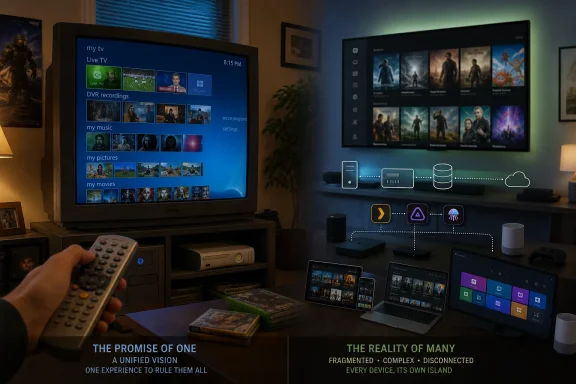
Today’s home-theater PCs and media servers are more capable in nearly every technical respect. Plex, Jellyfin, Kodi, Channels DVR, and HDHomeRun systems can provide modern codecs, remote access, mobile apps, metadata, and flexible tuner support. Yet the experience is also more fragmented. Microsoft’s old platform understood something that the current streaming era has largely forgotten: a household should not need to become its own IT department merely to make television, recordings, discs, and personal files appear in one coherent place.
 The PC That Wanted the Best Seat in the House
Windows Media Center arrived at a time when the personal computer was still primarily seen as a desk-bound productivity device. Microsoft saw an opportunity to turn that assumption upside down. The company released Windows XP Media Center Edition to PC manufacturers in September 2002, positioning it as a new form of Windows machine built around television and digital entertainment rather than spreadsheets and web browsing. Microsoft’s original announcement made clear that the product depended on cooperation among PC makers, silicon vendors, decoder providers, remote-control suppliers, and electronic-program-guide companies.
That ecosystem requirement was both Media Center’s greatest strength and its original limitation. The experience was not designed as a casual software download for any random Windows XP desktop. It arrived on purpose-built systems from manufacturers such as HP, with appropriate television tuners, infrared receivers, remote controls, graphics hardware, DVD decoding support, and suitable audio connections already in place. Microsoft’s lifecycle documentation records the North American release date for the 2002 edition as October 28, 2002.
The central concept was the 10-foot interface: a full-screen environment that could be read across a room and controlled from a sofa. This was a fundamentally different proposition from simply running Windows Media Player on a television. Media Center used oversized text, animated navigation, predictable menus, and remote-focused controls to hide much of the PC’s traditional complexity.
At its best, it made a Windows computer behave less like a computer and more like an appliance.
A single screen for multiple kinds of entertainment
Media Center’s core feature set now sounds familiar because the industry has spent two decades rebuilding it in separate products:
- Live television through compatible TV tuners
- Electronic program guides with listings and scheduling information
- DVR recording, including scheduled recordings and series recording
- Time shifting, letting viewers pause and rewind supported broadcasts
- DVD playback from the same sofa-friendly environment
- Personal music, photo, and video libraries
- Remote-control navigation rather than a mouse-and-keyboard requirement
- Whole-home playback through Extender devices
- Internet video services, later including Netflix
The difference was not that Microsoft invented every individual component. Digital video recorders already existed. DVD players already existed. Music libraries, photo viewers, set-top boxes, and television guides all existed. The achievement was the attempt to place these functions under one navigational and visual model.
Microsoft’s launch materials emphasized the free guide service as an important part of the value proposition. In the United States and Canada, Tribune Media Services provided up to 14 days of listings and show descriptions, allowing viewers to search and schedule recordings without the recurring subscription fees that were common among dedicated DVR products. Microsoft described that guide arrangement in its 2002 release announcement.
That detail matters because it illustrates the confidence behind the original strategy. Microsoft was not selling Media Center as a bare software shell that customers would need to complete with multiple paid services. It was selling an integrated digital-living-room experience.
Media Center Was Early to the Home-Server Model
The first Media Center PCs were interesting, but the platform became more significant when Microsoft began treating them as central servers for the rest of the home. That shift foreshadowed the architecture now used by nearly every serious personal-media platform.
The most consequential expansion came with Windows Media Center Extenders. Rather than placing a full PC beside every television, users could run the main Media Center system in one room and access its interface, recordings, music, photos, and video from compatible devices elsewhere.
The Xbox 360 was more than a game console
When the Xbox 360 launched in November 2005, it doubled as a full Windows Media Center Extender. Microsoft’s documentation described the console as capable of connecting to a Windows XP Media Center Edition or Windows Vista Media Center PC over a home network, displaying the Media Center interface while supporting high-definition video and surround sound. Microsoft Learn’s Extender documentation confirms the Xbox 360’s role as a fully functional Extender.
That was a notably forward-looking arrangement. A PC could sit in an office, closet, or basement, while a relatively simple device connected to the television acted as the household’s entertainment endpoint. The Xbox 360 could be a gaming machine for one part of the day and a television, recording, photo, and media client for another.
In 2026, the concept feels entirely normal. A Plex server, Jellyfin server, NAS appliance, or network DVR commonly plays the same role. Client devices—from smart TVs and tablets to streaming boxes and game consoles—retrieve media from a central system rather than storing everything locally.
But in 2005, this was not an obvious mainstream model. Home Wi-Fi was less reliable, fast broadband was less universal, network-attached storage was a specialist purchase, and television interfaces were generally limited to cable boxes, DVD players, and game consoles. Media Center and the Xbox 360 recognized that the home network would become a distribution layer for entertainment before most televisions had meaningful software platforms of their own.
Windows Vista and Windows 7 broadened the pitch
Media Center eventually escaped its original OEM-only status. The platform was integrated into selected consumer editions of Windows Vista and Windows 7, making the idea less dependent on buying a specially branded living-room PC. It could become part of a regular household computer that happened to have a compatible tuner and remote.
This was arguably the high point of the platform. Windows 7 Media Center combined a relatively polished interface with broad support for broadcast standards, multiple tuners, optical-disc playback, personal media, and Extender devices. It was not the easiest product to configure, but it was unusually complete once it worked.
The platform also reached toward online video. Netflix launched an official Windows Media Center application for U.S. users in 2009, bringing a major streaming service into an interface that already contained local files, recorded television, and live channels. As MakeUseOf’s retrospective notes, this represented an unusually integrated approach: streaming content was not necessarily isolated in a separate device or ecosystem.
That vision looks even more striking now. Most contemporary home media setups divide entertainment into separate silos:
- Broadcast TV lives in a tuner app or cable-box interface.
- Streaming subscriptions live in individual vendor apps.
- Personal video libraries live in Plex, Jellyfin, Kodi, or a file browser.
- Physical discs frequently require separate playback software.
- Music may be split between local libraries and cloud services.
- Photos are usually handled by yet another application or service.
Windows Media Center was never perfect, but it understood the unification problem.
Why Such an Elegant Idea Was So Difficult to Own
Media Center was ahead of its time in design philosophy, but it was often trapped by the technological and commercial realities of its era. The platform’s failures were not merely the result of Microsoft losing interest. Its most demanding features required a level of hardware compatibility, content licensing, and support coordination that few ordinary consumers wanted to manage.
Hardware setup undermined the appliance illusion
A truly successful living-room device must feel dependable. Users expect to press a button, select a program, and watch it. Media Center could deliver that result, but the road to it was not always simple.
A typical setup could require:
- Selecting a compatible analog, digital terrestrial, satellite, or cable TV tuner.
- Installing drivers and ensuring Windows recognized the hardware correctly.
- Connecting an antenna, cable feed, or set-top box.
- Configuring the electronic program guide.
- Setting up infrared blasters to control an external cable or satellite receiver.
- Connecting the PC to a television or AV receiver.
- Configuring a remote and, for multi-room use, pairing Extender devices.
That is a reasonable weekend project for an enthusiast. It is not a good onboarding experience for a household that wants the television to work immediately.
Microsoft was trying to sell a high-end software experience on top of the notoriously variable PC hardware ecosystem. In a conventional desktop scenario, a driver quirk is annoying. In a living room, a failed tuner or remote-control handshake can make the whole device feel broken.
CableCARD showed the danger of building around closed ecosystems
The United States cable market intensified the problem. CableCARD promised a way for certified third-party hardware to decrypt cable channels without relying entirely on the provider’s own set-top box. In practice, the technology came with strict certification rules, provider coordination, and limited consumer understanding.
Media Center users who pursued premium digital-cable features could face an unpleasant combination of hardware requirements, activation calls, card pairing, firmware issues, and provider support representatives who were unfamiliar with the setup. The experience demonstrated a lesson that still applies today: the more a media product depends on restricted content systems, the less control the customer ultimately has.
Digital-rights management made that lesson even sharper. Where channels were marked with restrictive copy-control flags, recordings could be tied tightly to the original PC and its authorization state. A major hardware change, Windows reinstall, or damaged license store could transform an existing recording library into inaccessible files.
This was not a uniquely Microsoft problem. It was a consequence of the television industry’s insistence on controlling content after it reached the subscriber’s home. Still, it undercut the reliability that Media Center needed to become a true household appliance.
Microsoft Turned Stagnation Into Withdrawal
A niche audience alone does not justify killing a product. Many of Microsoft’s most important technologies began as niche products. The more revealing problem was that Media Center stopped receiving meaningful strategic investment precisely when streaming, home networking, and connected televisions were about to make its foundational ideas more relevant.
Windows 7 was effectively the last era in which Media Center felt like a growing platform rather than a legacy component.
Windows 8 made the product harder to discover
Microsoft’s Windows 8 strategy exposed the company’s changing priorities. Rather than shipping Media Center as an included feature in appropriate consumer editions, the company separated it into an add-on.
Microsoft announced in 2012 that Windows Media Center would be available as an add-on for Windows 8 Pro rather than an ordinary built-in feature. The Windows Experience Blog’s edition announcement characterized it as an economical media-pack option, but the move nonetheless transformed a once-included capability into an extra decision and an extra purchase.
The subsequent pricing was stark. Microsoft set the Windows 8 Media Center Pack at $9.99 in the United States for Windows 8 Pro systems, while the Windows 8 Pro Pack—which was required for standard Windows 8 users who wanted both Pro features and Media Center—was listed at $99.99 after the promotional period. Microsoft’s pricing update documented both figures. Windows 8.1 retained the same basic split, offering Media Center for $9.99 to Pro users and bundling it into the $99.99 Pro Pack for standard-edition users. Microsoft’s Windows 8.1 packaging post confirmed that arrangement.
The financial logic was understandable. Broadcast television and DVD playback involved codec and licensing costs, and fewer Windows customers were using physical media or tuner-based television. But the decision was strategically self-defeating.
A product positioned as a paid legacy upgrade is not a product being prepared for the future. It is a product being managed toward retirement.
Windows 10 removed the platform, not just a feature
Windows 10 completed the withdrawal. Media Center was removed entirely, and users upgrading from eligible Media Center editions of Windows 7 and Windows 8 received the much narrower Windows DVD Player application for a limited time. Microsoft’s Windows DVD Player support page lists the qualifying editions and notes that the app was distributed through Windows Update after an eligible upgrade.
That replacement was revealing. DVD playback was preserved in a limited form, but Media Center’s broader identity—live TV, DVR support, guide data, remote navigation, recordings, Extenders, and unified media—was not.
The company did not replace Windows Media Center with a modern Windows Media Center. It replaced a complete entertainment platform with a DVD app.
Xbox One Briefly Looked Like a Successor
Microsoft did not entirely abandon the living-room television concept at once. For a period, Xbox One appeared positioned to inherit portions of the Media Center mission through HDMI input, OneGuide, digital tuners, and planned DVR features.
In August 2015, Microsoft announced over-the-air DVR for Xbox One. The company said the feature would support recording to a USB hard drive, recording schedules, mobile streaming, downloads to Windows 10 devices, and remote management through Xbox and SmartGlass applications. Xbox Wire’s announcement described the service as subscription-free after the necessary hardware purchase.
The proposal was recognizably Media Center-like. It brought live television, scheduled recordings, storage management, and multi-device viewing into a Microsoft entertainment device. Earlier Xbox One television features had already included guide data, live-TV integration, pause support, and companion-app control in selected markets. Xbox Wire’s digital-tuner announcement outlined those capabilities for compatible European markets.
But the momentum did not last. Microsoft’s later Xbox development priorities focused more heavily on gaming, social features, backward compatibility, and platform services. The outcome reinforced the broader pattern: Microsoft remained interested in television features, but not enough to sustain a durable, cross-generational home-entertainment platform.
The Quiet End of the Program Guide
Media Center’s decline was not one dramatic shutdown. It was a gradual loss of the services that made the product practical.
The electronic program guide was particularly important because it transformed a tuner-equipped PC into a DVR that ordinary people could actually navigate. Without guide data, users could still watch channels and create manually timed recordings in some configurations, but features such as searchable listings, easy schedules, and dependable series recording became far less convenient.
Microsoft’s support documentation states that its guide service was removed in January 2020, requiring users who wanted continuing guide data to find another listings provider. Microsoft’s Windows Media Center guide troubleshooting page identifies that retirement explicitly. Earlier, Microsoft had already warned users that a 2015 guide-data-provider transition could change lineups, remove certain lineups, or leave channels without metadata. Microsoft’s 2015 EPG update notice documented those potential disruptions.
For enthusiasts, community projects and third-party listing services could keep parts of the experience alive. But that is the difference between a supported product and a preserved hobbyist platform. The former is something a family can use. The latter is something a technically confident owner maintains.
Modern Media Servers Prove the Original Vision Was Right
The irony of Windows Media Center is that its central thesis won. Personal media can be centralized. Television tuners can be networked. Recordings can be scheduled remotely. A server can distribute video to televisions, tablets, phones, browsers, and game consoles. Metadata can organize huge libraries. Remote controls and simplified interfaces can make a server feel like an appliance.
The market did not reject these ideas. It absorbed them.
Plex, Jellyfin, Kodi, and the new fragmented stack
A modern Windows home-theater setup can be far more capable than Media Center ever was. Depending on the software and hardware chosen, it can support:
- 4K HDR playback
- HEVC and AV1 video
- Hardware-accelerated transcoding
- Network television tuners
- Over-the-air DVR recording
- Mobile downloads
- Remote streaming
- Automatic artwork, cast, and metadata retrieval
- Multiple user profiles
- Browser-based administration
- Apps across televisions, phones, tablets, consoles, and streaming devices
Jellyfin offers a particularly attractive option for users who want an open-source, self-hosted media server without a mandatory subscription. Kodi remains a flexible television-friendly front end for local files, network shares, and compatible PVR backends. Plex provides a polished commercial ecosystem with broad client support and simple library sharing. Channels DVR offers a more television-first approach for households focused on tuners and recording.
These platforms are not inferior to Media Center. In many respects, they are the fulfillment of what Media Center could have become.
But they also reveal what has been lost.
Integration is still the unsolved problem
A household that wants a modern version of the Media Center ideal may need a NAS or server, media-management software, a tuner, guide data, client apps for each television, reliable networking, storage planning, transcoding settings, remote-access security, and ongoing maintenance.
That setup can be rewarding. It can also be absurdly complicated compared with the simple aspiration of turning on the TV and seeing everything in one place.
The deeper issue is not merely technical. Streaming companies have little incentive to surrender their separate applications, recommendation engines, advertising surfaces, subscription flows, or account systems to a neutral media interface. Netflix, Disney+, Prime Video, and other services want to own the entire viewing relationship. A unified library is therefore much harder to achieve now than it was when media primarily consisted of broadcasts, discs, and local files.
Microsoft’s old interface did not solve every content problem, but it was built around a more user-centered premise: the media belongs in the household’s library, not in the vendor’s silo.
What Microsoft Got Right—and What It Got Wrong
Windows Media Center deserves neither uncritical nostalgia nor dismissal as a relic. It was a sophisticated platform whose failures were real, but whose ambitions were more durable than many of its successors.
The enduring strengths
Media Center’s strongest ideas remain instructive:
- The remote should be first-class. A living-room interface cannot be a desktop application with larger icons.
- Personal media deserves equal status. Family videos, music collections, photos, and recordings should not feel secondary to commercial streaming catalogs.
- Television is more useful when it is searchable and schedulable.
- One central server can simplify a multi-screen home.
- A good interface reduces the need to understand the infrastructure beneath it.
- Entertainment systems should prioritize continuity over vendor fragmentation.
These principles explain why so many enthusiasts still remember the Windows Media Center experience warmly, even while acknowledging its flaws.
The risks Microsoft failed to resolve
The weaknesses were just as real:
- Hardware compatibility could be fragile.
- Cable and premium-channel support was burdened by DRM and provider restrictions.
- The PC form factor was not always quiet, compact, or appliance-like.
- Setup complexity discouraged ordinary households.
- Guide data and online integrations made the platform dependent on external services.
- Codec licensing and content-industry requirements complicated Microsoft’s business case.
- The product never received the sustained development needed to transition cleanly into the streaming era.
Microsoft’s mistake was not that it eventually recognized these problems. The mistake was treating withdrawal as the only response.
A better strategy would have preserved the core experience while separating it into clearer layers: a simple free media shell for local files and basic streaming, optional tuner and DVR packs for enthusiasts, supported network devices, and a modern app model for services. Instead, Microsoft allowed a once-distinctive platform to age in place, then removed it without building a true successor.
The Living Room Still Needs a Media Center
Windows Media Center did not lose because its premise was wrong. It lost because the PC ecosystem, television industry, and Microsoft’s own shifting priorities made the platform difficult to evolve. In that sense, it was both ahead of its time and trapped by it.
The modern media-server landscape confirms that the original vision was sound. People still want a central place for their collections. They still want a usable DVR. They still want a television interface that respects the remote control. They still want media to move freely between rooms and devices. And they still want less friction between the entertainment they own, the recordings they make, and the services they subscribe to.
What has changed is that the responsibility for assembling that experience has moved from Microsoft to the user. Today’s solutions may offer better video quality, more capable hardware, broader device support, and stronger remote-access options. Yet they often demand more configuration, more accounts, more maintenance, and more compromises.
Windows Media Center was not the finished future of home entertainment. It was something more interesting: an early, unusually coherent sketch of that future. Microsoft saw where the living-room PC could go, built much of the road, and then walked away before the rest of the industry arrived.
