
C:\Windows\Media may find 11 .raw files that refuse to play in Media Player, Audacity, or a normal double-click. They are not corrupt leftovers: Neowin traced them to ElementSoundPlayer, Microsoft’s WinUI control-sound system, and the filenames map directly to interface actions such as Focus, Invoke, Show, Hide, MoveNext, MovePrevious, and GoBack.
The files include Focus0_48000Hz.raw through Focus4_48000Hz.raw, plus GoBack_48000Hz.raw, Hide_48000Hz.raw, Invoke_48000Hz.raw, MoveNext_48000Hz.raw, MovePrevious_48000Hz.raw, and Show_48000Hz.raw.
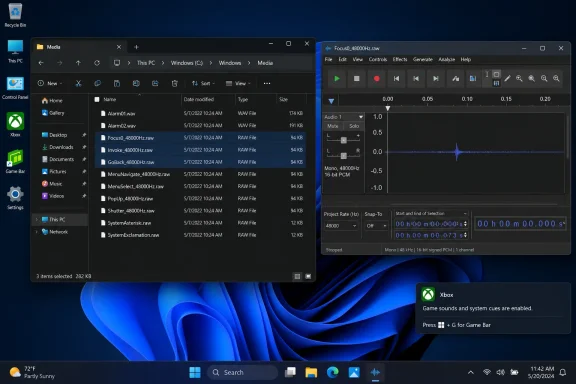 Why Windows will not open them normally
A .raw audio file is audio samples without the metadata container that tells a player how to decode them. Unlike WAV, it does not declare its sample rate, bit depth, channel layout, or byte order. A player can therefore interpret valid data incorrectly as static—or reject the file outright.
Neowin’s testing identified these Windows files as 48 kHz, 16-bit signed PCM, mono audio. That makes the 48000Hz suffix meaningful, but it still leaves enough information absent to prevent conventional players from recognizing the clips automatically.
The sounds are extremely short UI cues rather than notification tones. The five Focus files are also intentional variants, not duplicates.
The filenames match Microsoft’s control-sound API
Microsoft’s ElementSoundKind documentation defines the same set of actions: Focus, Invoke, Show, Hide, MovePrevious, MoveNext, and GoBack. ElementSoundPlayer is available in both the legacy UWP XAML API and modern WinUI, where an app can request a named interface sound instead of shipping its own click and navigation effects.
Microsoft’s design guidance also explains why many PC users will never hear them. ElementSoundPlayer defaults to an automatic state intended for 10-foot experiences, meaning control sounds are normally heard when an app runs on Xbox. Developers can explicitly invoke them, control volume, or disable spatial audio behavior.
That makes the files less a hidden Windows sound scheme than a shared resource installed alongside Windows platform components.
A safe way to inspect them
If you simply want to verify the files, open File Explorer and browse to:
C:\Windows\Media
Do not rename, delete, or replace anything in that folder. For playback, import a copy into an audio editor as raw data and specify:
- 48,000 Hz sample rate.
- 16-bit signed PCM encoding.
- One mono channel.
Exporting that imported audio to WAV adds the missing header, making the result playable in ordinary software. Because each cue lasts only a few dozen milliseconds, looping the clip or adding silence between repeats makes it easier to distinguish.
For developers, the more useful takeaway is that the filenames correspond to supported WinUI semantics—not undocumented Windows hooks. Calling ElementSoundPlayer with ElementSoundKind.Invoke, for example, is preferable to reaching into C:\Windows\Media and hard-coding a path to a system asset.
The mystery ends up being mundane but revealing: Windows includes audio assets for a broader Microsoft UI stack, while the standard desktop experience generally keeps those Xbox-oriented navigation sounds silent.