
The PowerShell Gallery listing identifies Microsoft Corporation as the author and shows the first release as published on August 19, 2026, with support for Windows PowerShell 5.1 and PowerShell 7. That date conflicts with the August 20 publication time attached to the submitted item. The Gallery’s package manifest was generated on August 14 and the live package listing records August 19 as its publication date, making the Gallery record the more concrete release marker.
For Windows administrators, the release turns a set of Graph APIs into an interactive tool that can inventory a user’s cloud-held backup settings, map data to devices, export it locally, and clear it when necessary. Microsoft’s own code makes clear this is aimed at Windows Backup for Organizations administration rather than ordinary consumer backup troubleshooting.
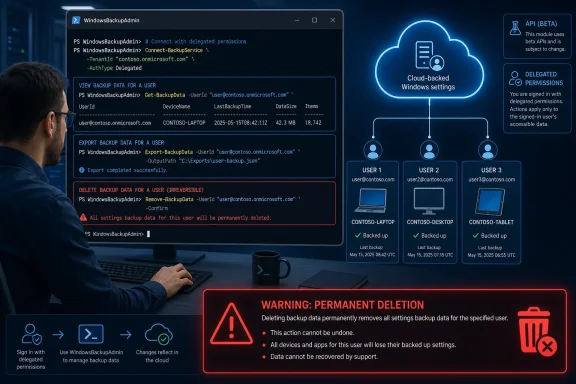 WindowsBackupAdmin packages two commands and two very different risk levels
The module exports Get-WindowsBackup and Remove-WindowsBackup, while preserving View-WindowsBackup and Delete-WindowsBackup as aliases. Get-WindowsBackup can inspect the signed-in user’s backup or another user’s backup, summarize settings by device, show modification times, decode selected payloads where possible, and export the results.
Remove-WindowsBackup is the command administrators should treat with particular care. Microsoft’s module description says the operation “permanently delete ALL Windows settings backup data for a user,” and the shipped script reinforces that limitation: it performs one deletion call against the user-level Windows settings collection. There is no -DeviceId, -SettingId, dry-run, recovery option, or per-setting cleanup path.
Before asking for confirmation, the script reads the backup collection, counts associated device profiles and settings, and displays a device rollup. That is useful guardrail behavior, but it does not narrow the operation. Once the administrator confirms with Y, the command sends a delete request that clears the target user’s full backup collection and expects Graph to return HTTP 204.
This makes the module appropriate for situations such as account offboarding, privacy-related deletion requests, or resetting corrupt backup state after an incident. It is a poor fit for routine troubleshooting where the goal is to remove stale settings from one retired laptop while retaining the user’s other Windows backup data.
The delete path depends on Microsoft Graph beta
Microsoft Graph documents windowsSetting as a cloud-stored Windows setting associated with a user. The objects distinguish between roaming settings, which can sync across devices, and backup settings, which are used for backup and restore and can carry a device identifier.
Reading Windows settings is available through Microsoft Graph v1.0. The API supports filtering by settingType and windowsDeviceId, which is how a tool can separate backup content from roaming settings and organize results by device. Microsoft’s own Graph documentation shows the read operation is limited to delegated access; application-only permissions are not supported.
The significant split is deletion. Microsoft documents deletion of a user’s windowsSetting data only in the Graph beta endpoint. The documentation explicitly says beta APIs can change and are not supported for production applications. WindowsBackupAdmin’s delete script uses that beta endpoint directly, even though its module package itself is version 1.0.0.
That distinction has operational consequences. A stable PowerShell module version does not mean the cloud service operation beneath every command has reached stable Graph support. Administrators who automate this module into runbooks should expect Microsoft to potentially change the beta API’s behavior, permissions, URL requirements, or availability before the endpoint graduates to v1.0.
The module’s read script also uses Graph beta when it accesses another user’s Windows settings backup, while self-service reading is available from the stable v1.0 endpoint. Microsoft has therefore packaged a workflow that spans both supported and preview service surfaces, rather than offering a wholly production-stable administrative API.
Cross-user access requires a specific role, not merely Global Administrator
WindowsBackupAdmin is not a tenant-wide, unattended cleanup tool. It uses interactive Microsoft Graph authentication, requires delegated OAuth scopes, and cannot operate through application permissions. For a user viewing their own data, the relevant scope is UserWindowsSettings.Read.
Cross-user access requires broader scopes and a role assignment. The module asks for UserWindowsSettings.Read.All and User.Read.All to inspect another user’s backup, while deletion requests UserWindowsSettings.ReadWrite.All and User.Read.All. Microsoft’s Graph deletion documentation separately requires the calling account to hold the Microsoft 365 Backup Administrator Microsoft Entra role.
The code is unusually direct about the access boundary: it warns that Global Administrator rights by themselves do not grant access. That is consistent with Microsoft’s Graph documentation, which calls out the Backup Administrator role as a requirement for deletion. In practice, a tenant should assign that role deliberately to a small recovery or data-governance group rather than assuming existing high-privilege administrators can use the tool when needed.
The module also resolves a target user’s UPN to an Entra object ID and combines it with the tenant ID for cross-user beta calls. This is a clue that the tool is built around the administrative form of the Graph API, not a simple extension of the end-user Windows Backup interface in Settings.
It also means the tool is limited to the global Microsoft Graph service. Microsoft’s v1.0 Windows settings documentation lists the API as unavailable in US Government L4, US Government L5/DoD, and Microsoft’s China-operated cloud. Organizations in those environments should not assume the module will work simply because PowerShell Gallery installation succeeds.
Exports can contain the actual settings values
The viewing command has three export modes. A metadata-only JSON export records device and setting information without the payloads. A second JSON option includes decoded payload values. A third option writes raw decoded payloads into .dat files, creates a manifest, and packages the result as a ZIP archive.
That is valuable for diagnostics and for responding to a request to inspect what a Windows backup contains. It also creates a data-handling obligation that the package description does not spell out: an export containing decoded payloads is local data copied outside the Microsoft cloud service. Windows settings backups can include personalization, application-related information, language preferences, and—depending on the Windows Backup configuration—account, Wi-Fi, and password-related settings categories.
Microsoft’s Windows Backup policy documentation separates controls for apps, accessibility, personalization, language, “other Windows settings,” and credentials. The existence of those controls does not prove that every export includes every category for every user; the Graph data available depends on what that user enabled and uploaded. But it does mean administrators should classify full-payload exports as potentially sensitive and store them accordingly.
The tool includes a limited readability check: it attempts to Base64-decode payloads as UTF-8 text and reports binary content when the result cannot be treated as text. That behavior is sensible for inspection, but it should not be mistaken for a portable restore format. Microsoft’s Windows settings API documentation notes that some backup payloads originate from registry data, files, or other at-rest locations and were not designed for use outside the components that created them.
In other words, an export is evidence and diagnostic material, not a supported method to transplant Windows preferences into another account or device. The module’s inclusion of ZIP and JSON output should not be read as a promise of cross-device or cross-tenant restoration.
A safer operating pattern is inspect, export selectively, then decide
The tool’s strongest contribution is visibility into backup data that has historically been opaque to administrators. Its biggest hazard is that the cleanup function is intentionally coarse-grained. A sensible operational sequence is to first use Get-WindowsBackup against a test account or the administrator’s own backup, inspect the device rollup and payload types, and decide whether an export is necessary before considering deletion.
Administrators should keep decoded JSON and raw .dat ZIP exports in a controlled location, restrict their retention, and ensure the person running the module has only the Graph scopes and Entra role needed for the specific job. The module auto-installs Microsoft.Graph.Authentication for the current user if it is missing, so environments with tightly controlled PowerShell repositories may also want to pre-stage and validate that dependency rather than allow ad hoc installation.
Microsoft has made the destructive boundary clear in its own code: this is a whole-user purge, it has no undo, and it uses Graph beta. WindowsBackupAdmin is therefore most useful as an administrative inspection and export utility today; its deletion command belongs in an approved, logged process where clearing every Windows settings backup object for a user is exactly the intended result.