
WindowSill developer Étienne Baudoux announced the expansion on August 2, describing Files and Directory Opus as first-class targets alongside File Explorer. There is no setup switch, plug-in, or Files-side extension to install, according to the WindowSill announcement; it says both Microsoft Store and standalone installs of Files are detected automatically.
The Microsoft connection needs a more careful reading than the headline suggests. Baudoux is a Microsoft software engineer, but WindowSill is his separate product, published by Veler, LLC. Microsoft has not announced, bundled, endorsed, or integrated WindowSill into Windows 11. This is an independent developer who happens to work at Microsoft shipping a private third-party utility that interoperates with two third-party file managers and File Explorer.
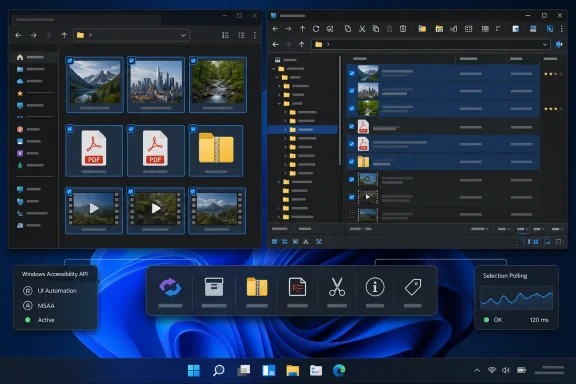 WindowSill turns file selection into a command surface
WindowSill positions a narrow toolbar around the taskbar area and changes its available controls based on the active application and selected content. Its newest file-manager support moves the relevant question from “which app owns this folder?” to “what kind of file is selected?”
For a photo, the bar can offer resize, format conversion, and compression functions; a batch of images can be combined into a PDF. Selecting PDFs can expose merge, split, page-extraction, image-export, and password-related actions. Video files can be converted or compressed, while text, Office-style documents, CSV files, and spreadsheets can be converted between supported formats. ZIP files get inspection details and an option to look inside without extracting them.
Those are WindowSill features, rather than new native capabilities of Files or Directory Opus. The distinction matters for deployment and troubleshooting: installing or updating Files alone will not create this toolbar, and removing WindowSill removes the integration. The feature is also presented as part of WindowSill’s free tier, although WindowSill itself is not open source.
The extensions powering several of these actions are open source under the MIT License in the WindowSill extensions repository. That does not make the host application open source. IT administrators evaluating it should treat the closed-source WindowSill executable and its open-source extensions as different components with different auditability.
Files support uses Accessibility API, not a Files plug-in
The technical mechanism is more revealing than the polished “no configuration” pitch. Baudoux says WindowSill reads selection changes in Windows File Explorer through COM APIs, while its Files integration relies on the Windows Accessibility API, also known as UI Automation.
That means the integration is external to Files. WindowSill observes the active Files window, identifies the current folder and selected items, and presents actions in its own desktop bar. It does not require the Files project to merge WindowSill code, publish an add-on, or change its own command bar.
For end users, that is why the integration can work with both the Microsoft Store package and a standalone build of Files. For administrators, it also establishes the real boundary: the utility must be able to inspect UI elements exposed by the file manager while it has focus. The WindowSill announcement does not spell out what selection metadata is retained, logged, or transmitted, and it does not provide enterprise controls specific to the new Files or Directory Opus connectors.
There is no evidence in the announcement that file contents are uploaded merely because a file is selected. But some offered operations—such as document conversion, PDF processing, or media compression—necessarily act on content when the user invokes them. Organizations with data-handling requirements should test those operations with representative sensitive files before treating the convenient toolbar as a harmless cosmetic overlay.
The integration also relies on accessibility exposure being consistent. Baudoux has acknowledged that certain applications can limit what WindowSill detects through Accessibility APIs unless users change their own accessibility settings. Files appears to expose enough information for the announced workflow, but this remains a screen-level integration, not a documented Files API partnership. That is a useful compatibility shortcut, yet it leaves WindowSill dependent on future UI behavior in Files.
Directory Opus support carries a different reliability trade-off
Directory Opus is also newly supported, but it is not connected through the same event-driven route. In a discussion following the announcement, Baudoux said WindowSill uses dopusrt.exe /cmd to retrieve selected items and relies on a timer while Directory Opus has focus because he could not find a selection-change event that fits the integration.
That implementation is important for power users. It means the Directory Opus connector polls for selected-file state rather than reacting directly to a native selection event. Baudoux says the polling logic runs only when Directory Opus is focused, which limits unnecessary work. Still, it is a less robust arrangement than the COM-based File Explorer path and the event-driven Accessibility API approach used for Files.
A Directory Opus community member pointed out that the file manager’s scripting API can respond to selection changes, but would require a Script Add-In and a communications bridge to WindowSill. That would introduce a separate installation and trust prompt. Baudoux chose the zero-configuration route instead.
The consequence is that Directory Opus support should be regarded as early interoperability rather than deep platform integration. Users with heavily customized multi-pane layouts, unusual display modes, high-latency folders, or scripts that rapidly change selections should test the behavior rather than assume it will be indistinguishable from File Explorer. Baudoux has specifically asked for feedback from long-time Opus users because of the breadth of custom configurations in the community.
The reported Files 4.2.2 release needs a correction
Neowin’s report ties the WindowSill news to a purported Files 4.2.2 update, listing sidebar icon changes, folder-loading and archive-extraction performance work, encrypted-archive behavior, and a substantial bug-fix set. Those are plausible improvements for a modern file manager—but the public primary record does not presently substantiate that version and changelog.
Files’ official news site identifies Files v4.2, released July 5, 2026, as its most recent broadly announced stable release. That update added a tree-view sidebar, an “Open With” toolbar flyout, more flexible dual-pane behavior, improved session restoration, media metadata editing improvements, and network-discovery guidance. Its published changelog does not contain the WindowSill integration, the claimed v4.2.2 archive-performance changes, or the same bug-fix list reported by Neowin.
The WindowSill integration also does not appear to depend on a Files 4.2.2 release. WindowSill’s own announcement says it detects both Store and standalone Files builds, with no stated minimum Files version. In other words, the core news is a WindowSill update that can work with Files; it is not confirmed evidence that Files itself shipped a matching integration release.
That distinction saves users from chasing the wrong update. If the aim is to obtain WindowSill’s file-aware toolbar in Files, update WindowSill first. A Files update may still be worthwhile for its own fixes and features, but the available primary documentation does not establish that Files 4.2.2 is a prerequisite or that it contains the published performance claims.
A useful add-on, not a Windows 11 remedy
Files and Directory Opus users now have a way to bolt quick actions onto their existing file-manager workflow without abandoning it for File Explorer. That is especially attractive for people who frequently batch-convert images, inspect archives, manipulate PDFs, or transcode media and want fewer application launches.
But it is still a layered solution: WindowSill observes selection context, offers the action, then invokes its own tooling. It does not improve Windows 11’s native archive engine, modernize File Explorer’s command model, or make File Explorer perform like Files or Directory Opus. Nor does it turn a Microsoft employee’s side project into an official Windows feature.
For the moment, the most concrete next step is to update WindowSill and test it against the file manager actually used in daily work. Files users should expect the cleaner, event-driven Accessibility API path; Directory Opus users should watch for polling-related quirks in their own customized layouts.
