
MacSources’ review of the new Xerox C303a reaches a sensible conclusion for a lightly managed home office: this is a capable 32-page-per-minute color laser multifunction printer that prints, copies, scans, faxes and handles automatic two-sided output without the usual consumer-printer friction. But the review’s strongest claim — that the C303a is a reliable long-term investment — arrives before the evidence can support it. Xerox only introduced this model on June 23, 2026, and MacSources does not disclose a test duration, total page count, whether the unit was purchased or supplied for review, or how it behaved through toner changes, firmware updates and sustained office use.
That does not invalidate the hands-on findings. MacSources reports a straightforward wireless setup, consistently clean document output, a responsive touchscreen, quiet operation and trouble-free scanning. Those are meaningful early impressions, especially for buyers replacing an unreliable inkjet. The practical correction is that the C303a should be viewed as a promising new small-workgroup MFP, rather than a machine with a demonstrated multi-year reliability record.
Xerox’s own specification sheet backs much of the basic positioning: the C303a is rated at up to 32 ppm in color and monochrome, includes a single-pass duplex document feeder, Ethernet, Wi-Fi, USB, fax, a 2.8-inch color touch display and a recommended monthly volume of 750 to 5,000 pages. Its $499 promotional price on Xerox’s U.S. store as of August 5 is materially more compelling than its $699 list price. At $699, the machine sits uncomfortably close to more expandable business-class hardware; at $499, it becomes a serious alternative to premium home-office inkjets and lower-end color lasers.
The C303a matters beyond its individual feature list because it is part of Xerox’s first hardware family released under its newly unified brand after the Lexmark acquisition. Xerox completed its $1.5 billion purchase of Lexmark on July 1, 2025. Nearly a year later, the company introduced the C240/C245, C255a and C300/C303a/C305ae A4 color printer families as the first products intended to represent the combined business.
Xerox calls the C303a a new product, but the documentation makes the inheritance plain. The product’s detailed technical record and user documentation remain hosted through Lexmark infrastructure, and its model naming convention follows Lexmark’s long-standing suffix system: the “a” denotes analog fax. That is not a problem in itself. In fact, the C303a’s support for PCL 5, PCL 6, PostScript 3 emulation and direct PDF printing is exactly the kind of compatibility Windows administrators expect from a mature business-printer platform.
For Windows users, that distinction is more useful than the review’s emphasis on phone printing. Xerox lists support for Windows 10, Windows 11, Windows Server 2016, Windows Server 2019, Windows Server 2022 and Windows Server 2025. It also lists Microsoft Universal Print with a Print Support Application. That makes the C303a far more plausible in a managed Microsoft 365 environment than a consumer device that depends on a vendor mobile app and a proprietary driver package.
There is one operational warning for IT teams: Universal Print support should be validated in the deployment method actually planned. Microsoft documents a known issue in which some Xerox printers registered through the Universal Print Connector can fail after a Xerox Print Support App is installed. A small office connecting the C303a directly over Ethernet or Wi-Fi may never encounter that problem. An organization rolling out queues through Universal Print should pilot the device, confirm finishing and media capabilities are reported correctly, and avoid treating “Universal Print” in a marketing specification as a substitute for deployment testing.
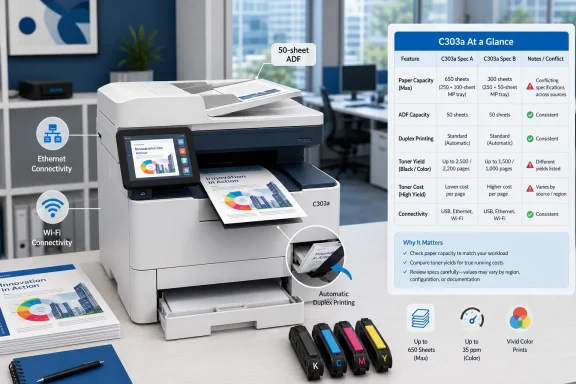
MacSources lists the C303a’s single-pass duplex automatic document feeder at 50 sheets. Xerox’s C303a brochure also says 50 sheets. The detailed product record retained on Lexmark’s site supports the same small-workgroup positioning and describes the 50-sheet duplex ADF. Yet Xerox’s U.S. shop page currently claims the C303a has a 250-sheet document feeder.
That 250-sheet ADF number is almost certainly a specification error. It appears to be a copy-and-paste collision with the printer’s 250-sheet main paper tray, because Xerox’s brochure clearly separates the two: a 250-sheet input tray, one-sheet manual feed slot, and a 50-sheet duplex document feeder. Buyers should plan around 50 pages in the ADF, not 250.
The distinction matters for the exact kind of workload MacSources describes. Scanning a few multi-page contracts, tax documents or pay stubs is comfortably within the C303a’s intended use. Scanning several hundred pages at a time is different: the operator will be reloading the feeder repeatedly, even though the machine scans both sides of each sheet in one pass. Xerox rates it at up to 48 images per minute for simplex black-and-white scanning and 96 images per minute for duplex black-and-white scanning, but the feeder’s 50-sheet capacity remains the physical limit on unattended batches.
The storefront error also makes a larger point. The C303a is a newly branded product family with product pages still being assembled across Xerox and Lexmark systems. Administrators should download and retain the current product brochure, user guide and driver package when standardizing on the device. Do not build purchasing assumptions around a single retail-page specification.
The review leaves out an important qualification: the C303a is expandable. Xerox and Lexmark documentation list up to two optional 250-sheet trays, bringing total input capacity to 751 sheets when the standard tray and one-sheet manual feed are included. That changes the buying decision for a small office that expects regular use but does not need a floor-standing copier.
The catch is that Xerox’s U.S. retail listing emphasizes the $499 printer but does not clearly present the optional trays as a straightforward configuration choice. That omission turns a manageable capacity limitation into an apparent fixed hardware limitation. Before buying, a business should get a written quote for the base C303a, the optional trays and any service coverage, rather than assume accessories will be readily available at consumer retail prices.
The 5,000-page recommended monthly volume should also be read carefully. It is a planning range, not a promise that every part will endure 5,000 pages each month without intervention. Xerox’s 75,000-page maximum monthly duty cycle is a stress ceiling used for comparison; it is not the target workload for a home office. A buyer consistently approaching 5,000 pages a month should calculate toner, paper loading, service response and the cost of expanded input trays before choosing this compact chassis.
This is where the review’s otherwise positive recommendation needs more financial discipline. The printer price is easy to see; the cost of maintaining a four-cartridge color laser is not. Xerox’s current store lists a standard-capacity black cartridge at $74.99 for 1,300 pages. The company also sells high-capacity bundles, but the pricing shown in its storefront is inconsistent enough to demand confirmation before purchase. One listed bundle price is identical for products described as standard-capacity and high-capacity bundles, despite the radically different published page yields.
That storefront inconsistency does not establish that supplies are overpriced or mispriced at checkout. It does mean buyers should not rely on the displayed bundle value without checking individual cartridge part numbers, yields and final cart pricing. The sensible purchase plan is to price a full replacement CMYK set at the same time as the printer, then compare that figure against competing devices. A color laser that is inexpensive on day one can become expensive very quickly if its supply plan is opaque.
MacSources is also an affiliate-supported publication and says it may receive a commission when readers buy through its links. The disclosure is present, but the review does not include a cost-per-page calculation, a comparison against competing models, or a statement of whether the toner was supplied with the review unit. Those omissions do not prove bias; they do mean the conclusion that the C303a is a good long-term investment is more of a buying recommendation than a fully documented total-cost-of-ownership finding.
Those security features make the C303a more than a home-office appliance, but Xerox’s product page also draws a line within its own family. The more expensive C305ae carries the Trusted Platform Module 2.0 notation; the C303a does not. Organizations with formal hardware-root-of-trust requirements should not assume that “comprehensive security” means feature parity across the new C300 series.
Before committing to a fleet, test the C303a with the actual Windows print path, confirm that a standard user can install or discover the intended queue without local-admin workarounds, validate scan-to-network-folder permissions, and make sure firmware management fits the organization’s patch policy. Test PDF, PCL and PostScript workloads if line-of-business software uses them. Finally, verify the real ADF capacity and optional-tray availability with the reseller in writing, because Xerox’s current store listing is wrong on the former and thin on the latter.
For a home office or a small team whose output is mostly invoices, forms, estimates, presentations and ordinary color documents, the C303a appears to be a credible new option at its current $499 sale price. The early review is useful evidence that Xerox has avoided an ugly setup experience. The evidence does not yet show years of reliability — and the company’s own conflicting specifications are a reminder that the product is still new enough to require careful buying, not blind faith.
Xerox’s own specification sheet backs much of the basic positioning: the C303a is rated at up to 32 ppm in color and monochrome, includes a single-pass duplex document feeder, Ethernet, Wi-Fi, USB, fax, a 2.8-inch color touch display and a recommended monthly volume of 750 to 5,000 pages. Its $499 promotional price on Xerox’s U.S. store as of August 5 is materially more compelling than its $699 list price. At $699, the machine sits uncomfortably close to more expandable business-class hardware; at $499, it becomes a serious alternative to premium home-office inkjets and lower-end color lasers.
 The C303a is Xerox’s first post-Lexmark hardware test
The C303a matters beyond its individual feature list because it is part of Xerox’s first hardware family released under its newly unified brand after the Lexmark acquisition. Xerox completed its $1.5 billion purchase of Lexmark on July 1, 2025. Nearly a year later, the company introduced the C240/C245, C255a and C300/C303a/C305ae A4 color printer families as the first products intended to represent the combined business.Xerox calls the C303a a new product, but the documentation makes the inheritance plain. The product’s detailed technical record and user documentation remain hosted through Lexmark infrastructure, and its model naming convention follows Lexmark’s long-standing suffix system: the “a” denotes analog fax. That is not a problem in itself. In fact, the C303a’s support for PCL 5, PCL 6, PostScript 3 emulation and direct PDF printing is exactly the kind of compatibility Windows administrators expect from a mature business-printer platform.
For Windows users, that distinction is more useful than the review’s emphasis on phone printing. Xerox lists support for Windows 10, Windows 11, Windows Server 2016, Windows Server 2019, Windows Server 2022 and Windows Server 2025. It also lists Microsoft Universal Print with a Print Support Application. That makes the C303a far more plausible in a managed Microsoft 365 environment than a consumer device that depends on a vendor mobile app and a proprietary driver package.
There is one operational warning for IT teams: Universal Print support should be validated in the deployment method actually planned. Microsoft documents a known issue in which some Xerox printers registered through the Universal Print Connector can fail after a Xerox Print Support App is installed. A small office connecting the C303a directly over Ethernet or Wi-Fi may never encounter that problem. An organization rolling out queues through Universal Print should pilot the device, confirm finishing and media capabilities are reported correctly, and avoid treating “Universal Print” in a marketing specification as a substitute for deployment testing.
Xerox’s own product pages disagree on the document feeder
The most important factual problem is not in the MacSources review. It is in Xerox’s own U.S. storefront.MacSources lists the C303a’s single-pass duplex automatic document feeder at 50 sheets. Xerox’s C303a brochure also says 50 sheets. The detailed product record retained on Lexmark’s site supports the same small-workgroup positioning and describes the 50-sheet duplex ADF. Yet Xerox’s U.S. shop page currently claims the C303a has a 250-sheet document feeder.
That 250-sheet ADF number is almost certainly a specification error. It appears to be a copy-and-paste collision with the printer’s 250-sheet main paper tray, because Xerox’s brochure clearly separates the two: a 250-sheet input tray, one-sheet manual feed slot, and a 50-sheet duplex document feeder. Buyers should plan around 50 pages in the ADF, not 250.
The distinction matters for the exact kind of workload MacSources describes. Scanning a few multi-page contracts, tax documents or pay stubs is comfortably within the C303a’s intended use. Scanning several hundred pages at a time is different: the operator will be reloading the feeder repeatedly, even though the machine scans both sides of each sheet in one pass. Xerox rates it at up to 48 images per minute for simplex black-and-white scanning and 96 images per minute for duplex black-and-white scanning, but the feeder’s 50-sheet capacity remains the physical limit on unattended batches.
The storefront error also makes a larger point. The C303a is a newly branded product family with product pages still being assembled across Xerox and Lexmark systems. Administrators should download and retain the current product brochure, user guide and driver package when standardizing on the device. Do not build purchasing assumptions around a single retail-page specification.
The paper-capacity complaint is real, but not the whole story
MacSources identifies the 250-sheet main tray as its only meaningful criticism. Out of the box, that is fair. A 250-sheet tray is enough for personal work, a small office with irregular printing, or a reception desk that mostly prints forms and occasional color documents. It is less convenient for a busy environment that alternates letterhead, plain paper, labels and envelopes, especially because the manual feed slot holds only one sheet.The review leaves out an important qualification: the C303a is expandable. Xerox and Lexmark documentation list up to two optional 250-sheet trays, bringing total input capacity to 751 sheets when the standard tray and one-sheet manual feed are included. That changes the buying decision for a small office that expects regular use but does not need a floor-standing copier.
The catch is that Xerox’s U.S. retail listing emphasizes the $499 printer but does not clearly present the optional trays as a straightforward configuration choice. That omission turns a manageable capacity limitation into an apparent fixed hardware limitation. Before buying, a business should get a written quote for the base C303a, the optional trays and any service coverage, rather than assume accessories will be readily available at consumer retail prices.
The 5,000-page recommended monthly volume should also be read carefully. It is a planning range, not a promise that every part will endure 5,000 pages each month without intervention. Xerox’s 75,000-page maximum monthly duty cycle is a stress ceiling used for comparison; it is not the target workload for a home office. A buyer consistently approaching 5,000 pages a month should calculate toner, paper loading, service response and the cost of expanded input trays before choosing this compact chassis.
Toner economics will decide whether the $499 price is a bargain
The C303a ships with starter cartridges rated for up to 1,300 black pages and up to 1,200 pages for each color. Xerox’s published yields for high-yield supplies are substantially better: up to 6,200 black pages and 6,400 pages each for cyan, magenta and yellow, measured under the ISO/IEC 19798 standard. Those figures are useful for comparing devices, but they assume standardized coverage rather than photo prints, dense marketing sheets or colorful school handouts.This is where the review’s otherwise positive recommendation needs more financial discipline. The printer price is easy to see; the cost of maintaining a four-cartridge color laser is not. Xerox’s current store lists a standard-capacity black cartridge at $74.99 for 1,300 pages. The company also sells high-capacity bundles, but the pricing shown in its storefront is inconsistent enough to demand confirmation before purchase. One listed bundle price is identical for products described as standard-capacity and high-capacity bundles, despite the radically different published page yields.
That storefront inconsistency does not establish that supplies are overpriced or mispriced at checkout. It does mean buyers should not rely on the displayed bundle value without checking individual cartridge part numbers, yields and final cart pricing. The sensible purchase plan is to price a full replacement CMYK set at the same time as the printer, then compare that figure against competing devices. A color laser that is inexpensive on day one can become expensive very quickly if its supply plan is opaque.
MacSources is also an affiliate-supported publication and says it may receive a commission when readers buy through its links. The disclosure is present, but the review does not include a cost-per-page calculation, a comparison against competing models, or a statement of whether the toner was supplied with the review unit. Those omissions do not prove bias; they do mean the conclusion that the C303a is a good long-term investment is more of a buying recommendation than a fully documented total-cost-of-ownership finding.
What Windows shops should test before standardizing
The C303a has the pieces that matter for a compact Windows-centered office: wired Gigabit Ethernet, modern Wi-Fi including WPA3, automatic duplex printing, AirPrint and Mopria support for mixed-device environments, fax where it is still required, and scan destinations including email, USB, FTP, network folders and a network-connected computer. Xerox also advertises digitally signed firmware, TLS 1.3, certificate management, confidential print, audit logging and protected USB ports.Those security features make the C303a more than a home-office appliance, but Xerox’s product page also draws a line within its own family. The more expensive C305ae carries the Trusted Platform Module 2.0 notation; the C303a does not. Organizations with formal hardware-root-of-trust requirements should not assume that “comprehensive security” means feature parity across the new C300 series.
Before committing to a fleet, test the C303a with the actual Windows print path, confirm that a standard user can install or discover the intended queue without local-admin workarounds, validate scan-to-network-folder permissions, and make sure firmware management fits the organization’s patch policy. Test PDF, PCL and PostScript workloads if line-of-business software uses them. Finally, verify the real ADF capacity and optional-tray availability with the reseller in writing, because Xerox’s current store listing is wrong on the former and thin on the latter.
For a home office or a small team whose output is mostly invoices, forms, estimates, presentations and ordinary color documents, the C303a appears to be a credible new option at its current $499 sale price. The early review is useful evidence that Xerox has avoided an ugly setup experience. The evidence does not yet show years of reliability — and the company’s own conflicting specifications are a reminder that the product is still new enough to require careful buying, not blind faith.
References
- Primary source: MacSources
Published: 2026-08-05T15:01:13+00:00
- Related coverage: shop.xerox.com
Xerox C303a Color All-in-One Printer | Wireless, Duplex, 32 ppm
Buy Xerox C303a Color Multifunction Printer with Wi‑Fi, duplex & fast 32 ppm performance at our best price. Reliable, high-quality printing and fast duplex scanning for teams. www.shop.xerox.com
- Related coverage: news.xerox.com
Xerox Completes the Acquisition of Lexmark, Uniting Two Industry Leaders | Xerox Newsroom
Xerox Holdings Corporation (NASDAQ: XRX) today completed its acquisition of Lexmark International, Inc. from Ninestar Corporation, PAG Asia Capital, and Shanghai Shouda Investment Centre. The transaction, valued at $1.5 billion inclusive of net debt and...www.news.xerox.com - Related coverage: brasil.news.xerox.com
Xerox Conclui Aquisição da Lexmark, Unindo Dois Líderes da Indústria - Notícias Xerox
NORWALK, Conn., 1º de julho de 2025 – A Xerox Holdings Corporation (NASDAQ: XRX) concluiu hoje a aquisição da Lexmark International, Inc. da Ninestar Corporation, PAG Asia Capital e Shanghai Shouda Investment Centre. A transação, avaliada em US$ 1,5 bilhão (incluindo dívida líquida e passivos...brasil.news.xerox.com - Related coverage: investors.xerox.com
- Related coverage: latam-es.news.xerox.com
Xerox completa la adquisición de Lexmark, uniendo a dos líderes de la industria - Noticias Xerox
NORWALK, Conn., 1 julio, 2025 – Xerox Holdings Corporation (NASDAQ: XRX) completó hoy la adquisición de Lexmark International, Inc. de Ninestar Corporation, PAG Asia Capital y Shanghai Shouda Investment Centre. La transacción, valorada en 1.500 millones de dólares, incluyendo deuda neta y...latam-es.news.xerox.com - Related coverage: investors.xerox.com
Xerox Completes the Acquisition of Lexmark, Uniting Two Industry Leaders
PDF documentinvestors.xerox.com
- Related coverage: actualites.xerox.fr
Xerox finalise l’acquisition de Lexmark, réunissant deux leaders de l’industrie - Actualités Xerox
NORWALK, Connecticut, Etats-Unis, 1er juillet 2025 – Xerox Holdings Corporation (NASDAQ: XRX) vient de finaliser l’acquisition de Lexmark International, Inc. auprès de Ninestar Corporation, PAG Asia Capital et Shanghai Shouda Investment Centre. La transaction, évaluée à 1,5 milliard de dollars...actualites.xerox.fr - Related coverage: xerox.gcs-web.com
- Related coverage: portugal.news.xerox.com
Xerox conclui a Aquisição da Lexmark, unindo dois líderes do mercado - Notícias Xerox
A Xerox Holdings Corporation (NASDAQ: XRX) anunciou hoje a conclusão da aquisição da Lexmark International, Inc., anteriormente detida pela Ninestar Corporation, PAG Asia Capital e Shanghai Shouda Investment Centre. A transacção, avaliada em 1,5 mil milhões de dólares (incluindo dívida líquida e...portugal.news.xerox.com - Related coverage: news.xerox.com
Xerox to Acquire Lexmark | Xerox Newsroom
NORWALK, Conn., and LEXINGTON, Ky., Dec. 23, 2024 – Xerox Holdings Corporation (NASDAQ: XRX) today announced it has agreed to acquire Lexmark International, Inc., from Ninestar Corporation, PAG Asia Capital, and Shanghai Shouda Investment Centre in a...www.news.xerox.com - Related coverage: security.business.xerox.com
Security Information for Xerox C303a
Read security information or find software releases for the secure installation and operation of Xerox C303asecurity.business.xerox.com
- Related coverage: lexmark.com
Xerox C303a
The Xerox C303a Color Multifunction Printers deliver compact, reliable, intelligently secure performance with fast setup, intuitive print and scan tools that keep small teams productive and protected.www.lexmark.com
- Related coverage: shop.xerox.com
Standard Yield Toner Cartridges for Xerox C240, C300, C303a, C305ae, C245 & C255a
Shop genuine Xerox standard yield toner cartridges for C240, C300, C303a, C305ae, C245 & C255a printers. Available in all colors. Free shipping & best prices.
www.shop.xerox.com
- Related coverage: news.xerox.co.uk
Xerox Introduces A4 Colour Printers and MFPs as First Products Under Unified Brand | Xerox UK Newsroom
Uxbridge, U.K., June 23, 2026 — Xerox today introduced the Xerox® C240/C245, Xerox® C255a, and Xerox® C300/C303a/C305ae colour printers and multifunction printers, the first hardware offerings launched under the unified Xerox brand following the...news.xerox.co.uk - Related coverage: support.lexmark.com
- Related coverage: lexmark.com
Xerox C303a
Los equipos multifunción a color Xerox C303a ofrecen un rendimiento compacto, confiable y con seguridad inteligente, con configuración rápida y herramientas intuitivas de impresión y escaneo que mantienen a los equipos pequeños productivos y protegidos. - Related coverage: argecy.com
Xerox C303a Color Laser Multifunction Printer
OEM toner, imaging supplies, trays and parts for the Xerox C303a color multifunction printer — standard & return-program CMYK cartridges, waste container, trays and accessories. In stock, fast shipping from Argecy.www.argecy.com - Related coverage: cdwg.com
Xerox - magenta - original - toner cartridge - Use and Return - 006R05053 - Toner Cartridges - CDWG.com
Buy a Xerox - magenta - original - toner cartridge - Use and Return or other Toner Cartridges at CDWG.com www.cdwg.com
- Related coverage: beachaudio.com
Xerox 006R05091 C300 303 305 Black Return Program Print | Beach Audio
Buy Xerox 006R05091 As low as $145.23 in bulk In stock Xerox 006R05091 C300 303 305 Black Return Program Print Cartridge [6000 Yield]www.beachaudio.com - Related coverage: connection.com
- Related coverage: download.support.xerox.com
- Related coverage: support.lexmark.com
- Related coverage: download.support.xerox.com
- Related coverage: hinta.fi
Xerox C303a - Tuotetiedot
Katso tuotteen tarkemmat tiedot. Xerox C303a hinta nyt vain 614,3 €! Puolueeton hintavertailu.hinta.fi - Related coverage: printer-benchmark.com
Xerox C303a / C 303 a : : DMO Machines
DataMaster is the printing solutions market specialist. Every model of copier, printer or digital press, all the color or black and white ranges of the different manufacturers, all the brands (Canon, Konica Minolta, Ricoh, Xerox...) is in our database, and so are all the related software...www.printer-benchmark.com - Related coverage: octo24.com
Lexmark 100S14876 | Xerox C303a Laser A4 2400 x 600 DPI 32 ppm Wi-Fi | OCTO24.com
Lexmark 100S14876 günstig im OCTO24 Shop kaufen | Xerox C303a Laser A4 2400 x 600 DPI 32 ppm Wi-Fi | EAN: | 533.99 € www.octo24.com
- Related coverage: learn.microsoft.com
Supported print options - Universal Print | Microsoft Learn
Find out what print options are supported by Universal Print.learn.microsoft.com - Related coverage: learn.microsoft.com
Get access to Universal Print | Microsoft Learn
Overview of Universal Print licensinglearn.microsoft.com