


RodBarnes
Extraordinary Member
Member details
- Joined
- Dec 8, 2011
- Messages
- 71
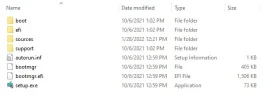
I've used Win32DiskImager in the past to create bootable Windows media on a USB. I am almost certain that, after completing the flash, I was able to insert the USB into an operating Windows10 system and the folders and files appear and look just like what I see if I mount the ISO directly in Windows (see attached image). But, this time, if I insert the USB into an operating Windows10 system, it requests to format it and thinks it is unreadable.
NOTE1: I've tried this with multiple known-good USB flash drives of various sizes, all large enough to contain the image. In all cases, it has resulted in the USB being unreadable. I can go ahead and format the USB drive to make it usable again.
NOTE2: I tried this with a new ISO image of Windows10 21H2 I just created with the MediaCreationTool21H2.exe. Then I tried it with an existing ISO of Windows10 20H2 which I know I've used previously to create a working Windows10 system.
What am I missing here?
NOTE1: I've tried this with multiple known-good USB flash drives of various sizes, all large enough to contain the image. In all cases, it has resulted in the USB being unreadable. I can go ahead and format the USB drive to make it usable again.
NOTE2: I tried this with a new ISO image of Windows10 21H2 I just created with the MediaCreationTool21H2.exe. Then I tried it with an existing ISO of Windows10 20H2 which I know I've used previously to create a working Windows10 system.
What am I missing here?
Attachments
-
 Microsoft Defender: No threats detected Scan detailsMounted ISO.webp13 KB · Views: 92


