

I have a Laptop lenovo Win 10; I always do an Image backup of the System with an external Toshiba HD via USB.
The Image I do it using the Win 10 Control Panel (Back up and restore Windows 7)
Just today I had a problem with Outlook and decided to restore my last image of few days back as I normally do back up Image once a week.
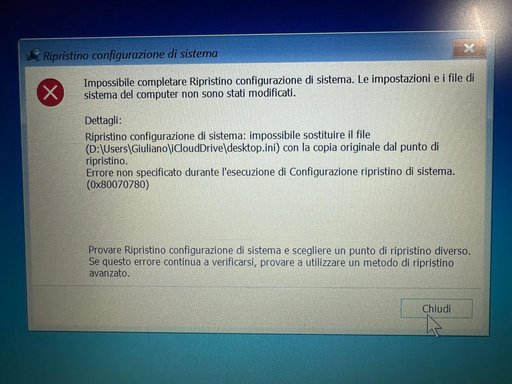
Today the restore back up image did not function properly it stop to restore with the following message error as you can see First picture when I was not yet in windows and second picture message once I entered win 10 inside.
I purchase another new external USB HD and I perform again an Image back up that like always it ends successfully and afterwards I tried again to restore the image but I obtained the same error message? What should I do?
There are no problems visible with drivers that are all up to date
There is no malware Norton is up to date as well as windows 10.
Please help the only technician I had is retired and I visited a local pc shop that makes repairs on hardware and software but they are not able to help!
The Image I do it using the Win 10 Control Panel (Back up and restore Windows 7)
Just today I had a problem with Outlook and decided to restore my last image of few days back as I normally do back up Image once a week.
Today the restore back up image did not function properly it stop to restore with the following message error as you can see First picture when I was not yet in windows and second picture message once I entered win 10 inside.
I purchase another new external USB HD and I perform again an Image back up that like always it ends successfully and afterwards I tried again to restore the image but I obtained the same error message? What should I do?
There are no problems visible with drivers that are all up to date
There is no malware Norton is up to date as well as windows 10.
Please help the only technician I had is retired and I visited a local pc shop that makes repairs on hardware and software but they are not able to help!
Attachments
-
 Microsoft Defender: No threats detected Scan detailsWhatsApp Image 2025-11-11 at 15.26.02.webp418.2 KB · Views: 0

