Hi mccmw. If
.docx and
.pdf thumbnails already work, the global thumbnail setting is probably enabled. There is
no standard Windows setting specifically for .txt thumbnails; the difference may come from the Notepad version or a thumbnail shell extension installed on the work PC.
Check the basic settings
- Open File Explorer.
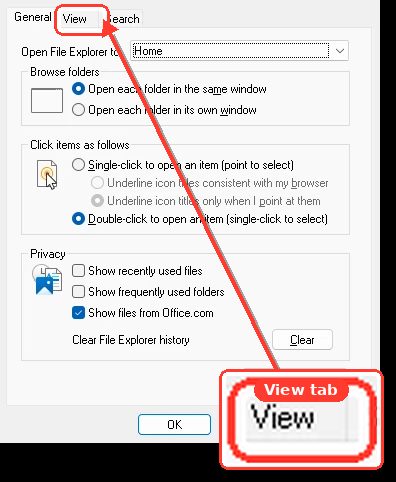
- Select … > Options > View.
- Clear Always show icons, never thumbnails.
- Enable Display file icon on thumbnails.
- Click Apply, then OK.
- Select View > Large icons or Extra large icons.
Update Notepad and rebuild the cache
- Open Microsoft Store > Library.
- Select Check for updates and update Windows Notepad.
- Open Settings > Windows Update > Check for updates.
- Search for Disk Cleanup from Start.
- Select the Windows drive.
- Check Thumbnails, then select OK > Delete Files.
- Restart Windows.
Also verify that
.txt files are assigned to Notepad under
Settings > Apps > Default apps, since damaged file associations can affect their displayed icons.
If the work PC shows an actual miniature of the
text contents, rather than merely a large Notepad document icon, it probably has additional software or a shell extension installed. Windows and PowerToys do not currently list ordinary
.txt content thumbnails among their standard thumbnail handlers.
Could you post a screenshot showing one of these
.txt thumbnails on the work computer? That would clarify whether it is a genuine content thumbnail or simply the newer Notepad file icon.