

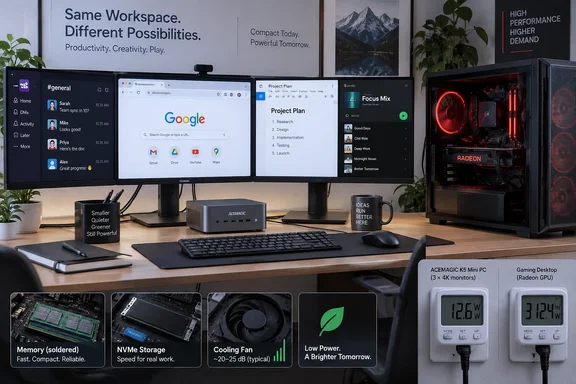
The author did not replace the gaming machine for gaming, rendering, or any sustained high-performance work. He used an ACEMAGIC K5 review unit for a couple of weeks of writing and browser-based work, found it acceptably responsive, and concluded that the large desktop was excessive for that particular slice of his routine. That is a useful observation for people who already own a gaming PC and work at the same desk—but it is not evidence that a five-thread mini PC is an equal replacement for a modern desktop.
Independent testing by CNX Software does support the central hardware claim: Intel’s Core 3 304-based K5 can run Windows 11 Pro, drive three 4K displays, handle office-style work, and play high-resolution streamed video smoothly. It also shows why the power argument needs more care than the original story gives it.
The $26 annual saving is an estimate, not a measured result
How-To Geek used HWiNFO readings to estimate that the Ryzen CPU averaged 43W and the Radeon GPU roughly 40W during work, then assumed a total system draw of about 100W after allowing for the motherboard, memory, fans, and power-supply losses. The mini PC side of the comparison is similarly derived from processor telemetry: about 10W during the author’s usual work, rounded up to 15W for the table.
Those are useful clues about component behavior, but they are not a wall-power comparison. CPU package power does not capture memory, storage, USB peripherals, monitor signalling, motherboard power delivery, or the losses incurred while converting AC power from the outlet. GPU telemetry has the same limitation. The author acknowledges that no watt meter was used, yet the annual electricity-cost calculation depends on the resulting estimates being accurate.
CNX Software performed the measurement missing from the original report. With a wall power meter and the supplied ACEMAGIC adapter, it recorded the K5 at 3.7W to 4.3W idle, 12.5W to 15.9W playing 8K60 YouTube in Firefox, and approximately 30W to 33W under sustained Cinebench multi-core load. Those figures validate the broader conclusion that the K5 is a low-power Windows desktop. They do not validate the claim that it uses less than one watt while idle; that was a CPU reading, not what the household meter sees.
The desktop comparison remains unmeasured. A Ryzen 7 7700 system with a discrete Radeon card, two active displays, and a large 850W power supply may indeed consume around 100W under a light office workload. It could be lower or higher depending on display refresh settings, Radeon idle behavior, background tasks, motherboard settings, peripheral load, and the power supply’s efficiency at low output. The only way to turn the article’s 0.54 kWh-per-workday saving into a dependable number is to put both systems on the same plug-in meter and run the same workload.
That procedural difference matters for IT buyers as well as home users. A deployment decision based on “CPU package watts” will undercount the fleet’s actual energy demand; a wall measurement tells administrators what appears on the power bill and what enters the room as heat.
The K5 is capable office hardware with fixed memory limits
The ACEMAGIC K5 configuration discussed by How-To Geek combines Intel’s Core 3 304 with 12GB of LPDDR5 memory and either 256GB or 512GB of NVMe storage, depending on the listing. The processor has one performance core and four low-power efficient cores, for five cores and five threads. It is deliberately aimed at browser, Office, communications, media playback, and light multitasking—not at the workstation or gaming tasks normally justified by a discrete graphics card.
CNX Software found the machine scored 5,309 in PCMark 10, completed 4K and 8K YouTube playback without obvious stuttering, and reached 2.37Gbps over its wired 2.5GbE connection. It also verified the three-display arrangement through HDMI, DisplayPort, and USB-C DisplayPort Alt Mode. That is enough connectivity for a compact desk setup, a reception system, a thin-client-like office station, or a user whose work lives in Microsoft 365, Teams, a browser, and line-of-business applications.
The practical constraint is memory. The 12GB LPDDR5 allocation is soldered to the motherboard. It cannot be expanded later, even though storage can be: CNX Software’s teardown found a second M.2 2280 slot for another NVMe drive. For a single-user office machine with modest browser habits, 12GB may be comfortable. For an employee who keeps dozens of tabs, a Teams call, Outlook, OneDrive sync, Excel workbooks, a local development environment, and endpoint security tools open at once, it leaves much less margin than a 16GB or 32GB desktop.
That distinction is largely absent from the “I barely noticed a downgrade” framing. The author’s stated workload—four or five Chrome tabs plus lightweight productivity apps—is a favorable test case. A mini PC that feels responsive there can still become cramped when users add virtual machines, large spreadsheets, local AI tools, photo batches, code compilation, or a heavy Electron application stack.
Price records for the K5 do not line up
The purchase case gets weaker when the reported pricing is examined. How-To Geek lists the K5 at $550, while CNX Software reported a $399.99 Amazon price on September 6 for its 12GB/512GB review configuration. The Gadgeteer subsequently described a $549.99 K5 with 12GB RAM and a smaller 256GB SSD. Earlier, CNX Software noted that ACEMAGIC had not yet put up a product page for the exact Core 3 304 model it reviewed.
That conflicting record makes it difficult to treat any single advertised price as settled. It also changes the energy-payback argument sharply. Using How-To Geek’s own $26-per-year estimate, a $550 purchase would take more than 21 years to recover in electricity savings if it is bought solely to avoid running an existing gaming desktop during work hours. Even at roughly $400, the simple payback is about 15 years before accounting for the cost of a keyboard, monitor arrangement, management time, or any accessories.
The calculation looks better in an office replacing an aging, always-on desktop fleet, or where air-conditioning costs and noise are a meaningful part of the decision. It looks far worse for an individual who already has a working gaming system and merely wants a second computer for Word documents. The strongest value proposition is convenience—less desk space, less heat, lower idle consumption, and a system that can be mounted behind a monitor—not a rapid return on the hardware purchase.
Sustained work exposes a cooling trade-off
The K5 is not silent and it is not built for uninterrupted heavy CPU work. CNX Software recorded thermal throttling on all five cores during Cinebench R23 multi-core testing, with CPU temperatures reaching roughly 92°C. Its fan reached 45.7 dBA to 47 dBA in that test, and the outlet draw stabilized around 30W to 33W.
That does not undermine its suitability for the office tasks described in the original story. It does define the boundary: the K5 is a low-power productivity desktop that can burst into demanding work, not a mini workstation intended to compile large projects, transcode video, render 3D assets, or maintain all-core loads for hours. The absence of USB4 or Thunderbolt also limits expansion options for users considering an external GPU or high-speed storage as an escape hatch.
The published comparison therefore lands on a narrower, more useful conclusion. A modern gaming desktop is often a wasteful way to run a light Windows workday, and the Core 3 304 K5 demonstrates how little power basic productivity can require. But a reader should measure their own desktop at the wall, inventory memory and software needs, and compare the actual K5 configuration and price before treating a second PC as a cost-saving purchase.
ACEMAGIC’s Windows image should not be trusted blindly
There is one more reason not to take a preinstalled Windows 11 Pro image on an ACEMAGIC system as a reason to skip setup work. In 2024, independent reporting by Tom’s Hardware and The Gadgeteer documented malware detections on certain earlier ACEMAGIC systems. ACEMAGIC acknowledged an incident involving a specific batch and said it had changed its supply-chain controls; the reports concerned older models, not the K5, and there is no evidence in the available reporting that the K5 carries the same problem.
Still, for a machine that will handle work accounts, browser sessions, passwords, or company data, the sensible deployment procedure is to erase the factory installation, install Windows 11 from Microsoft’s official media, apply Windows Update, obtain drivers from verified vendor sources, and confirm BitLocker, Microsoft Defender, and firmware settings before signing into production accounts.
The K5’s real lesson is not that every gamer should “ditch” a desktop. It is that a separate, measured low-power machine can be a rational work companion—provided buyers do not mistake a favorable review-unit experiment and an unverified savings estimate for a complete purchasing case.
References
- I ditched my gaming PC for work after trying this low-power mini PC How-To Geek · 2026-09-19T19:00:13+00:00