

The important limitation is buried beneath the broad launch language. The Business Wire announcement republished by citybiz describes Windows and Mac support for “desktop AI clients,” but AgentCloak’s own product FAQ says that ChatGPT Desktop is the only supported desktop chatbot client at launch, with more clients promised later. For Windows users working in Copilot, Claude, Gemini, Grok, or DeepSeek through a browser, the supported route is the extension—not a general-purpose native desktop shield around every AI app.
That distinction changes both the deployment model and the security decision. AgentCloak Desktop may reduce direct exposure of names, addresses, account details, and similar identifiers in chat prompts, but it is not evidence that an organization’s entire AI workflow—file uploads, connected data sources, third-party plug-ins, browser extensions, or automated agents—is now protected.
A prompt-level privacy layer, not a private AI service
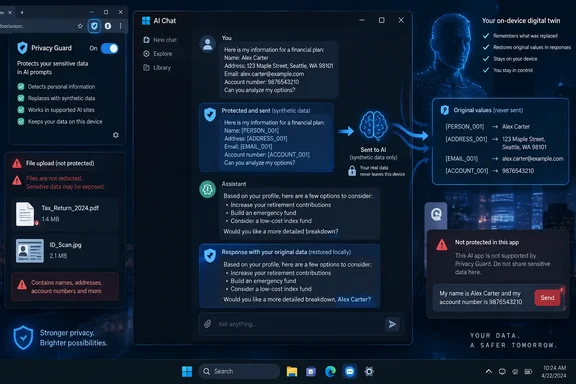
AgentCloak’s approach is token substitution rather than hosting a model or requiring customers to switch to a separate chatbot. If a user enters a customer name, street address, email address, or bank-account number, the software is designed to replace that value locally with a synthetic equivalent before the request goes to ChatGPT, Claude, Copilot, Gemini, Grok, DeepSeek, or another supported web interface.
The model sees the substitute rather than the actual identifier. On the response path, AgentCloak says its local “digital twin” mapping reinserts the original data for the user. The company calls this “Zero Data Sending,” meaning the protected values should not leave the device at all.
This is a useful distinction from an AI provider’s data-retention settings or contractual promise not to train on enterprise prompts. A no-training setting can limit a provider’s future use of data while still allowing the provider to receive the prompt. AgentCloak’s stated goal is to remove particular values before that point.
For routine tasks—rewriting a customer email, drafting a contract clause, summarizing notes, or asking an AI service to turn a support narrative into a response template—the design can preserve enough context for the model to generate usable text. A consistently substituted person, address, or account can remain a coherent entity in the conversation without exposing its real-world value.
But this is data minimization, not a guarantee of de-identification. The surrounding text can still reveal who or what a prompt concerns. A prompt that describes a rare incident, a unique job title, a specific location, dates, and a one-of-a-kind transaction may remain identifiable even after obvious fields are replaced. Synthetic placeholders also do not prevent a user from pasting confidential business logic, source code, proprietary pricing, credentials, or regulated information that the tool does not recognize.
The Windows version has a narrower documented scope
The product announcement says AgentCloak Desktop works with several major AI services and is available as a Windows native application for people using desktop clients. Its current product page makes a more specific statement: the desktop application presently supports ChatGPT Desktop, while browser extensions are the path for web-based chat sessions.
That means Windows administrators should not interpret the announcement as coverage for the Microsoft Copilot Windows app, the Microsoft 365 Copilot experience, a locally installed Claude client, or every other desktop AI program. AgentCloak has not publicly documented those as supported native targets in its own FAQ.
The browser extension has a different boundary. It can operate where it recognizes a supported chatbot’s web interface, which AgentCloak lists as including ChatGPT, Claude, Gemini, Copilot, Grok, and DeepSeek on its launch materials. That architecture is practical for organizations whose users have already gravitated toward browser-based AI, but it also means protection depends on the extension continuing to recognize each provider’s changing web application.
AI providers routinely alter page structure, prompt editors, attachment workflows, and sign-in flows. A privacy layer that works by interacting with browser content has to keep pace. IT teams considering a managed rollout should test the specific sites, browser versions, authentication methods, and user workflows they plan to permit rather than assume support for a brand name covers every interface bearing that brand.
What AgentCloak says it detects—and what it does not promise
The free Desktop release is advertised as detecting first and last names, email addresses, telephone numbers, URLs, Social Security and tax identification numbers, bank routing and account numbers, and street addresses. It supports English, Spanish, French, German, Italian, Portuguese, and Dutch.
AgentCloak says the client combines deterministic rules with a small local neural model, identified as Rampart, to identify values that need cloaking. The company’s Mac App Store listing is more candid than the launch release about the limits: it says the product is harm reduction rather than a guarantee and tells users to review sensitive messages before sending. It also says names written in non-Latin scripts—including Chinese, Japanese, Korean, Arabic, and Cyrillic—are outside the stated scope.
That disclosure is the one organizations should treat as the operating assumption. Automated detection can miss context-dependent identifiers, unconventional formatting, OCR text, typo-ridden data, free-form medical notes, internal project codenames, or data that becomes sensitive only in combination. A tool may correctly recognize a Social Security number yet miss a highly specific support case that identifies the same person through circumstance.
The free product’s documented scope also stops at text-prompt cloaking. AgentCloak positions its paid Server product as adding protection for uploaded files, richer relationship-aware mappings across prompts, terminology generalization, numerical ranges, sector-specific detection packages, and Model Context Protocol protection for applications such as Salesforce and HubSpot. In plain terms, those capabilities should not be presumed to exist in the free browser extension or Windows client.
A user who uploads a customer spreadsheet, PDF contract, screenshot, or source archive needs to know whether the file itself is processed and altered before upload. Based on AgentCloak’s own product segmentation, the free Desktop offering is not the product it describes for file-level protection.
Edge deployment creates a management question, not a bypass
For Windows organizations, the strongest practical part of the launch is the claimed ability to deploy preconfigured AgentCloak Desktop installations through Microsoft Intune and similar management platforms, with AgentCloak Server adding audit logs and sign-in integration with Microsoft Entra, Google Workspace, and Okta.
That could give IT departments a middle ground between two blunt policies: blocking public AI outright or allowing employees to paste sensitive material into consumer chatbots without controls. A managed extension can be useful when an organization has a clearly defined list of permitted chatbot domains and a narrow list of protected data categories.
It does not remove the need for browser-extension governance. A tool that must inspect and modify what users type into AI sites is necessarily placed in a sensitive position in the browsing stack. Administrators should validate the extension publisher, the requested site access, update behavior, data storage behavior, and compatibility with existing endpoint security controls before deploying it broadly.
The company says the free product uses no account, does not upload information to AgentCloak, and keeps the local mapping on the user’s device. Those are claims about the product’s intended operation, not a substitute for an enterprise security review. At publication time, no independent security audit or public source-code review was cited in the launch announcement or on the product page.
The useful deployment is narrow and testable
AgentCloak Desktop makes the most sense as an additional control for text pasted into approved browser-based AI services, especially where users need help drafting or transforming customer-facing material but should not disclose direct identifiers. It is less suitable as a blanket assurance that an organization can now safely use any generative-AI feature without revising its data-handling rules.
A sensible pilot would start with a limited user group, one or two approved chatbot sites, a defined set of detectable data types, and test prompts built from synthetic records. Administrators should verify that substitutions remain consistent across multi-turn conversations, that returned answers restore correctly, and that normal copy, paste, edit, retry, and attachment behavior does not expose unmodified data.
The product’s value lies in reducing a specific kind of leakage: identifiable values sent in a chat prompt. Its immediate consequence for Windows users is more modest than the launch pitch suggests. The browser extension may offer coverage across several web chatbots, while the documented native Windows support currently centers on ChatGPT Desktop—and file uploads, non-Latin-script names, indirect identifiers, and broader enterprise application flows remain separate problems.
References
- AgentCloak Launches Free Desktop Privacy Layer for Popular AI Chatbots citybiz · 2026-09-18T14:36:29+00:00