

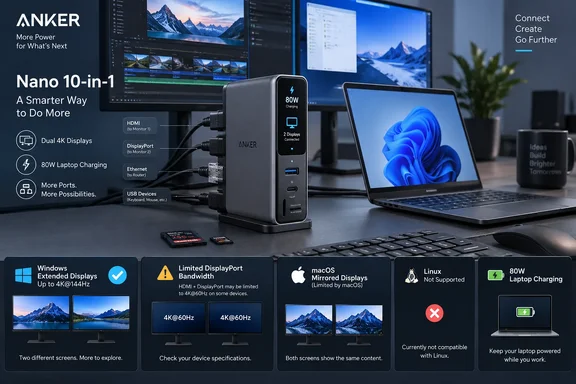
The Gadgeteer highlighted the product’s desktop-first layout this week, while 9to5Toys reported that it went on sale September 15. Anker’s own listing confirms the $99.99 price, 10-port count, and the feature that needs the most careful reading: the headline dual 2K at 240Hz capability depends on a host laptop with DisplayPort 2.1 and Display Stream Compression at 3:1.
For Windows users replacing a pile of travel dongles, that makes the A210C a potentially sensible dock. For buyers expecting any USB-C laptop to drive two high-refresh displays, it is a compatibility trap waiting to happen.
The 240Hz claim is a host-laptop claim
Anker markets the hub around support for a single display at up to 4K at 144Hz or 2K at 240Hz, and up to two 2K displays at 240Hz. The second figure is technically plausible, but it is not a capability supplied by the hub in isolation. The laptop must provide the required DisplayPort 2.1 output and DSC compression over its USB-C connection.
That immediately narrows the audience. A substantial number of business laptops, including many otherwise capable Thunderbolt 3 and Thunderbolt 4 systems, use DisplayPort 1.4 tunneling rather than DisplayPort 2.1. Those machines may still work with the dock and may still support two external displays, but they should not be purchased on the assumption that dual 1440p at 240Hz will be available.
Anker’s product page does not provide a comprehensive resolution-and-refresh table for every combination of DisplayPort generation, DSC support, and operating system. The Gadgeteer describes lower outcomes for DisplayPort 1.4 systems depending on DSC support, but buyers should treat that as a planning guide rather than a guaranteed matrix until Anker publishes a more explicit compatibility chart.
The important practical step is to check the manufacturer specification sheet for the specific laptop model, including its USB-C display capabilities. “USB-C,” “Thunderbolt,” and “USB4” labels alone are insufficient. A port can physically accept the hub while exposing fewer display lanes or lower DisplayPort bandwidth than the marketing image implies.
Windows gets extended desktops; macOS gets mirrored screens
The A210C is far more straightforward on Windows than on macOS. Anker says Windows 10 and Windows 11 machines can use each external monitor as a separate extended display, which is the expected behavior for a two-monitor desk setup.
On macOS, Anker explicitly says both external displays show identical content. That limitation is especially important because the device has both HDMI and DisplayPort connectors; having two physical outputs does not mean a MacBook user gets two independent external workspaces. The hub may be usable for mirrored presentations, duplicated monitoring, or a single external screen, but it is not a replacement for a DisplayLink-based dock or a native multi-display dock for Mac users who need separate windows on each panel.
That split is an example of why dock specifications should be read by operating system rather than by connector count. A dual-output dock can behave as a conventional dual-monitor device on Windows and as a mirror-only adapter on macOS without any hardware defect. The limitation stems from the display paths and operating-system support chosen for the product.
Anker also says the A210C is not compatible with Linux. That is an unusually blunt exclusion for a standard-looking USB-C hub, particularly because Ethernet, storage, USB peripherals, and DisplayPort Alt Mode ordinarily rely on widely supported interfaces. The company does not explain on its product listing whether the exclusion applies to every basic function or reflects the unsupported status of its smart-display controls and management software. Linux users should therefore avoid treating the hub as a supported docking option.
Its USB-C ports do less than their shape suggests
The front-facing USB-C port is rated for 10Gbps data, alongside a 10Gbps USB-A port and two 5Gbps USB-A ports. Those figures are useful for fast external SSDs, card readers, and wired peripherals. The hub also includes separate SD and microSD slots and Gigabit Ethernet, putting its core I/O ahead of cheap USB-C adapters that still top out at 5Gbps or omit wired networking.
But Anker’s documentation is clear on a detail frequently buried in hub listings: the front USB-C port and USB-A ports are data-only. They cannot charge devices and cannot drive a USB-C monitor. The only video outputs are the rear HDMI 2.1 and DisplayPort 1.4 connections.
That means a buyer with a USB-C-only monitor should look elsewhere or add an adapter chain, which defeats part of the hub’s cable-management appeal. It also means the A210C should not be confused with a Thunderbolt dock that can pass a full-function USB-C connection to a display or downstream device.
The host connection is a permanently attached 700mm cable, another sign that Anker designed this for a fixed desk rather than a laptop bag. It limits cable replacement options if the host cable is damaged, but it saves a separate upstream cable and lets the unit stand in a consistent position beside a monitor or laptop stand.
“100W” power input does not mean 100W laptop charging
The A210C accepts up to 100W through its USB-C Power Delivery input, yet the laptop receives up to 80W. Anker reserves up to 20W for the hub’s own operation when the input is 65W or higher. A 100W USB-C charger and an appropriate cable are required to reach the 80W ceiling, and neither comes in the box.
For many ultrabooks, 80W is ample. Dell Latitude, Lenovo ThinkPad, HP EliteBook, Surface Laptop, and similar productivity systems often ship with 45W to 65W adapters. A laptop that normally uses a 90W, 100W, or higher adapter may run acceptably while browsing, writing, or using office applications, but can discharge under sustained CPU and GPU load even while connected to the hub.
That makes the Nano a better match for ordinary office, coding, remote-work, and media desks than for a workstation-class laptop expected to run compiles, rendering jobs, or demanding games through a pair of high-refresh monitors. The advertised 80W host charging is respectable at this price, but it is a ceiling with conditions, not a bundled charging solution.
The screen is status hardware, not a reason to replace a dock
The Nano’s built-in display shows connection status, charging power, transfer activity, device temperature, and attached-monitor details. It can also show user-uploaded images and provide a focus timer and break reminders. 9to5Toys reported that touch controls on the top of the hub operate those features, while Anker advertises web and app control.
This could be genuinely helpful when troubleshooting a desk setup. A dock that visibly reports whether it is receiving power, whether an external display is active, or whether a peripheral has negotiated a connection can eliminate some of the guesswork normally hidden behind a single LED. It will not diagnose every USB-C problem, however. It cannot reveal a laptop’s missing DisplayPort bandwidth, fix firmware defects in a monitor, or turn a data-only USB-C port into a display output.
The screen is best viewed as an operational convenience on a dock whose basic port selection already fits the desk. It should not be the deciding feature for anyone who needs Thunderbolt bandwidth, multiple independent Mac displays, USB-C monitor output, Linux support, or more than 80W of laptop charging.
A tidy Windows dock, provided the laptop passes the test
Anker’s strongest design decision is physical rather than electronic: it places roughly 80% of the connections at the rear and includes a magnetic, adhesive-backed base to keep the 5.12-inch hub upright. That arrangement can remove Ethernet, display, power, and USB storage cables from the front edge of a desk while leaving the card readers and one USB-C data port accessible.
The A210C has enough practical value to earn attention from Windows laptop owners, particularly those moving between a mobile computer and a permanent two-monitor desk. Yet its most aggressive display specification belongs to a small subset of newer systems, its USB-C peripheral port is not full-function, and the external charger is an additional purchase.
Before ordering, Windows users should verify three things in the laptop manual: that the USB-C port supports Power Delivery input, that it provides DisplayPort Alt Mode, and whether its DisplayPort generation and DSC support actually match the desired monitor mode. If those answers line up, Anker’s Nano hub is a compact way to replace several adapters. If they do not, the smart display will only make the resulting limitations easier to see.
Update: Anker launches a $109.99 Valorant-themed version with display themes (September 23, 2026)
Anker has released a Valorant Limited Edition of its Desktop USB-C Hub in the US for $109.99, according to Notebookcheck. The hardware is otherwise substantially the same as the standard A210C, including 10 ports, up to 80W laptop charging, a 700mm integrated host cable, and the same headline display modes.
The practical change is cosmetic and software-facing: the limited model adds Valorant artwork and customizable smart-display themes. Jett ships as the default theme, while Anker plans Phoenix and Killjoy themes in an over-the-air update in October, with additional agent-inspired designs planned afterward.
For Windows buyers, this does not change the underlying compatibility requirements for dual 1440p at 240Hz. The host still needs sufficient DisplayPort bandwidth and DSC support; the themed enclosure does not add Thunderbolt capability, full-function downstream USB-C, higher laptop charging, or Linux support.
References
- Anker releases new Valorant-themed USB-C dock with 240Hz monitor support and smart display Notebookcheck · 2026-09-23T08:48:00+00:00
- Anker Nano 10-in-1 USB-C Hub adds a smart display to desktop docking - The Gadgeteer The Gadgeteer · 2026-09-19T03:00:20+00:00