

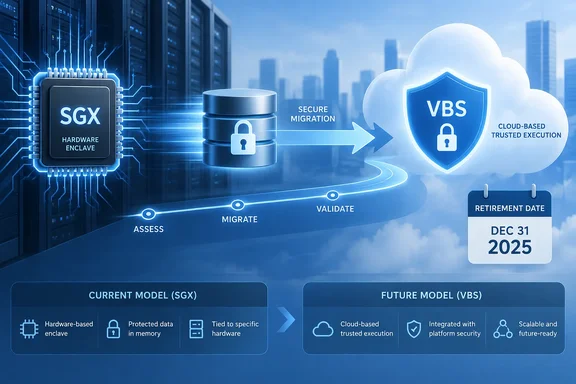
What is being retired
The retirement covers one enclave implementation. Always Encrypted and secure enclaves in general stay. In Azure SQL Database, databases on the DC-series hardware configuration (vCore purchasing model) use Intel SGX enclaves. That includes standalone databases and databases in DC-series elastic pools. Microsoft's migration guide says every database in a DC-series pool is affected.
Microsoft's own documentation says Intel SGX is not available in hardware other than DC-series. The retirement therefore effectively ends enclave-on-DC-series as a design choice.
What happens if you do nothing
After October 31, 2027, Azure automatically moves any database still on the DC-series compute tier to a supported standard-series (non-DC) compute tier and enables virtualization-based security (VBS) enclaves.
That is a change of compute tier and of enclave type. It does not preserve SGX. Treat it as a platform change to plan for, not a no-op.
SGX vs. VBS
The two enclave types protect against different threats.
- Intel SGX is a hardware-based trusted execution environment. Microsoft's documentation says Intel SGX enclaves are resistant to attacks from the host operating system.
- VBS is software-based. Microsoft's Azure SQL team describes the trade-off this way: the main disadvantage of VBS enclaves is that they provide weaker security guarantees than Intel SGX enclaves.
- Where they run: the same team notes that VBS enclaves can run on any Azure SQL Database service tier in any region and come with no extra cost.
- Region caveat: Microsoft's documentation lists one exception. VBS enclaves are available in all Azure SQL Database regions except Jio India Central.
The practical question is whether your threat model includes a compromised host operator. If it does, VBS inside Azure SQL Database may not be enough. Microsoft's migration guide points those workloads to a different path, covered below.
Attestation also changes. Microsoft's documentation says attestation lets a client application establish trust with the database's secure enclave before using it to process sensitive data. For SGX in Azure SQL Database, attestation is mandatory and uses Microsoft Azure Attestation. VBS enclaves in Azure SQL Database don't support attestation. Applications can't keep their old attestation settings after the move.
Step 1: Find the DC-series databases
Microsoft's guide says to inventory every standalone database and elastic pool on DC-series. First confirm that you can view and modify the target logical servers, databases and pools. Also list the applications that connect to them, because their drivers, connection strings and attestation settings will probably need changes.
Azure portal
- Open each Azure SQL logical server.
- On the Overview page, find the Available resources table.
- Filter the Pricing tier column for DC-series.
- Record each database that matches.
- Repeat for every logical server in your environment.
PowerShell and Azure CLI
Microsoft supplies scripts for both. You need the Az PowerShell modules or the Azure CLI, and you must be signed in.
- The PowerShell script lists standalone databases whose service objective name matches a DC pattern. It also finds elastic pools whose SKU family is
DCand lists their databases. - The CLI approach lists standalone databases where
currentSku.familyisDC. It then finds DC-family elastic pools and lists the databases in each. - Run either one per logical server. If a run returns no rows, that server has no DC-series databases.
Step 2: Choose a migration path
Option A: Stay in Azure SQL Database with VBS enclaves
Choose this if VBS meets your security requirements. For a single database, Microsoft's sequence is:
- Select a supported standard-series (non-DC) configuration that meets your performance and availability needs.
- Move the database to it.
- Enable VBS enclaves. This sets the
preferredEnclaveTypedatabase property toVBS. - Check the client driver requirements for VBS without attestation, and update the driver if needed.
- Change each application connection to the
Noneattestation protocol and remove the Microsoft Azure Attestation URL. The exact connection-string keywords depend on the driver. - Validate the result.
For an elastic pool, Microsoft notes that VBS enclaves are available in all Azure SQL Database offerings, including elastic pools. The pool sequence is:
- Pick a supported standard-series configuration for the pool.
- Set the pool's
preferredEnclaveTypetoVBS. - Update drivers and connection settings as above.
- Validate every database in the pool. Databases inherit the pool's enclave configuration.
Option B: SQL Server on an Azure confidential VM
Microsoft suggests this for workloads that need a hardware-enforced boundary protecting the guest OS from host operators. The guide warns that confidential VMs encrypt VM memory and have different security properties from SGX enclaves. Measure that difference against your compliance requirements instead of assuming equivalence.
Here, SQL Server 2019 and later supports VBS enclaves for Always Encrypted, and Intel SGX enclaves aren't supported. Host Guardian Service attestation is optional.
The high-level plan:
- Deploy SQL Server on a confidential VM.
- Decide whether to use attestation, either none or HGS.
- Configure Always Encrypted with VBS enclaves on the instance.
- Plan the move of the database, logins, keys, connectivity and dependent resources.
- Update connection strings and validate.
Microsoft lists three common data-transfer options. Each has its own prerequisites and limits.
| Method | Notes from Microsoft |
|---|---|
| Azure Data Factory copy activity | Treats Always Encrypted columns as binary/ciphertext and moves them without needing the Column Master Key. |
| Smart Bulk Copy | Copies schema and data from Azure SQL Database to SQL Server. Review its prerequisites and limitations first. |
| BACPAC | Suited to smaller databases with supported data-tier objects. Encrypted data stays encrypted and the file includes key metadata. |
One BACPAC caveat comes from Microsoft's enclave documentation. That page notes that when migrating with a BACPAC in either product, you should drop all indexes on enclave-enabled columns that use randomized encryption before creating the file. The enclave overview also says that after restoring a VBS-enabled database, you must set the VBS enclave configuration again.
Step 3: Validate before cutover
Microsoft's checklist is practical:
- Confirm applications connect with Always Encrypted enabled.
- Run representative queries on encrypted columns, including ones that need enclave computation.
- Test inserts, updates, deletes and index operations on encrypted columns.
- Test performance and adjust compute if necessary.
- Test business continuity, disaster recovery and failover. If the workload uses enclave operations, all replicas must support secure enclaves.
- Watch for enclave, attestation and query errors before completing the cutover.
The replica point is easy to miss. Microsoft's enclave documentation warns that if the primary has an enclave and a secondary doesn't, statements that use enclave functionality fail after failover. With active geo-replication, secondaries need enclave support too.
Analysis
This is a documented, dated deprecation with a concrete automatic fallback, which is the friendliest kind. Still, plan around three things:
- Security posture. Microsoft's own materials say SGX offers stronger guarantees than VBS. If your auditors or data-protection design assumed host-level protection, the automatic move changes what you can claim. Review that before the deadline, not after.
- Application breakage. Apps still set to Azure Attestation need the
Noneprotocol on VBS. Older drivers may not support VBS without attestation. Test in a non-production copy first. - Cost and capacity. Microsoft's Azure SQL team has said DC-series carries extra cost and is capped at 40 physical cores, while VBS has no extra cost. Moving to standard-series may change both your bill and your performance profile, so size it deliberately.
The Azure Updates entry itself carries little detail. The migration guide, last updated October 1, 2026, is the substantive reference. Given the roughly year-long runway from today's date, the sensible plan is to inventory now, decide between VBS in Azure SQL and a confidential VM, and rehearse in staging.
References
- Retirement: Always Encrypted with Intel SGX Enclaves Azure Updates · 2026-10-06T16:42:33Z
- Always Encrypted with Intel SGX enclaves migration guide - SQL Server | Microsoft Learn learn.microsoft.com
- Always Encrypted with secure enclaves - SQL Server | Microsoft Learn learn.microsoft.com