

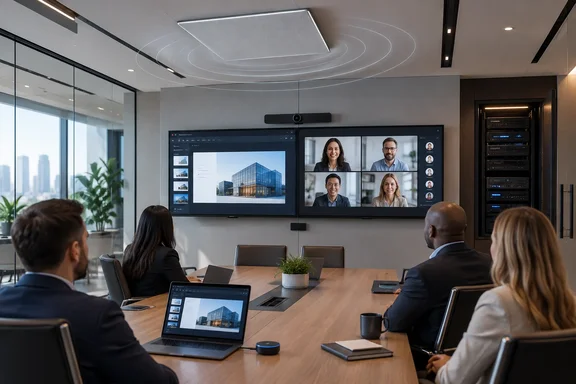
AV Magazine reported the announcement on September 16, a day after Barco’s September 15 release. Barco says the configuration combines the ClickShare Hub Pro, Huddly L1, Shure MXA902, and Shure’s ANIUSB-MATRIX audio interface, and that the complete bundle is Certified for Microsoft Teams.
For IT teams, the important word is complete. Microsoft Teams Rooms certification is valuable when it applies to a tested room configuration, not merely a collection of peripherals that happen to work individually. But as of September 17, Microsoft’s public Teams Rooms on Android hardware catalog has not yet added this specific Barco-Huddly-Shure package, even though it lists several other ClickShare Hub Core and Hub Pro bundles. That does not disprove Barco’s announcement; certification listings can lag launches. It does mean procurement teams should get the precise certified SKU, software baseline, and support entitlement from Barco or their integrator before treating the public catalog as confirmation.
A ceiling-audio Teams Rooms option for Barco deployments
The new package moves Barco’s ClickShare Hub line into a different class of room build from an all-in-one videobar. The Huddly L1 is a 6K conference camera with an on-device AI director for framing people and conversations. Shure’s MXA902 combines a ceiling-mounted microphone array, digital signal processing, and loudspeaker in one unit, while the ANIUSB-MATRIX bridges audio over USB and Dante-based network audio.
That architecture will be familiar to AV integrators working on rooms where people do not sit close enough to a display-mounted camera or soundbar. The camera can be placed for a wider view of the room, while ceiling audio avoids the usual trade-off of putting microphones and loudspeakers at one end of a long table. Barco’s technical sheet says the MXA902’s single-zone coverage is designed for a 20-by-20-foot, or 6-by-6-meter, area out of the box.
The bundle’s value is therefore less about adding another Teams meeting endpoint than reducing the integration burden in rooms that need distributed AV. Shure already sells the MXA902 and ANIUSB-MATRIX as a certified Teams audio kit, and Microsoft’s Windows-based Teams Rooms catalog separately recognizes the MXA902 system with the ANIUSB-MATRIX interface in several approved host configurations. Barco’s release adds its Hub Pro appliance and Huddly L1 to that audio design as a named Teams room package.
There is an installation consequence, though. This is not a compact USB videobar that can be mounted beneath a display and left to facilities staff. A ceiling microphone-and-speaker array, an audio interface, network configuration, camera placement, cable routing, and acoustic commissioning all remain part of the job. Certification reduces compatibility risk; it does not make a ceiling-audio room a plug-and-play deployment.
The certification record has not fully caught up
Barco’s own ClickShare Hub ecosystem page now lists five Teams-certified bundles: Hub Core combinations with Logitech MeetUp 2 and Sennheiser TeamConnect Bar S; Hub Pro combinations with Huddly C1 and Sennheiser TeamConnect Bar M; and the new Hub Pro, Huddly L1, and Shure MXA902 configuration.
Microsoft’s public Teams Rooms on Android catalog, however, currently shows the first four Barco combinations but not the Huddly L1 and Shure bundle. The Barco entries it does list include firmware versions for the older bundles and an August 15, 2028 certification-expiry date. The omission is most likely a documentation timing issue: Barco announced the new bundle only two days ago. Still, it creates a short-term verification gap that administrators should not ignore when buying through resellers or writing internal standards.
Barco’s own support documentation reveals a second reason to verify the exact design. Its compatibility page lists Huddly L1 and Shure ANIUSB-MATRIX as supported devices, but places them under general interoperability rather than the older section for certified bundles. The same page says the Huddly L1 is supported only through the Huddly USB adapter. That is a concrete deployment requirement missing from the announcement’s simplified description of a modular room system.
The result is a sensible but narrow recommendation: organizations evaluating this product should request a bill of materials that explicitly includes the Huddly adapter, the required ClickShare Hub firmware, the Huddly and Shure firmware levels, and the cabling design. A quote that merely names “ClickShare Hub Pro plus Huddly and Shure” is not enough to prove that it matches the certified configuration.
It is Teams Rooms on Android, not a Windows appliance
ClickShare Hub Pro runs Android on Microsoft’s Device Ecosystem Platform, or MDEP. That makes this a Teams Rooms on Android deployment, not a Windows PC running the Teams Rooms application. For organizations standardized on Windows-based Teams Rooms devices, the distinction affects imaging practices, troubleshooting assumptions, peripheral support paths, and lifecycle management.
Barco promotes the platform’s centralized management and security posture, while its product documentation identifies XMS Cloud as the management and reporting service. That can be attractive to a distributed organization trying to manage room systems as appliances rather than maintain a fleet of Windows endpoints. It also means the IT owner needs to understand which operational controls reside in Teams Admin Center, which reside in Barco’s management service, and which adjustments require the AV team’s access to Shure’s networked audio environment.
The announcement also confirms that a Microsoft Teams Rooms license is required. The hardware bundle is therefore not a substitute for the room account and licensing work that enables calendar integration, one-touch join, and standard Teams Rooms administration. Barco has not published list pricing, regional ordering details, availability dates, or an answer on whether existing Hub Pro installations can be converted into the same certified configuration with separately purchased Huddly and Shure equipment.
Those omissions matter for refresh planning. A company that already owns ClickShare Hub Pro devices may see this as an upgrade path, but it should not assume that buying the three peripherals and connecting them produces the same supported result. The certified designation applies to a documented bundle, including its tested hardware and software conditions.
Wireless sharing remains the differentiator
Teams Rooms hardware from Logitech, Poly, Yealink, Neat, Cisco, and others already offers one-touch meetings and a wide range of camera and audio options. Barco’s differentiator remains ClickShare: two fifth-generation ClickShare Buttons provide wireless content sharing, while the Hub Pro also supports dual displays and 4K content presentation.
That is useful in rooms where presenters routinely arrive with unmanaged Windows PCs or Macs and expect to share locally stored content without joining the room system’s Teams meeting from their laptop. Barco also advertises wireless BYOD use for Zoom, Webex, and Google Meet through the room’s AV hardware. This flexibility can reduce friction in mixed-platform organizations, but it should be tested against local security policy, guest-network controls, and the organization’s preferred method of handling non-Teams meetings.
The Button itself uses Wi-Fi 6E-capable hardware, and Barco lists operation across 2.4 GHz, 5 GHz, and 6 GHz bands subject to country support. That makes RF planning relevant. In dense offices, the success of wireless presentation often depends less on the conference-room appliance than on channel planning, client behavior, and how the room network is segmented from employee and guest devices.
“Medium” rooms need a measured definition
Barco’s announcement repeatedly calls the configuration a solution for medium-sized rooms. Its technical sheet, dated July 24, calls the same system a Teams Rooms solution for “medium-to-large” meeting rooms. Huddly’s partner page places the L1-and-Shure configuration in the medium-room category, while showing a different Huddly Crew and Shure design for large and extra-large rooms.
The discrepancy is not necessarily a contradiction; room labels are too imprecise to be an engineering specification. But it reinforces why buyers should define a room by its table layout, seating count, ceiling height, reverberation, display positions, and cable pathways rather than accept a vendor category. The MXA902’s stated 20-by-20-foot coverage area is a more useful starting point than the phrase “medium room,” though it is still not a substitute for an acoustic review.
For organizations that need a native Teams Rooms appliance, wireless sharing for laptops, and ceiling-based audio without commissioning a custom Windows compute solution, Barco’s new configuration fills a real gap. The immediate next step is not to order on the strength of the certification headline, but to obtain the certified configuration details and confirm that the room design matches the hardware Barco says it tested.
References
- Barco introduces a Teams bundle with Huddly and Shure - avinteractive.com avinteractive.com · 2026-09-16T17:07:03+00:00