

Microsoft’s roadmap record 573376 marks the feature Launched, with general availability listed for October 2026. The record covers the web platform in the Worldwide (Standard Multi-Tenant) cloud. It does not provide a specific rollout day, so that status should not be read as confirmation that every tenant already has the action.
What the reversal preserves
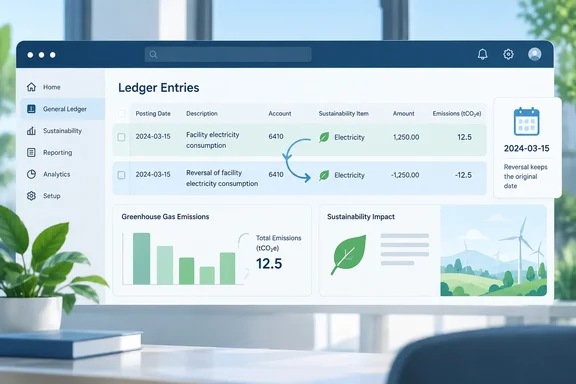
According to Microsoft’s roadmap description, the action creates a new sustainability ledger entry rather than removing the mistaken posting. The reversing entry:
- Retains the original entry’s document number.
- Uses the original posting date.
- Records the user who performed the reversal.
- Offsets the original values in the same reporting period.
The distinction matters because Business Central already treats posted sustainability data as retained history. Microsoft Learn explains that users cannot delete posted sustainability ledger data; mistakes are corrected by posting an opposite-sign transaction. The new action brings that correction mechanism directly to the ledger page for the supported journal-originated entries.
In practical terms, reversal cancels the erroneous contribution without pretending the original posting never happened.
Why the original posting date matters
Microsoft Learn says the sustainability ledger holds posted sustainability transactions and supplies the entries used by active sustainability reports. A correction’s date therefore matters alongside its value.
Consider a simplified example: an eligible journal transaction incorrectly records 100 units in September. A reversal of −100 units, dated to the original September posting, produces a zero net contribution from that pair within September.
Dating the offset in October instead would leave September overstated and introduce a negative adjustment in October. That is the reporting problem the roadmap’s same-date behavior is designed to avoid.
This example illustrates the arithmetic, not a tested tenant scenario. A reversal also does not supply the correct replacement value: if the underlying activity still needs to be recorded, the team must separately post the appropriate corrected data.
Where the action applies—and where caution is needed
The documented scope is entries posted from sustainability journals or general journals. Microsoft’s release notes do not describe this action as a universal reversal mechanism for every sustainability posting source.
That boundary is important. Microsoft Learn documents purchase documents as another route for recording greenhouse-gas emissions, alongside those journals. Purchase-originated entries should therefore not be assumed eligible merely because they appear on the same ledger page.
Likewise, general journals can post emissions alongside financial amounts, but the roadmap describes the creation of a reversing sustainability ledger entry. It does not establish that this action also reverses associated financial ledger entries. Finance teams should not treat a sustainability correction as proof that the accounting transaction has been undone.
A practical review checklist
For an environment where the feature is available, the described entry point is straightforward: open Sustainability Ledger Entries, identify the mistaken eligible posting, and choose Reverse Transaction. Microsoft Learn documents opening the ledger through Business Central’s search by entering that page name.
Before relying on the corrected figures, a sensible operational checklist is to:
- Confirm that the original entry came from a supported journal.
- Review its document number, posting date, account, and recorded values.
- Inspect the resulting reversal for the expected offset and retained date.
- Post corrected data where necessary.
- Reconcile the affected reporting period.
These are review recommendations, not additional Microsoft-mandated interface steps. The available feature description does not specify confirmation dialogs, permissions, bulk selection behavior, or closed-period handling.
Prevent mistakes before they become ledger history
Reversal is useful, but prevention remains cheaper. Microsoft Learn documents optional background validation on Sustainability Setup: when enabled, it identifies journal issues and prevents posting when errors occur. The Journal Check FactBox displays issues for the current line and batch.
The takeaway is modest but valuable: Business Central is making eligible sustainability corrections easier to perform while retaining the original record. For administrators and reporting teams, the priorities are to verify availability in their environment, respect the posting-source boundary, and check the resulting period totals—not simply celebrate the arrival of another button.
References
- Dynamics 365 Business Central: Sustainability Management - Reverse Sustainability Ledger entries transaction Microsoft 365 Roadmap · 2026-09-30T23:31:03.389585Z
- Record sustainability entries - Business Central | Microsoft Learn learn.microsoft.com
- Chart of sustainability accounts and ledger - Business Central | Microsoft Learn learn.microsoft.com