

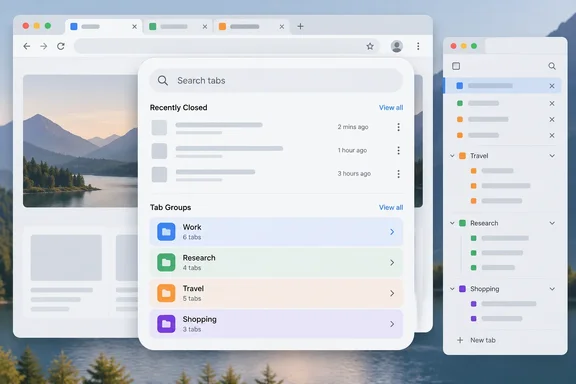
Chrome Canary's Tab Search panel adds a Tab Groups section
In stable Chrome, the Tab Search panel has two sections: Open Tabs and Recently Closed. In the Canary build that Windows Report's Venkat tested, a third section called Tab Groups appears below Recently Closed. It lists the tab groups currently available in the browser. If there are more groups than the panel can show, a Show more control reveals the rest.
The new section also shows each group's assigned color. Group colors are how most people tell groups apart on a crowded tab strip, so seeing the same colors in the search panel should make it quicker to connect a list entry to a group on screen.
The reported behavior stops there. Windows Report describes what the section displays. It doesn't say what happens when you click a group entry, such as whether the group opens, expands, gets focus, or restores in a new window. It also doesn't say whether typing in the search box filters group names or only matches tabs. Those details will decide how useful the feature is in daily use, and right now they are unknown.
No other outlet has independently reported this redesign, and Google hasn't announced it. The report also gives no Canary build number, operating system, or feature flag. It says the panel is "currently appearing in Chrome Canary," but doesn't claim that every Canary install has it. Chrome often tests features on a subset of Canary users, so a reader running Canary today may not see it.
A rounder Tab Search layout that works with horizontal and vertical tabs
The second part of the test is visual. According to Windows Report, the Search Tabs control at the top of the panel is now a rounded, pill-shaped field. The panel as a whole has more spacing and more rounded elements than the current version, and the tab rows look roomier.
Windows Report also says the redesigned panel works in both of Chrome's tab layouts, with the same interface in either one. That's relevant because Chrome now officially supports vertical tabs. Google's current Chrome Help page describes vertical tabs as moving the tab strip to the side of the window, and it documents a Tab Search button in that layout as well. You can switch layouts by right-clicking blank space on the tab strip, or a tab, and choosing Show Tabs Vertically or Show Tabs Horizontally. The same choice is under Settings > Appearance > Tab position.
Vertical tabs followed the path this redesign is on now. In November 2025, Windows Report found a hidden "Show tabs on side" option in Canary. Inside the vertical layout, the Tab Search button sits at the top. Tab groups and the plus button for new tabs are at the bottom. Other outlets covering that build noted that the exact layout and option list may change as Google refines the interface ahead of wider availability. That feature is now part of Chrome and documented in Google's Help. The Canary tests that preceded it therefore gave an accurate picture of where the design was heading.
Tab Search and Tab Groups have always been separate tools
Both features were built for the same problem: too many open tabs. They grew up separately. Tab groups came first. By November 2020, Google's Chrome release post already listed grouping next to pinning as ways to organize tabs. That same post introduced Tab Search as a way to see a list of open tabs "regardless of the window they're in" and type to find the one you need. It launched first on Chromebooks and then on other desktop platforms.
Recently closed tabs came early too. In a 2022 Google post, Chrome engineering director Max Christoff described Tab Search as narrowing the list as you type and including tabs he had closed moments earlier. The Canary test doesn't create tab search or recently closed entries. What's new is putting tab groups in the same panel.
In current stable Chrome, groups live elsewhere. Google's Help says you create a group by right-clicking a tab and choosing Add tab to group, then picking a new or existing group. You edit a group by right-clicking its colored circle or name on the tab strip, where you can rename it, change its color, add tabs, or remove the group. A closed group is saved rather than deleted. You reopen it from the bookmarks bar, from the Chrome menu under Tab groups, or from a separate saved tab groups button. Chrome also offers two Appearance settings: Show tab groups in bookmarks bar, and Automatically pin new tab groups to the bookmarks bar.
So today there are several places to find a group and a separate panel for searching tabs. If the Canary layout ships, the Tab Search button or shortcut becomes one place for both. That doesn't change what a group is. It changes where you go to find one.
Sync and deletion rules for Chrome tab groups stay the same
The test is a change to how groups are displayed, and nothing in the report suggests it changes how groups are stored. That's worth stating because of how Chrome's sync rules work. According to Google's Help, when browsing history and tabs are synced with a Google Account, changes to tab groups are saved automatically and synced across all of your devices.
Google's Help also separates three actions, which are easy to confuse. Closing a group keeps it saved so you can reopen it later. Deleting a group removes it on your device and on other devices that use the same Google Account. Ungrouping leaves the tabs open, but it also deletes the group on your device and on other devices signed in to that account.
A Tab Groups section in the search panel will probably lead more people to open, close, and manage groups from there. Those sync consequences apply wherever you trigger the action. The report doesn't say whether the new section includes delete or close controls. If it ships with them, the cross-device deletion rule applies just as it does on the tab strip.
Chrome's Tab Search button has been redesigned before
This isn't the first time Google has reworked Tab Search in Canary. In April 2024, a Reddit user found Tab Search changes being tested in Chrome Canary on Windows 10. That test aimed at relocating the Tab Search button to the left of the minimize button and removing the previous elaborate styling. Chrome has moved the button several times since. Current Help says Tab Search is on by default and pinned to the tab strip. You can unpin it by right-clicking it, and restore it with the Show tab search button setting under Settings > Appearance.
Canary is where Google tries out interface ideas, and not all of them survive. Windows Report says it is "not yet clear" whether Google will bring this exact layout to stable Chrome, and that the design could change as development continues. A reasonable reading is that adding groups to the panel is the more important part of the test, while the pill-shaped search field and extra spacing are the parts most likely to be adjusted along the way.
What this means for you
You don't need to do anything now. Stable Chrome hasn't changed, and there is no documented, reliable way to turn on the redesigned panel. Enthusiasts who already run Canary can watch for the new section. Everyone else can get most of the same workflow from tools Chrome already has.
- In stable Chrome on Windows and Linux, open Tab Search with Ctrl + Shift + A (Command + Shift + A on Mac), type keywords, and select a result to switch to that tab or click its close button to shut it.
- In the address bar, type @tabs, press Tab or Space, and enter keywords to search open tabs without opening the panel.
- Saved groups can be reopened from the bookmarks bar or the Chrome menu's Tab groups entry. Turning on Show tab groups in bookmarks bar under Settings > Appearance makes them visible at all times.
- Remember that deleting or ungrouping a synced tab group removes it on every device signed in to the same Google Account, while closing a group keeps it saved.
- Don't use unverified flags or command-line switches to force the new panel on. No build number or flag has been documented for it.
- Admins who standardize on stable Chrome have no documentation, training, or policy changes to plan for until the redesign appears in the Beta or Stable channel.
Chrome's tab management has been built up in separate pieces: groups in 2020, search the same year, vertical tabs much later. This Canary test is the first sign that Google wants one panel to handle all of it. Vertical tabs took the same route, from a hidden Canary option to a documented feature, and a Tab Groups section in Tab Search would probably follow the same order. The first concrete sign to look for is the section appearing in Chrome Beta or in a Chromium change that names it. That would move it from something one tester saw to something Google plans to ship.