

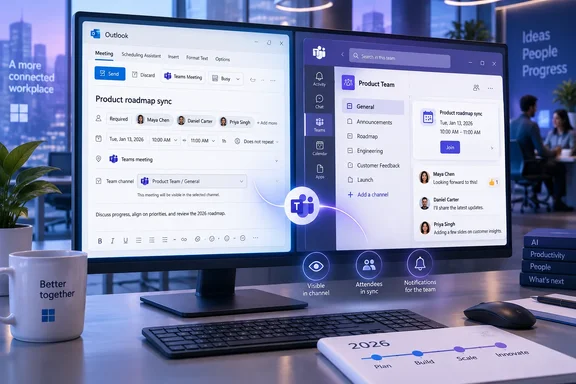
The practical change is straightforward: a user creating a Teams meeting in Outlook classic should be able to associate it with a Teams channel rather than switching to Teams to create the event. But Microsoft has published almost none of the implementation details administrators will need before treating the October target as a deployable change: there is no named Teams version, Outlook build requirement, licensing statement, rollout sequence, or description of how the channel-picker experience will appear in the Outlook meeting form.
That absence matters because Microsoft’s own current support documentation still describes channel meetings as a Teams-only workflow.
The Outlook classic limitation Microsoft is now planning to remove
Classic Outlook already supports creating ordinary Teams meetings through the Teams Meeting add-in. Microsoft’s Outlook support guidance says business users with Microsoft 365 Exchange accounts can create an Outlook meeting, use the Teams Meeting control, add participants, and send an invitation with the join details attached.
What it does not provide today is a documented way to designate a Teams channel as the meeting’s home. That distinction is more than cosmetic. A normal Teams meeting is centered on its invitees and their calendars; a channel meeting is associated with a team workspace, where members can see and join it in the channel and related discussion is retained in the channel context.
Microsoft’s Teams documentation currently directs users to schedule a channel meeting from within Teams itself: choose the team, use the menu beside Meet now, then select Schedule a meeting. Its separate channel-calendar guidance is even more explicit, saying channel events can only be scheduled and viewed from the Teams app.
Roadmap item 571389 therefore represents a real workflow change rather than another variation of the existing Teams Meeting ribbon button. For organizations where executive assistants, project coordinators, or departmental administrators work primarily in Outlook, it removes an extra application hop from meeting creation.
The roadmap entry leaves key behavior unanswered
Microsoft’s roadmap calls the feature “Schedule Teams Channel Meetings from Win32,” which points specifically to the traditional Windows desktop Outlook client. Yet the same entry labels its platforms as Desktop and Mac. Those terms do not resolve whether any related support is planned for Outlook for Mac, which is not a Win32 application, or whether Microsoft is using broad platform metadata for a Teams-backed feature whose initial scheduling interface is Windows-only.
Until Microsoft publishes product documentation or release notes, admins should treat Outlook classic on Windows as the only clearly identified client. The Mac designation should not be read as a commitment that Outlook for Mac will gain the same capability in October.
The roadmap also does not say whether the feature will be delivered by an update to Outlook, the Teams Meeting add-in, the Teams desktop client, a cloud-side service change, or some combination of those components. That is important for enterprises that manage Microsoft 365 Apps update channels separately from Teams, or that tightly control Outlook add-ins through Group Policy and endpoint-management tooling.
There is another unanswered question: whether Outlook-created channel meetings will carry the same rules as those scheduled in Teams. Today, Microsoft says channel meetings are not available in private channels. It also notes that people outside the organization cannot access the channel calendar, while the Teams meeting itself may still include external attendees. The roadmap entry does not state whether Outlook will surface those restrictions before sending a meeting request, block unsupported channel types, or create a meeting that behaves differently from one created in Teams.
Channel visibility changes the invitation model
The distinction between a channel meeting and a meeting merely sent to selected people is where this change can create operational surprises.
Microsoft’s Teams documentation says that when a channel meeting is scheduled in Teams, everyone in the team can see and join it from that channel. At the same time, the company’s channel-calendar documentation says channel members do not necessarily receive a direct invite unless the organizer adds them individually, and only members who enabled notifications for that channel will receive notice that an event was created.
In other words, scheduling a meeting in a channel is not a reliable substitute for individually inviting the people who must attend. It creates a visible, joinable event in the relevant collaboration space, but notification and calendar behavior can vary based on direct invitation, channel notification settings, and whether users follow the associated Microsoft 365 group in Outlook.
That nuance should shape user training. An Outlook-first organizer may assume that selecting a channel automatically produces the same delivery behavior as addressing a distribution list. Microsoft’s existing Teams guidance indicates otherwise. A project stand-up intended to be open to a team can fit the channel model well; a mandatory review meeting for a defined group of people still needs named attendees.
The reverse problem is also possible. Users who select a channel for organizational convenience may not realize that the meeting will be visible to channel members who were never placed on the attendee line. Administrators should consider whether channel selection needs governance guidance for confidential working sessions, personnel matters, legal reviews, or customer discussions.
What IT teams should do before October
There is nothing to deploy yet. The roadmap status remains in development, and a general-availability month is a target rather than a versioned release commitment. Microsoft has not posted a Message Center reference, support article, or tenant-admin configuration documentation alongside the roadmap item.
Still, this is a useful point to prepare rather than wait for users to find a new control in Outlook:
- Review whether the Teams Meeting add-in is consistently available in classic Outlook for the user groups that schedule departmental meetings. Microsoft’s current Outlook guidance ties Teams meeting scheduling to Microsoft 365 business Exchange accounts and does not support POP, IMAP, or personal Microsoft accounts for this workflow.
- Identify teams that rely on channel calendars and clarify when organizers should use a channel meeting rather than a conventional meeting invitation. The most important distinction is audience visibility, not the presence of a Teams join link.
- Test the feature first in Targeted Release when Microsoft makes it available. Validate channel selection, private-channel handling, external attendees, room resources, recurring meetings, delegate scheduling, and how invitations appear in both Outlook and Teams.
- Do not revise user documentation based solely on the roadmap description. Microsoft has not yet stated the Outlook UI path, whether users need the new Teams client, or whether the capability has tenant-level prerequisites or policy controls.
The October 2026 rollout target gives Microsoft only weeks to replace a documented Teams-only limitation with an Outlook classic workflow. When the feature arrives, the critical test will not be whether Outlook can add a channel field; it will be whether the meeting created there has predictable visibility, notification, and calendar behavior across the Outlook and Teams clients that organizations actually use.