

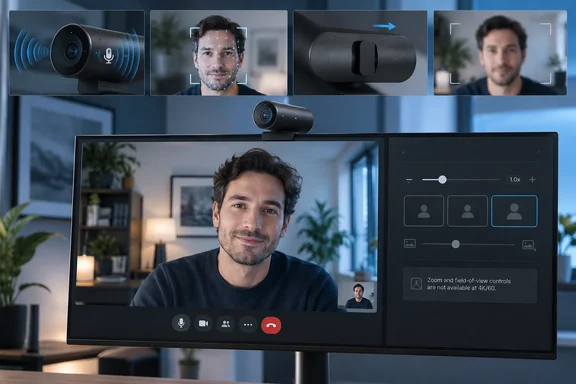
Dell’s own U.S. store now lists the webcam at $189.99, a $10 reduction from its launch price. That lower price helps, but it does not change the uncomfortable part of the Pro 7’s pitch: Dell’s premium capture mode has a feature limitation that directly removes two of the controls buyers would reasonably expect from a $200 webcam.
The Pro 7 has been on sale since June 2026, so this is not a launch verdict based on Dell’s specifications. The emerging record from Tom’s Hardware, Tom’s Guide, and Wired is more useful: the camera is solidly built, easy to use, and offers credible Windows-focused security and management features, but its image quality has failed to separate it from strong alternatives at the same price.
The 4K/60 mode drops zoom and field-of-view controls
The Dell Pro 7’s defining specification is 4K UHD video at 60 frames per second. That is uncommon in conventional desktop webcams, and it can be useful for local recording where motion matters. But Dell acknowledges in support document 000477454 that when the camera is set to 4K/60fps, its field of view and digital zoom cannot be changed in Dell Display and Peripheral Manager on either Windows or macOS.
Dell says the restriction exists because the camera uses a real-time image-output mode at 4K/60fps to reduce power consumption; its image signal processor cannot rescale each frame in that mode. Put plainly, selecting the specification that differentiates the Pro 7 means giving up its advertised framing adjustments.
That is a material constraint for desktop users. A 90-degree field of view can be useful when presenting a whiteboard or including several people, but it can also show more of a home office or shared workspace than intended. The four-times digital zoom is supposed to solve part of that problem. At 4K/60fps, it cannot.
Dell said in June that it was developing firmware to address the limitation and expected the update during September 2026. As of September 20, Dell’s public support notice still carries that promised timing rather than a released firmware version. Anyone buying the Pro 7 specifically for 4K/60 recording should treat adjustable framing at that setting as unavailable today, rather than as a completed capability waiting to be enabled.
Dell also says the restriction has no functional impact in Teams Rooms or Zoom Rooms. That is a narrow reassurance. It does not mean that individual Windows 11 users running Teams, Zoom, OBS, or Dell’s own configuration software will have the controls available while capturing at 4K/60.
Strong microphones are the point of difference
Tom’s Hardware’s review gives the Pro 7 its clearest win: built-in microphones that it says can be recommended rather than merely tolerated. The outlet found the dual beam-forming array picked up speech loudly and clearly at a typical desk distance, with more body and presence than most webcam mics. Keyboard and mouse sounds remained an issue, and software noise reduction could damage speech, but the underlying microphone quality stood out.
Tom’s Guide reached a similar conclusion, reporting clear voice reproduction and effective ambient-noise reduction. That is meaningful corroboration, even though the two outlets did not conduct the same test or reach identical conclusions about keyboard noise.
The distinction matters for Windows laptop and mini-PC users trying to simplify a desk setup. A webcam that also supplies acceptable call audio can eliminate a headset or standalone USB mic for occasional meetings. It will not replace a quality desktop microphone for podcasting, recording, or noisy shared offices, but the Pro 7 appears to be more useful than the usual webcam audio fallback.
Wired reached a much harsher overall assessment, saying the Pro 7 did not justify its $200 class price compared with Insta360’s Link 2C family, including on microphone clarity and focus speed. That disagreement is worth noting rather than smoothing over. The consistent finding is that Dell’s audio is better than the low expectations buyers usually bring to webcams; the unresolved point is whether it is strong enough to compensate for the camera’s image and focus shortcomings against direct rivals.
Windows Hello and presence sensing have real administrative value
For a Windows 11 workstation, the Pro 7 offers more than a video feed. Dell lists Windows Hello compatibility, presence sensing, face tracking, auto-framing, gesture control, document view, and a physical privacy shutter. It also carries Microsoft Teams and Zoom certifications, a three-year limited hardware warranty with Advanced Exchange Service, and support for Dell Display and Peripheral Manager.
Windows Hello is the most concrete reason to consider it in an office deployment. Dell’s documentation says setup requires enabling the external webcam priority in Dell Display and Peripheral Manager, then configuring facial recognition through Windows sign-in settings. The camera’s IR LED flashes during Windows Hello authentication, while its white status light indicates normal camera use.
Dell also promotes presence sensing as a way to sign a user in when they arrive and lock the PC when they leave. That can be useful on assigned desks, reception workstations, and hot-desk systems, but IT administrators should validate the behavior against their organization’s lock-screen policies before treating it as a security control. Presence detection can improve convenience and reduce unattended-session exposure; it does not replace enforced screen-lock policies, multifactor authentication, or physical safeguards.
There is an operating-system wrinkle in Dell’s own materials. The retail listing emphasizes Windows 11, including x64 and Arm64 systems, while Dell’s support page separately lists Windows 10 64-bit and Windows 11 as supported operating systems. Organizations standardizing on Windows 10 should verify which Dell Display and Peripheral Manager features, especially Windows Hello and presence sensing, are supported in their deployed version rather than assuming the broad support-page listing guarantees feature parity.
Image quality is good enough, not class-leading
Tom’s Hardware found the Dell Pro 7 handles well-lit scenes capably. Its auto-exposure kept scenes balanced as the reviewer moved around, and it avoided flattening the image under aggressive lighting. The review’s larger criticism was that the camera’s color balance consistently skewed cool and that the available manual controls did not provide enough latitude to correct it.
Low light is where the premium claim becomes harder to defend. Tom’s Hardware found visible noise, artifacts during movement, and slower autofocus in a dark test scene, placing the Dell below the Logitech MX Brio and Elgato Facecam Pro in its comparison. Tom’s Guide independently criticized the Pro 7’s color reproduction, saying the camera made skin tones look washed out, while Wired judged its image quality and focus speed well behind the Insta360 Link 2C Pro and Link 2C.
The agreement across those reviews is broader than any one lab result: the Pro 7 can deliver a professional-looking feed under ordinary favorable lighting, but it does not consistently produce the color accuracy, low-light performance, or autofocus confidence expected from a premium webcam. Dell’s Sony STARVIS sensor, f/2.0 aperture, Smart HDR, and AI image processing describe the hardware and software stack; they have not translated into a clear real-world lead.
The camera’s low-profile 1.4-inch-high body and magnetic mounting system are positives for permanent monitor installations. But buyers using thin laptop displays should account for its weight. Tom’s Guide reported that the 8.5-ounce camera-and-mount assembly was heavy enough to pull down a laptop lid during testing. The universal clip supports monitors up to 1.81 inches thick, but Dell specifically says it is incompatible with Alienware gaming monitors.
A good fit only when Windows features and audio outweigh image quality
The Dell Pro 7 Webcam 4K makes most sense for a fixed Windows 11 desk where Windows Hello, a physical shutter, presence-aware locking, a detachable USB-C cable, and unexpectedly competent integrated audio reduce accessory clutter. It is also a reasonable option for users recording locally at 4K/60 who do not need to change their field of view or zoom at that resolution.
It is a weaker recommendation for buyers seeking the best image for client-facing calls, dim rooms, laptop travel, or fast subject tracking. In that group, the evidence from Tom’s Hardware, Tom’s Guide, and Wired points to competitors that deliver more convincing color, autofocus, or image quality for roughly the same money.
Dell’s promised firmware update is the immediate milestone to watch. Until it actually appears, the Pro 7’s marquee 4K/60 mode remains a tradeoff: smoother capture, but without the framing controls that make a high-resolution webcam easier to use at a real desk.
References
- Dell Pro 7 Webcam 4K Review: Sounds surprisingly great Tom's Hardware · 2026-09-20T15:11:14+00:00