

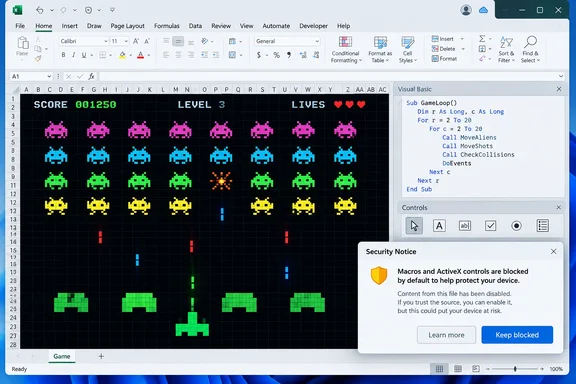
How-To Geek recently highlighted Evanml2030’s public GitHub project, Excel-SpaceInvader, which packages a Space Invaders-style game in a macro-enabled SpaceDefender.xlsm workbook. The project is not a newly released Microsoft feature, nor is it a revival of an official Excel Easter egg. Its GitHub repository describes it simply as a VBA implementation of a classic game, contains the downloadable workbook, and shows 295 commits—but no formal releases or compatibility matrix.
That distinction is worth making before anyone treats the workbook as a harmless novelty. A game that uses legacy Office automation features can be fun to inspect on a personal test machine. It is a poor reason to relax security controls on a work installation of Excel.
The official Easter eggs are gone for a reason
Excel’s old hidden games were genuine artifacts of a very different Microsoft development culture. Excel 95 included the Hall of Tortured Souls, Excel 97 concealed a flight simulator, and Excel 2000 included the driving game Dev Hunter. Former Microsoft executive Ed Fries has described the loose internal culture that made such projects possible, including a convention where the egg code could exist but would not have an obvious direct call in the source.
Microsoft’s broader stance changed in January 2002 with Bill Gates’ Trustworthy Computing memo. Microsoft’s own retrospective says the initiative emerged after the Code Red and Nimda worms, along with internal security reviews that exposed how much work was needed to make secure engineering systematic rather than optional. Security, privacy, reliability, and business practices became the stated pillars.
The resulting policy against undocumented code had a practical engineering rationale. A hidden game may look innocuous in a spreadsheet application, but undocumented executable behavior is difficult to review, test, support, and secure. The old Easter eggs were entertaining precisely because they bypassed normal product expectations. That is not a trait an enterprise software team can reasonably preserve once the product is deployed at global scale.
The VBA game is therefore best understood as a community recreation of the old spirit, not evidence that Excel’s old Easter-egg era has returned.
SpaceDefender is an Excel application, not an Excel feature
The workbook uses Excel as a host for a small application. According to How-To Geek’s inspection, its VBA code manages player movement, enemy movement, projectiles, collisions, timing, and image-based graphics. It uses Windows API calls including GetAsyncKeyState for keyboard input and QueryPerformanceCounter and QueryPerformanceFrequency for higher-resolution timing.
Those are plausible building blocks for an interactive VBA program. VBA’s standard event model is not designed for responsive arcade controls, so a developer needs a way to watch key states and run an update loop without making Excel appear frozen. The reported use of DoEvents fits that model: it lets Excel process pending Windows messages while the game loop continues.
The graphics implementation is the more consequential detail. The game reportedly creates Microsoft Forms Image controls dynamically and moves them around the workbook to represent the ship, invaders, and projectiles. That puts it squarely in the part of the Office platform Microsoft is trying to de-emphasize: older ActiveX-based controls capable of interacting with Windows in ways ordinary worksheet formulas and standard cell formatting cannot.
For a VBA hobby project, that is clever. For an administrator, it is a compatibility and policy dependency.
Modern Office will block the controls it needs
Microsoft now disables ActiveX controls by default in Microsoft 365 and Office 2024. In Excel, that means a workbook that depends on ActiveX may open but be unable to create or interact with the controls required for its interface. A reader who downloads SpaceDefender and finds that it does not work on a current Excel installation should therefore expect the ActiveX policy—not a broken formula—to be the likely reason.
Microsoft’s documentation is unusually direct about the risk. It warns users to avoid enabling ActiveX in unexpected attachments and calls out the familiar social-engineering pattern: a downloaded file prompts the recipient to adjust Office security settings to make its content work. That warning applies even when the immediate request comes from a well-meaning game project rather than a phishing campaign.
The operational problem is broader than one workbook. Microsoft says changing the ActiveX setting affects Word, Excel, PowerPoint, and Visio, not only the file being opened. How-To Geek correctly notes that users should revert the setting after playing, but the safer conclusion is stronger: do not change a global ActiveX policy on a managed PC for this game.
A personal, isolated test environment is one thing. A corporate endpoint, a shared family computer used for banking and tax documents, or an Excel installation governed by organizational policy is another.
“No suspicious code found” is not a trust decision
How-To Geek reports that it inspected the workbook’s VBA and did not find code to launch external programs, make network connections, alter the registry, remove files, or auto-run through Workbook_Open or Auto_Open. That is useful reporting on the particular copy it examined, but it should not be converted into a blanket assurance about every downloaded copy of the workbook.
An .xlsm file is a container. Someone can redistribute a modified version under the same familiar filename, and a macro workbook can change after an article is published. The GitHub repository being public makes review easier than it would be for an opaque file host, but it does not make a binary download self-authenticating, digitally signed, or administratively approved.
For anyone determined to inspect it, the practical rule is to obtain it from the project’s repository rather than a mirror, preserve a copy for review, and examine the VBA project before enabling content. Testing should happen in a disposable virtual machine or a non-sensitive Windows account with no valuable local documents, saved browser sessions, VPN access, or corporate credentials.
Do not respond to an Office prompt by broadly enabling macros, placing the workbook in a Trusted Location, or permanently restoring less restrictive ActiveX behavior. Those options trade away precisely the protections Microsoft has added after decades of macro and control-based attacks.
The project is better as source code than as a download
The lasting value of Excel-SpaceInvader is not that it offers a convenient way to play an arcade game in a spreadsheet. There are easier and safer ways to play Space Invaders. Its value is as a compact example of what VBA and Excel’s object model can still do when someone treats a workbook as a programmable canvas.
For developers learning legacy Office automation, it offers a useful set of design questions:
- How does a VBA application schedule repeated updates without locking Excel’s user interface?
- How are keyboard input, animation timing, collision detection, and state reset organized in a language built around business automation?
- Which parts of the design rely on Windows-specific APIs or ActiveX components that new Office security defaults will restrict?
- How could the interface be redesigned with less reliance on ActiveX, or moved into a platform better suited to interactive graphics?
Those questions are more productive than treating the workbook as a workaround for Microsoft’s decision to remove Easter eggs. Excel still has enormous scope for creative programming, visualization, and prototyping. But a project that requires users to override contemporary Office protections also demonstrates why Excel is a constrained platform for interactive software.
The game may keep a little of the old spreadsheet mischief alive, but the security model has changed. On a current Microsoft 365 or Office 2024 installation, the sensible outcome is to study the VBA in a controlled environment—or leave the alien invasion to a browser game rather than weakening Office-wide ActiveX settings.
References
- Excel Easter eggs ended 24 years ago—but this open-source Space Invaders project keeps the fun alive How-To Geek · 2026-09-18T18:00:13+00:00