

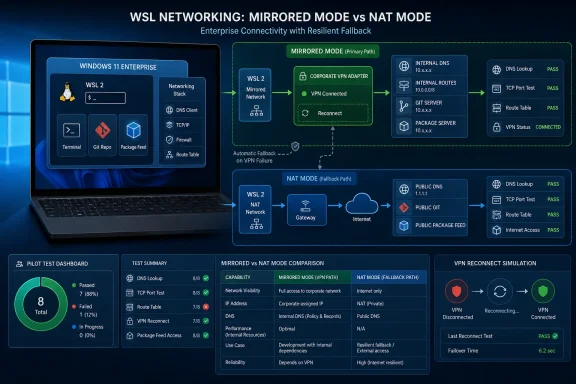
WindowsForum user reports show why that distinction matters. Readers describe WSL as a near-seamless way to run Linux development stacks on Windows until networking becomes the exception: the host remains connected, but WSL loses an internal name, route, repository, or usable performance. Other reports associate mirrored-mode failures with installations carrying KB5067036. Those reports are operational warning signals, not proof that the update, every VPN product, or mirrored networking as a whole will fail on every endpoint.
Use this matrix for the deployment decision:
| Condition observed | Recommended mode or action | Rollout decision | Evidence required |
|---|---|---|---|
| Internal DNS, required TCP ports, routes, reconnect behavior, and developer-tool performance pass in mirrored mode | Keep mirrored mode | Continue the tested deployment ring | Saved results from the representative tests below, including Windows/WSL versions and VPN profile |
| Windows reaches a corporate service, but WSL mirrored mode cannot resolve its name or open its required port; NAT succeeds | Use NAT for the affected endpoint or group | Continue only with the NAT workaround documented; do not standardize mirrored mode for that configuration | Same-device, same-VPN-session comparison showing mirrored failure and NAT success |
| Mirrored mode connects but causes repeatable, material workflow degradation; NAT restores acceptable performance | Use NAT while investigating performance | Hold mirrored-mode adoption for the affected group, but do not automatically pause Windows servicing | Timed before/after tests using the team’s real Git, package, remote-development, or local-service workflow |
| Failure begins after VPN disconnect/reconnect but clears after changing modes or restarting Windows | Prefer the stable mode and escalate recovery behavior | Hold mirrored-mode expansion for that VPN profile | Repeated reconnect test, timestamps, route/DNS captures, and recovery result |
| A candidate Windows update introduces a reproducible failure on the production image, and NAT is not an acceptable workaround | Keep the affected ring on the last validated update while investigating | Pause that update only for the affected deployment ring | Before/after update comparison on the same image, with update inventory and repeatable test results |
| A forum or tracker report resembles the local symptom, but local testing passes | Keep the validated mode | Continue the pilot or rollout with monitoring | Local pass results; the external report alone is not sufficient grounds for a pause |
| Both mirrored mode and NAT fail | Investigate the VPN, DNS policy, routes, endpoint controls, or service itself | Do not classify it as a mirrored-only regression | Windows-host tests, both WSL mode results, VPN logs, and confirmation that the destination is operational |
Apply the NAT fallback
If the Windows host can reach a corporate resource but WSL cannot, NAT is the first reversible comparison. It changes WSL’s networking path without requiring the developer to uninstall the VPN, change enterprise routing policy, or roll back Windows.
Open PowerShell and edit the WSL configuration file:
notepad $env:USERPROFILE\.wslconfig
Set the networking mode:
[wsl2]
networkingMode=nat
Save the file, close active WSL work, and run:
wsl --shutdown
Start the required distribution again:
wsl
Because this operation interrupts the active WSL environment, developers should save work and stop long-running jobs first. Do not assume that merely editing the file changes the networking behavior of an already running WSL instance.
To retest mirrored mode later, change the value to:
[wsl2]
networkingMode=mirrored
Then save the file, run wsl --shutdown, restart WSL, and repeat exactly the same tests. The important evidence is not that one mode “feels better.” It is a controlled before/after comparison using identical destinations, VPN state, endpoint image, and commands.
For a deeper explanation of the modes and why DNS behavior belongs in the test plan, see WindowsForum’s WSL Networking in Windows 11: Mirrored Mode and DNS Tunneling Guide. That guide reflects the attraction of WSL networking when it works: Linux tools, servers, compilers, and development stacks can feel integrated with Windows rather than isolated behind a second machine. The pilot below is designed to verify that experience under enterprise network controls.
Run an actionable mirrored-versus-NAT pilot
Choose at least one real internal Git or package host and one public control destination. Replace the examples below with approved names and ports from your environment:
- Internal Git host:
git.corp.example - Internal package host:
packages.corp.example - Git service port:
443or22 - Package service port:
443 - Public control:
[www.microsoft.com](http://www.microsoft.com)
Record the start time, Windows update state, WSL version output, distribution, VPN client and profile, and current networking mode before testing.
1. Capture the endpoint state in Windows
From PowerShell:
Get-Date
Get-ComputerInfo | Select-Object WindowsProductName, WindowsVersion, OsBuildNumber
Get-HotFix | Sort-Object InstalledOn -Descending | Select-Object -First 15 HotFixID, InstalledOn
wsl --version
wsl --status
wsl --list --verbose
Get-NetIPConfiguration
Get-DnsClientServerAddress
Get-NetRoute -AddressFamily IPv4 | Sort-Object RouteMetric |
    Select-Object DestinationPrefix, NextHop, InterfaceAlias, RouteMetric
If wsl --version is not available on the installed WSL release, note that fact rather than treating it as a networking failure. Preserve the other command output and the WSL package information available through the organization’s software inventory.
2. Establish the Windows-host baseline
Resolve the actual internal name from Windows:
Resolve-DnsName git.corp.example
Resolve-DnsName packages.corp.example
Test the required ports:
Test-NetConnection git.corp.example -Port 443 -InformationLevel Detailed
Test-NetConnection packages.corp.example -Port 443 -InformationLevel Detailed
If developers use SSH:
Test-NetConnection git.corp.example -Port 22 -InformationLevel Detailed
Capture the selected Windows route to the resolved internal IP:
Find-NetRoute -RemoteIPAddress 10.20.30.40
Replace 10.20.30.40 with an address returned by Resolve-DnsName. If the host cannot resolve the name or reach the required port, stop labeling the incident as WSL-specific. Confirm the VPN session, destination availability, access policy, and Windows routing first.
3. Test name resolution inside WSL
From the WSL shell:
date -Is
uname -a
cat /etc/os-release
getent hosts git.corp.example
getent hosts packages.corp.example
getent hosts [www.microsoft.com](http://www.microsoft.com)
cat /etc/resolv.conf
Where available, also collect:
resolvectl status
Do not rely only on ping. Many enterprise services and firewalls block ICMP even when HTTPS or SSH works correctly. A successful DNS lookup also does not prove that the required application port is reachable.
Record whether the internal name:
- Returns the expected private address;
- Returns an unexpected public or stale address;
- Times out;
- Produces no result while the public control still resolves; or
- Fails along with public names.
Those outcomes point to different problems. An internal-only lookup failure suggests split-DNS or corporate resolver behavior. Failure of both internal and public lookups suggests a broader resolver or WSL networking problem.
4. Test the exact TCP ports inside WSL
If nc is installed:
nc -vz -w 5 git.corp.example 443
nc -vz -w 5 packages.corp.example 443
nc -vz -w 5 git.corp.example 22
Run only the ports the service is expected to expose. A refused connection is different from a timeout or “No route to host,” and the incident record should preserve the exact message.
If nc is unavailable, Bash can perform a basic connection test:
timeout 5 bash -c '</dev/tcp/git.corp.example/443' \
  && echo "TCP 443 connected" \
  || echo "TCP 443 failed"

timeout 5 bash -c '</dev/tcp/packages.corp.example/443' \
  && echo "Package TCP 443 connected" \
  || echo "Package TCP 443 failed"
For an HTTPS endpoint, collect an application-level result as well:
curl -vkI --connect-timeout 10 [url]https://git.corp.example/[/url]
curl -vkI --connect-timeout 10 [url]https://packages.corp.example/[/url]
A certificate warning in this diagnostic command is not equivalent to a routing failure. Preserve the output so the network team can distinguish DNS, TCP, TLS, proxy, and authentication problems.
5. Check the WSL routes
Resolve an internal address, then inspect the selected route:
getent ahostsv4 git.corp.example
ip -4 address
ip -4 route
ip route get 10.20.30.40
Replace 10.20.30.40 with the internal address under test. Save the interface, source address, next hop, and any error. Also test a public address as a control:
ip route get 1.1.1.1
The goal is not to demand identical route tables from Windows and Linux. The goal is to determine whether WSL selects a usable path to the corporate destination and whether that selection changes between mirrored mode and NAT.
6. Test the real developer workflow
A port check is necessary but insufficient. Run a small, repeatable operation representative of the team’s work. Examples include:
time git ls-remote [url]https://git.corp.example/team/repository.git[/url] HEAD
or, for an SSH-based Git service:
time ssh -o BatchMode=yes -o ConnectTimeout=10 -T [email][email protected][/email]
For a package feed, use the team’s normal read-only metadata or index operation. Avoid publishing, modifying, or deleting packages during a network pilot. Record the command, elapsed time, whether authentication completed, and whether retries or hangs occurred.
WSL tracker issue #40176 is relevant here as a mirrored-mode performance example. It describes severe Windows-to-WSL performance degradation rather than a VPN failure. It should therefore inform performance testing, not be cited as proof that a VPN route is broken. A configuration may technically connect while making VS Code Remote, Git operations, or another workflow too slow for production use.
7. Exercise VPN disconnect and reconnect
Complete the DNS, TCP, route, and workflow tests in this order:
- Before connecting the VPN;
- Immediately after connecting;
- After at least one normal work interval;
- Immediately after disconnecting;
- After reconnecting without restarting WSL;
- After the approved WSL restart procedure, if needed;
- After a Windows restart only if the failure persists.
Use the same hostnames, ports, and commands each time. Record whether recovery is automatic or requires intervention.
WSL issue #13454 should be treated narrowly. The report documents a failure to configure mirrored networking, fallback to no networking, and intermittent recovery after a Windows restart. It does not establish a VPN-specific defect. Its value for this pilot is the recovery pattern: administrators should test whether wsl --shutdown is sufficient and whether a full Windows restart changes the result.
8. Switch to NAT and repeat without changing other variables
After saving the mirrored-mode output, change .wslconfig to NAT, restart WSL as described above, and repeat:
getent hosts git.corp.example
getent hosts packages.corp.example
nc -vz -w 5 git.corp.example 443
nc -vz -w 5 packages.corp.example 443
ip -4 route
ip route get 10.20.30.40
time git ls-remote [url]https://git.corp.example/team/repository.git[/url] HEAD
If nc is unavailable, use the /dev/tcp alternatives. Keep the VPN connected to the same profile and avoid installing updates, changing DNS settings, or switching networks between the mirrored and NAT runs.
Record the comparison in a compact table:
| Test | Mirrored result | NAT result | Windows-host result |
|---|---|---|---|
| Internal Git DNS | |||
| Package host DNS | |||
| Git TCP port | |||
| Package TCP port | |||
| Route to internal IP | |||
| Git/package workflow time | |||
| VPN reconnect recovery | N/A |
A mirrored failure followed by a NAT success on the same endpoint and VPN session is strong local evidence for choosing NAT. It does not, by itself, identify the responsible Windows, WSL, VPN, or endpoint-security component.
Why NAT is the right first comparison
On a managed laptop, the network stack includes more than Windows and WSL. It may include a VPN virtual adapter, route and name-resolution policies, endpoint security filters, proxies, internal certificate controls, and access rules that vary by user or group.
WindowsForum readers reporting “No route to host” and similar symptoms illustrate the operational problem: ordinary Windows connectivity can remain normal while a Linux development workflow stops working. WindowsForum’s coverage associated with KB5067036 likewise describes cases in which mirrored networking over a VPN stopped carrying the expected corporate traffic. Those reports justify testing the installed update level, but they do not establish that KB5067036 causes every current failure or that any named third-party VPN client is universally affected.
NAT provides a useful control because it changes the WSL networking path without first changing enterprise VPN policy. If both modes fail, the investigation should widen. If mirrored mode fails and NAT works, IT has a reversible mitigation and a much narrower escalation package.
When should IT switch a group to NAT?
Switch an affected group when testing demonstrates one of these patterns:
- Windows reaches the service, mirrored WSL does not, and NAT does.
- Internal DNS repeatedly fails only in mirrored mode.
- Mirrored mode loses corporate routes after VPN reconnect while NAT recovers consistently.
- Mirrored mode produces repeatable, operationally significant performance degradation that NAT avoids.
- The team needs immediate continuity while Microsoft, the VPN vendor, or internal networking staff investigates.
Apply the decision to the smallest configuration group supported by the evidence. Different teams can have different VPN profiles, DNS suffixes, route policies, endpoint controls, and development dependencies even when they use the same laptop model.
When should an organization pause a Windows rollout?
Pause a rollout only when the candidate update reproduces the failure on the organization’s own image and the impact cannot be acceptably contained. The preferred sequence is:
- Reproduce the workflow on the current production image.
- Install the candidate update in a controlled ring.
- Repeat the identical mirrored-mode tests.
- Test NAT as a workaround.
- Remove or roll back the candidate update only under the organization’s servicing procedure.
- Repeat the tests again.
- Decide whether to pause the affected ring.
WindowsForum reports connected mirrored-networking and VPN symptoms with KB5067036. Treat those reports as reasons to include that update in incident inventory and regression testing, not as a substitute for local before/after evidence. A host carrying the same update may fail for another reason, and a host without it may show a similar symptom.
The WSL issue tracker is an early-warning signal for error messages, recovery patterns, and configurations worth reproducing. It is not proof that a different Windows build, VPN profile, or endpoint image is affected, and it should not outrank controlled local results.
Use a consistent incident record
Attach this concise record to every escalation:
Incident ID and timestamp:
User/team and endpoint model:

Windows edition/version/build:
Installed Windows update(s):
WSL version/status:
Linux distribution and version:
Configured networking mode:

VPN client:
VPN client version:
VPN profile or gateway:
Connection type: office/home/mobile/other

DNS symptom:
- Internal name tested:
- Windows result:
- WSL mirrored result:
- WSL NAT result:

Route symptom:
- Internal IP tested:
- Windows selected route:
- WSL mirrored route/result:
- WSL NAT route/result:

Performance symptom:
- Exact command/workflow:
- Mirrored elapsed time/result:
- NAT elapsed time/result:

NAT result:
- Fully resolves / partially improves / no change:

Reconnect and recovery:
- VPN disconnect/reconnect result:
- WSL restart result:
- Windows reboot result:

Logs and command output attached:
Business impact:
Temporary mitigation:
This record prevents an ambiguous “WSL VPN is broken” report from obscuring whether the actual failure is DNS, route selection, TCP reachability, TLS, authentication, startup, or performance.
Frequently Asked Questions
Should every enterprise developer use NAT with a VPN?
No. NAT is the safer fallback for endpoints that fail mirrored-mode validation, not a universal mandate. Keep mirrored mode where the organization has demonstrated stable internal DNS, required routes and ports, reconnect behavior, and acceptable developer-tool performance.
Does editing .wslconfig immediately change a running WSL session?
Do not assume it does. Save active work, use wsl --shutdown, restart the required distribution, and verify the active behavior by repeating the same DNS, route, and TCP tests. Treat the command as disruptive to active WSL work and plan accordingly.
Is an open WSL GitHub issue proof that our VPN is affected?
No. Issue #13454 is a mirrored-mode configuration and recovery report, not VPN-specific evidence. Issue #40176 is a mirrored-mode performance example, not evidence of VPN failure. Both can improve a test plan, but neither proves that another endpoint configuration is affected.
Does a successful public website test prove mirrored mode is enterprise-ready?
No. A public site does not test split DNS, private routes, internal certificate requirements, repository authentication, package feeds, SSH jump hosts, or VPN reconnect behavior. Use real approved corporate destinations and the exact ports developers require.
Is “No route to host” always a routing-table problem?
No. Preserve the exact command and output. Similar user-visible failures can arise from route selection, interface state, filtering, name resolution that returned the wrong address, or another network control. Compare Windows, mirrored WSL, and NAT WSL before assigning a cause.
Should IT roll back Windows as soon as a forum report resembles the problem?
No. First reproduce the failure on the affected endpoint, compare NAT and mirrored mode, capture the installed update state, and test the candidate update in a controlled ring. Rollback or rollout pauses should follow organizational servicing policy and be supported by same-image before/after evidence.
What should IT watch next?
Watch WSL issue reports, Windows servicing information, VPN-vendor compatibility guidance, and internal help-desk patterns. The meaningful milestone is not merely a generic fix announcement. It is a successful retest of mirrored mode against the internal names, routes, ports, reconnect sequence, and developer workflows the organization actually uses.