

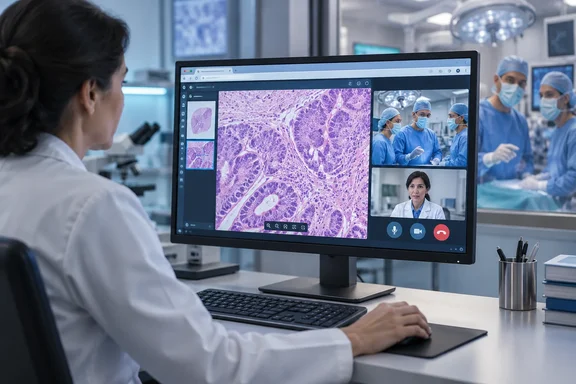
Techcyte Puts a Teams Call Button Inside the Fusion AP Slide Viewer
In its announcement, distributed through EIN Presswire, Techcyte says the feature starts a call directly from within a Fusion AP slide viewer, so everyone in a live, in-app collaboration session can communicate via voice and/or video. For consultations and teaching, the company says the Teams integration allows one-on-one or group meetings to start within the slide viewer.
Fusion AP's existing design explains why the viewer is where the call starts. Techcyte describes Fusion as a platform that unifies images, workflows, reporting, and AI into a single browser-based solution built for pathologists. Its product page already lists collaboration features. The worklist integrates seamlessly with EHR, LIS, grossing, and radiology systems, and includes a built-in messaging and notification system, and Techcyte says the viewer lets pathologists collaborate in real time on up to six co-registered images. Before this release, then, Fusion AP had messaging and shared viewing but no live voice or video channel of its own. The Teams integration adds that channel by connecting to a meeting platform that many hospitals already license.
On availability, Techcyte's wording is short: Microsoft Teams integration is available now to Fusion AP customers using the enterprise version of Microsoft Teams. The company doesn't say which Microsoft 365 or Teams licence counts as "enterprise," which Fusion AP release adds the feature, or whether administrators have to turn it on. A lab that runs Teams under a mix of licences should get those answers from Techcyte before promising the feature to clinicians.
Frozen Sections Are Techcyte's Main Use Case for Teams
Techcyte's pitch centres on the frozen section. In this procedure, tissue taken during surgery is examined quickly so the surgeon can make decisions while the patient is still on the table. Techcyte says that in these workflows pathologists, operating room staff, and surgeons can initiate calls directly from inside the case in place of OR intercoms or phones.
Joe Marbach, a Techcyte product manager, describes the goal in the release: "The Microsoft Teams integration facilitates quick communication to get a faster answer for the surgeon and their patient." He also says voice access to the pathologist from the OR adds "transparency and explainability" to each result. These are the benefits Techcyte expects. The announcement includes no timing comparisons, deployment figures or customer results showing that a Teams call shortens a frozen-section turnaround compared with an intercom.
Techcyte also says it is the first image management system to provide this functionality to pathology labs. That is the company's own claim, and the release offers nothing to back it up. No other outlet has reported on the integration, so the announcement is currently the only public record of the feature.
The regulatory status affects how US readers should read the frozen-section scenario. Techcyte's product page says Fusion aims to reduce inefficiencies, enhance diagnostic accuracy, and improve turnaround time, but the same page states that Fusion AP is for research use only and not for diagnostic use in the US. Nothing in the Teams announcement changes that. In the US, adding a Teams button does not make Fusion AP a cleared diagnostic tool.
The Missing Details in Techcyte's Teams Integration
The release documents one capability: a Teams meeting can be started from Fusion AP. It does not explain how the integration is built. It doesn't say whether Teams opens inside the Fusion window or in the separate Teams client, how participants are invited or identified, whether slides or annotations appear in the meeting automatically, or whether the call is linked to the case record.
For IT staff, the identity question matters most. According to its product page, Fusion AP handles single sign-on and role-based access through Auth0. Teams meetings run on the organization's Microsoft 365 tenant, and user identities there are managed through Microsoft Entra. The release doesn't say how a Fusion AP user's identity maps to a Teams account. It is fair to infer that someone will need a working Teams identity, or a permitted guest route into the meeting, for the call to connect. The exact requirements are something to confirm with Techcyte.
Techcyte also describes its next steps: Techcyte will further invest by integrating other Microsoft tools, such as Chat, into the Fusion platform. Additional support for other enterprise productivity suites is planned. The company gives no dates for either. Labs that don't use Microsoft 365 get nothing from this release yet.
Teams Guest and External Access Policies Control Who Can Join
Even without implementation details, one thing is clear from Microsoft's own documentation: a Fusion AP call is still a Teams meeting, so Teams meeting policies apply to it. Microsoft's admin guidance for planning Teams meetings says meeting policies define who can join, what the join experience looks like, which features organizers can set, and the recording and transcription rules. Administrators manage these policies in the Teams admin center, and some settings are available through PowerShell.
That affects the operating-room scenario directly. Surgeons, OR nurses and the pathology lab don't always sit in the same Microsoft 365 tenant, particularly when a reference lab serves a separate hospital or a consulting pathologist works for another institution. Microsoft's documentation lists three ways people outside an organization can join its meetings, and each is configured separately:
- Guests can join when guest access is turned on in Teams, and some meeting features can be restricted separately for guests.
- People from other trusted Microsoft 365 organizations can join without signing in to the host tenant, but only if both organizations trust each other and the users are enabled for external access.
- Participants who can't be validated join as anonymous participants, which organizations may allow or block depending on their compliance rules.
Lobby settings also apply. Through meeting policies, administrators decide who can bypass the lobby and whether dial-in callers can bypass it, and organizers can change some of these settings for individual meetings. In a frozen-section call, a surgeon left waiting in a lobby because nobody on the pathology side admitted them would undo the speed Techcyte is promising. That outcome would come from Teams policy, not from a fault in Fusion AP. Test it in advance rather than finding out during a live case.
Teams Recording Policies Carry More Weight When the Call Is About a Patient Case
Marbach's reference to "trackable" pathology results raises the question of record-keeping, and the release doesn't answer it. It doesn't say whether Fusion AP calls are recorded, transcribed or logged against a case. Whatever Teams does with these calls, it does according to the tenant's recording and transcription policies.
Microsoft's documentation for sensitive meetings sets out the controls. To record a meeting, admin policy must allow recording for both the person starting it and the meeting organizer. Recordings of private meetings are saved to the organizer's OneDrive, and channel meeting recordings go to the channel's SharePoint site. By default, recordings and transcripts expire after 120 days. Microsoft states that expiration saves storage space but does not enforce compliance requirements, and it points organizations with retention obligations to SharePoint libraries governed by Microsoft Purview retention policies.
Other controls are available. A Teams meeting policy can require participants to agree to being recorded before they can unmute or turn on their camera, and consent results are stored in the attendance report. Teams Premium adds sensitivity labels, watermarks, end-to-end encryption and limits on who can record and transcribe, which can be enforced through meeting templates or labels.
For a lab, the practical point is that a quick call started from a slide viewer is recorded, transcribed and retained under the same rules as any other Teams meeting in the tenant. If those rules were written for general office meetings, they may not suit conversations about individual patient cases. The pathology department and the Microsoft 365 administrators should agree on the policy before clinicians start using the button.
What This Means for Lab IT and Teams Admins
The decision here belongs to organizations that already run Fusion AP and are licensed for enterprise Teams. For them, the integration is available now, and the work is mostly Teams configuration and testing, not a new deployment. Labs outside that group, including those on other productivity suites, have nothing to act on yet. US labs should keep the research-use-only status in mind when deciding which workflows the feature supports.
Before rolling it out, map who needs to join each type of call: pathologists, surgeons, OR staff, trainees and outside consultants. Then check whether the tenant's guest access, external access and lobby settings let each of them in without delay. Run the whole sequence on the devices and networks the OR and reading rooms actually use, and keep the existing intercom or phone route as a documented fallback until the Teams route has proven reliable. That fallback advice is general good practice; Techcyte hasn't published it as a requirement.
- Techcyte says Fusion AP customers using the enterprise version of Microsoft Teams can start voice or video Teams meetings from the Fusion AP slide viewer as of September 25, 2026.
- The company hasn't specified the Teams licence, the Fusion AP version or the setup steps, so confirm eligibility with Techcyte before you plan a rollout.
- Teams meeting policies, guest access, external access and lobby settings decide who can join a call launched from Fusion AP, and each of those external access routes is configured separately.
- Recording and transcription follow the tenant's Teams policies. By default, recordings go to OneDrive or SharePoint and expire after 120 days, and that expiration doesn't meet retention obligations, which need Purview.
- Techcyte's speed benefits and its claim to be the first image management system with this feature come from the company alone, with no published measurements or outside corroboration.
- Techcyte states that Fusion AP is for Research Use Only and not for diagnostic use in the United States, and the Teams integration doesn't change that.
Techcyte is bringing Teams meetings into the slide viewer instead of building its own calling system, and that choice means the integration will only work as well as the lab's Teams configuration. Hospitals with tidy guest, lobby and recording policies can probably enable it quickly. Those without them will need to sort out tenant settings first. Techcyte says Chat integration and support for other productivity suites are next. Until those arrive, the lab's Teams admin center has as much say over how these calls work as Fusion AP does.
References
- Techcyte Launches Microsoft Teams Meetings from Fusion AP - EIN Presswire EIN Presswire · 2026-09-25T17:08:03+00:00
- Manage Microsoft Teams meeting recording and transcription options for sensitive meetings - Microsoft Teams | Microsoft Learn learn.microsoft.com
- Plan for Teams meetings - Microsoft Teams | Microsoft Learn learn.microsoft.com