

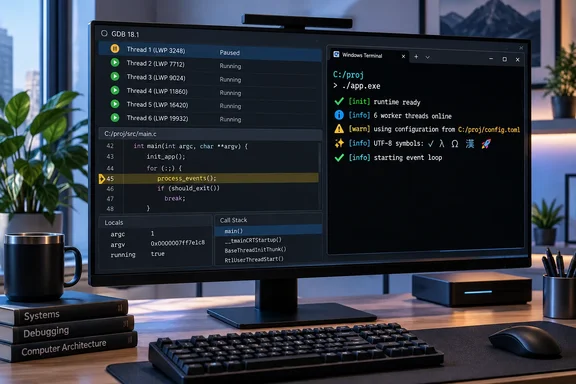
GDB 18.1 Brings Linux-Style Thread Control to the Windows Native Target
According to Phoronix, GDB 18.1 is the newest version of the debugger used for C/C++, Fortran, Rust, Go, Ada and other languages. The outlet described Windows as getting "a lot of love" in this release. GDB's own changelog, the NEWS file in the binutils-gdb repository, supports that description. Six of the entries under "Changes in GDB 18" are about Windows specifically.
Those entries fall into two groups:
- Execution control: non-stop mode, scheduler locking and native TLS variables. All three are listed for the Windows native target, meaning GDB running on Windows and debugging a Windows process on the same machine.
- Presentation: 24-bit color and UTF-8 in Windows Terminal, plus consistent forward-slash paths.
The native-target wording sets the scope. The Windows entries in NEWS describe GDB debugging a local Windows process. They say nothing about remote setups where GDB connects to a stub on another machine.
The feature work was large. A 47-part patch series titled "Windows non-stop mode" was posted to the gdb-patches mailing list in its second revision in May 2025. [PATCH v2 00/47] Windows non-stop mode @ 2025-05-19 It took well over a year to go from that posting to a tagged release.
Phoronix's other headline items also appear in NEWS. The file lists a new AArch64 MinGW target (aarch64-*-mingw*), support for the AArch64 Floating Point Mode Register (FPMR), and new commands including save history, set/show/unset local-environment and info proc environ. One caveat: NEWS marks info proc environ as supported on Linux, so it isn't a Windows feature. Phoronix is the only outlet so far to report the 18.1 release date itself; the GNU announcement on the mailing list was not available to check.
Non-Stop Mode on Windows 10 Changes What "Stopped" Means
By default GDB runs in all-stop mode. By default, when a thread stops to report a debugging event, GDB stops all other threads as well. This is called all-stop mode. On a program with many threads, one breakpoint freezes the whole process. That's fine for a simple crash. It's a problem when the bug only shows up while other threads keep working.
Non-stop mode changes this. GDB's manual says when a thread stops to report a debugging event, only that thread is stopped; GDB does not stop other threads as well. The manual also says this minimizes intrusion when debugging live systems, such as programs where some threads have real-time constraints or must continue to respond to external events. On Windows, that covers things like a service that has to keep answering requests, a UI thread that shouldn't hang, or a network worker whose peers time out if it stalls.
GDB 18.1 ties the feature to an OS version: the NEWS entry says non-stop mode on the Windows native target "requires Windows 10 or later." If you still debug on older Windows builds, you don't get this.
Non-stop mode also changes how some familiar commands behave, which catches out people coming from all-stop:
- In non-stop mode, all execution commands apply only to the current thread by default. That is, continue only continues one thread. To continue all threads, issue continue -a or c -a.
- Interrupting works the same way. In all-stop mode, this stops the whole process; but in non-stop mode the interrupt applies only to the current thread. To stop the whole program, use interrupt -a.
- GDB leaves the current thread where it is when another thread stops, because it would be confusing if gdb unexpectedly changed to a different thread just as you entered a command to operate on the previously current thread.
You also have to choose the mode at the right moment. The set non-stop preference is only consulted when GDB starts or connects to the target program, and it is not possible to switch modes once debugging has started. Put set non-stop on in your .gdbinit or type it before run or attach. Also, since not all targets support non-stop mode, even when you have enabled non-stop mode, GDB may still fall back to all-stop operation by default. Running show non-stop only tells you what you asked for. To confirm the mode is really active, check whether other threads keep running after one hits a breakpoint.
IDE front ends have wanted this for years. A 2018 feature request in Microsoft's vscode-cpptools repository asked for non-stop support and called it a must have feature if you are working on complex multi-threaded applications. Whether a particular front end uses non-stop mode on Windows is up to that front end. GDB 18.1 only provides the backend support.
Scheduler Locking and Native TLS Complete GDB 18.1's Multithreading Update
Scheduler locking controls which threads are allowed to run when GDB resumes a process. With set scheduler-locking on, only the current thread runs. NEWS says this command now works on the Windows native target and "previously it gave an error." It solves a different problem from non-stop mode. Non-stop lets other threads keep running while you look at one. Scheduler locking holds the other threads still while you step one. In the second case you can step through a function without another thread changing shared state underneath you.
NEWS doesn't give a Windows version requirement for scheduler locking. The Windows 10 requirement is stated only for non-stop mode. Don't assume it applies to both, and don't assume scheduler locking works on every older Windows release either.
The third change is native Thread Local Storage (TLS) variables on Windows, according to NEWS. TLS gives each thread its own copy of a variable, for example a per-thread error code, allocator cache or request context. If a debugger can't resolve TLS, it can't show you those values from inside the debug session, and they are often the ones that explain why one thread misbehaves and the others don't. The NEWS entry gives no toolchain or version details. Treat it as new capability and test it with your own compiler before building a workflow around it.
Windows Terminal Gets True Color and UTF-8 in GDB 18.1
The console changes come with specific conditions. NEWS says that when GDB runs in Windows Terminal, it now supports true-color 24-bit colors. A separate entry says that when Windows Terminal's output codepage is 65001 (the UTF-8 codepage), GDB supports emoji styling and UTF-8 text in general, and automatically sets its host charset to UTF-8.
The codepage condition belongs to the UTF-8 and emoji entry only. NEWS doesn't attach it to the true-color change. If you want UTF-8 output:
- Open a Windows Terminal session.
- Run
chcp 65001to switch the console output codepage to UTF-8, as the NEWS entry suggests. - Start GDB 18.1 in that session. GDB should detect the codepage and set its host charset to UTF-8 by itself.
This builds on styling work from the previous release. GDB 17 added set style emoji on|off|auto, and its default of auto shows emoji "in some situations when the host charset is UTF-8," according to NEWS. That makes the automatic charset switch in 18.1 the missing piece: once the codepage is 65001, the existing emoji default can take effect without extra settings. GDB 17 also added #RRGGBB TrueColor support to set style commands and a $_colorsupport convenience variable that reports what the terminal can do. With 18.1, Windows Terminal can now report rgb_24bit and use those color settings in full.
For people outside Windows these are small changes. For Windows developers, they mean UTF-8 identifiers, source lines and string contents can display correctly in GDB.
Forward Slashes Everywhere: GDB 18.1 Normalizes Paths in CLI, TUI, MI and DAP
The path change affects anything that parses GDB output. NEWS says that, depending on the compiler and build system, GDB could previously show paths with mixed separators, such as C:/proj/src\main.c. GDB 18.1 now always shows C:/proj/src/main.c.
The scope is broad. NEWS says the change applies to all of GDB's interfaces: the command-line interface (CLI), the text user interface (TUI), the machine interface (GDB/MI) that IDEs use, and the Debug Adapter Protocol (DAP) used by editors such as VS Code. It covers everywhere GDB shows a file or directory name, including source files, the executable, shared libraries, and the cd and pwd commands.
It's a display change. Files on disk and the paths in your build are left alone. For people typing commands, consistent slashes are easier to read. For tools, the effect is larger. A front end that matches GDB's reported source paths against its open editor tabs, or a script that scrapes MI output, might have handled mixed separators with its own workarounds, or might have depended on backslashes. My own inference, not something NEWS says: any tool that compares GDB's paths to native Windows paths character by character should be retested against 18.1.
What GDB 18.1 Leaves for Later: MSVC ABI and PDB Support
GDB 18.1 does not add support for code built with Visual Studio. The development branch shows where things are going and where they currently stand. Under "Changes since GDB 18," the master NEWS file says GDB now tells apart the GNU (MinGW) and MSVC Windows ABIs. set osabi gains the values Windows-GNU and Windows-MSVC, and new targets such as x86_64-*-windows-msvc have been added.
The same entry is clear about the limits. GDB so far only knows that long double differs between the two ABIs. It does not yet support the MSVC C++ ABI (name demangling or object layout) or PDB debug information. That work is post-18 and not part of 18.1. Even when it ships, binaries that carry only PDB symbols will still be outside what GDB can read.
In practice, the 18.1 Windows features are most useful for binaries from MinGW-based GCC or Clang toolchains that produce debug information GDB can read. Phoronix's report of a new AArch64 MinGW target fits with that. It means GDB can now be built for MinGW on Windows on Arm, not only on x86.
What this means for you
Upgrade to GDB 18.1 if you debug multithreaded native Windows programs with GDB. If you use GDB on Windows mainly for single-threaded crash analysis, you can wait.
If you maintain a front end, extension or script that reads GDB output on Windows, test before upgrading, because path normalization reaches the MI and DAP interfaces. If your builds use MSVC and PDB symbols, 18.1 doesn't help you yet. Keep using Microsoft's own debuggers for those binaries.
- Non-stop mode on the GDB 18.1 Windows native target requires Windows 10 or later, and you must set
set non-stop onbefore starting or attaching to the process. - In non-stop mode,
continueandinterruptact on the current thread only, so usecontinue -aandinterrupt -awhen you mean the whole process. set scheduler-locking onnow works on the Windows native target instead of returning an error, which lets you step one thread while the others stay frozen.- For emoji and UTF-8 output in Windows Terminal, run
chcp 65001before starting GDB so it switches its host charset to UTF-8 automatically. - GDB now shows every Windows path with forward slashes in the CLI, TUI, GDB/MI and DAP, so retest any tooling that parses those paths.
- GDB 18.1 still can't read PDB debug information or the MSVC C++ ABI; that work is only in the post-18 development branch.
GDB 18.1 makes GDB on Windows handle threads much more like GDB on Linux: it can stop one thread while others run, freeze all but one, and read per-thread data. The development branch's split between MinGW and MSVC ABIs is the next step. Until GDB can read PDB files, these improvements mainly benefit developers who build Windows software with GNU-compatible toolchains.