

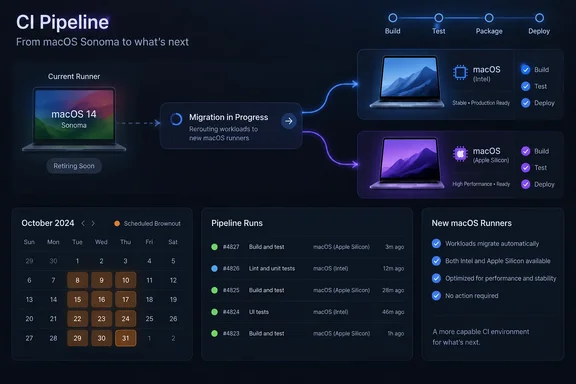
runs-on: macos-14, you have about a month to change that. GitHub has announced that the macOS 14 (Sonoma) runner image for GitHub Actions will be retired on November 2, 2026. Before then, GitHub will deliberately fail macOS 14 jobs during eight scheduled "brownout" windows in October. The first one starts on Monday, October 5.This is not a security incident and it doesn't change macOS itself. It's a standard image lifecycle step. Still, iOS, macOS and cross-platform teams that ship signed builds through GitHub-hosted runners could see a release pipeline fail at a bad moment if they ignore it.
What GitHub announced
GitHub's changelog entry from October 1 says the macOS 14 runner image goes away on November 2, 2026. Until then, jobs that target it will fail on purpose during the scheduled brownouts. The point is to get people's attention before the image disappears for good. The deprecation covers three labels:
macos-14macos-14-largemacos-14-xlarge
GitHub also warns that it may reduce macOS 14 runner capacity before the retirement date. Jobs that keep using these labels could wait longer in the queue even outside the brownout windows.
The changelog post is the final reminder, not the first notice. The runner-images project's tracking announcement, issue #13518, says deprecation began on July 6th, 2026 and the images will be fully unsupported by November 2nd, 2026 for GitHub Actions and Azure DevOps. Azure Pipelines users on Microsoft-hosted macOS 14 agents are affected too. The same issue states plainly that workflows using the macos-14, macos-14-large, macos-14-xlarge image labels will be terminated with an error.
Summary: macOS 14 runners are retired on November 2. Jobs fail during the October brownouts, and queue times may get longer in the meantime.
The brownout calendar
Every window runs from 14:00 UTC until midnight UTC, so each one lasts ten hours:
| Brownout start (UTC) | Brownout end (UTC) | Day of week (start) |
|---|---|---|
| Oct 5, 14:00 | Oct 6, 00:00 | Monday |
| Oct 12, 14:00 | Oct 13, 00:00 | Monday |
| Oct 16, 14:00 | Oct 17, 00:00 | Friday |
| Oct 19, 14:00 | Oct 20, 00:00 | Monday |
| Oct 23, 14:00 | Oct 24, 00:00 | Friday |
| Oct 26, 14:00 | Oct 27, 00:00 | Monday |
| Oct 29, 14:00 | Oct 30, 00:00 | Thursday |
| Oct 30, 14:00 | Oct 31, 00:00 | Friday |
For North American teams, 14:00 UTC is 10:00 a.m. Eastern and 7:00 a.m. Pacific while daylight saving time is in effect. That means most of the US working day falls inside each window. The windows get closer together toward the end of the month, ending with back-to-back days on October 29 and 30. That last stretch hits Thursday and Friday release trains particularly hard.
One small correction to some third-party summaries: endoflife.date describes brownouts in general as temporary 24-hour unavailability periods, but this schedule uses ten-hour windows. Plan around GitHub's actual times.
Summary: There are eight ten-hour windows between October 5 and October 31, mostly during US business hours.
Which replacement label? Check the architecture first
GitHub's changelog recommends moving to these arm64 labels:
macos-latest(currentlymacos-26)macos-15macos-latest-xlarge(currentlymacos-26-xlarge)macos-15-xlarge
That list works for two of the three retiring labels, but not the third. According to the runner-images repository's image table, macos-14-large is the x64 (Intel) image, while macOS 14 Arm64 uses macos-14 or macos-14-xlarge. If you move an Intel workload to one of the arm64 labels above, you've changed the CPU architecture, not just the OS version.
The tracking issue gives architecture-matched replacements for each label:
| Retiring label | Architecture | Recommended replacements (per runner-images #13518) |
|---|---|---|
macos-14 | arm64 | macos-latest, macos-15, macos-26 |
macos-14-large | Intel (x64) | macos-latest-large, macos-15-large |
macos-14-xlarge | arm64 (M2) | macos-latest-xlarge, macos-15-xlarge, macos-26-xlarge |
GitHub's larger-runners reference lists the Large size as Intel with 12 CPUs, 30 GB RAM and 14 GB SSD. XLarge is arm64 (M2) with 5 CPUs plus 8 cores of GPU hardware acceleration, 14 GB RAM and 14 GB SSD. The same page also notes some differences that matter when you switch:
- Community actions on arm64: GitHub says all of its own actions work on arm64 hosted runners, but community actions may not, and may need to be installed manually at runtime.
- No nested virtualization on macOS larger runners, because of a limitation in Apple's Virtualization Framework.
- Device UDIDs: arm64 macOS runners have no static UUID/UDID because Apple doesn't support it. Intel macOS runners get a static UDID. If your provisioning setup depends on that UDID, stay on Intel.
There's also a longer-term point about Intel. In the earlier macOS 13 retirement notice, GitHub described macos-15-intel as currently planned as the last supported image based on Intel CPU. That was a year ago and plans can change. Even so, teams moving off macos-14-large should treat the Intel replacement as temporary and start planning an arm64 migration.
Summary: Pick a replacement with the same architecture. The changelog's arm64 list doesn't cover macos-14-large.
macos-latest vs. pinning: what other teams chose
macos-latest is a moving alias. The runner-images README says the -latest label is used for the latest OS image version that is GA, and GitHub announces each change in advance. It currently points to macOS 26. That's convenient, but your OS version can then change without any commit in your repo.
Some open-source projects that are already migrating chose to pin a version. A pull request in the KybernesisAI kyber-studio repo moved its release job from macos-14 to macos-15 with a one-line change. The author explained that the job was pinned to macos-15 explicitly rather than macos-latest, because a lane that signs and notarizes builds shouldn't change OS silently. Fleet opened a similar issue to move its Fleet Desktop macOS build jobs to macos-15. It noted that a release that runs during a brownout window fails, and every run fails after November 2.
The Gridcoin project ran into a less obvious problem. Its macOS ARM64 job builds against Homebrew packages, and the maintainers found that Homebrew sets no deployment target when it builds a bottle, so a bottle's minimum is simply whatever macOS it was compiled on. If they simply moved to macos-15, the app could ship claiming macOS 14 support while actually requiring 15. If you advertise a minimum macOS version, check your deployment target and third-party binaries rather than assuming a label change won't affect them.
Summary: Pin a version for release and signing lanes. Use -latest only where an unannounced OS change is acceptable. Check deployment targets when your dependencies ship prebuilt binaries.
A practical migration checklist
These steps come from general CI practice. GitHub doesn't prescribe a specific migration procedure.
- Find every reference. Search
.github/workflows/formacos-14. That one string also matchesmacos-14-largeandmacos-14-xlarge. Check matrix definitions, reusable workflows, composite actions and any labels built from variables. In Azure DevOps, checkvmImagevalues in pipeline YAML. - Map by architecture and size. Use the table above, and don't move an Intel Large job to an arm64 label unless you mean to.
- Choose pinned or floating. Use an explicit label such as
macos-15for release and signing jobs.macos-latestis fine for exploratory or lint-style jobs. - Check the toolchain. Compare the installed Xcode versions, SDKs and tools on the new image with what your build expects. The runner-images repository publishes a software manifest for each image.
- Run the workflow before October 5. For workflows that only trigger on tags or manual dispatch, the kyber-studio PR used a temporary probe workflow that ran the build on
macos-15without signing or publishing. - Watch the warning signs. Failures during brownout windows, or unusually long queue times, mean a macOS 14 reference is still somewhere in your repo.
You'll know the migration worked when your macOS jobs run on the new label, the job logs show the expected image, and nothing fails between 14:00 and 00:00 UTC on October 5.
Why this keeps happening
The runner-images policy says GitHub supports (at maximum) 2 GA images and 1 beta image at a time, and starts deprecating the oldest image once a new OS image reaches GA. With macOS 15 and macOS 26 both available, Sonoma was next in line. GitHub ran the same process for macOS 12 in 2024 and macOS 13 in 2025. You can roughly predict when macOS 15 will start its own deprecation.
The brownouts are a reasonable approach. A scheduled failure with a clear error message beats having pipelines go dark without warning on November 2. The downside is the timing: windows during US business hours and four of them on Fridays. That stings for teams whose release process depends on one person who's on vacation in October. The fix takes a few minutes. Testing it properly takes longer, so start now.
Bottom line: Find every macos-14 reference, map each one by architecture, test the replacement, and get it done before the first brownout on October 5. Fixing it during a failed release later in the month will cost a lot more time.
References
- GitHub Actions: macOS 14 runner image retirement GitHub Changelog · 2026-10-01T19:11:23+00:00
- (macOS) The macOS 14 Sonoma based runner images will begin deprecation on July 6th and will be fully unsupported by November 2nd for GitHub Actions and Azure DevOps · Issue #13518 · actions/runner-images · GitHub github.com
- GitHub Actions Runner Images github.com