

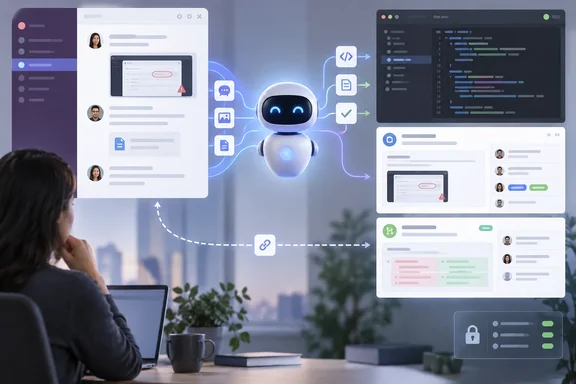
GitHub Copilot in Slack and Teams now reads more of the conversation
Some background helps. GitHub first connected its coding agent to Slack in October 2025. At that time it said the GitHub app for Slack joins the GitHub app for Microsoft Teams, which is now generally available. The current experience is newer. On August 21, 2026, GitHub announced that the GitHub integration in Slack now brings the agentic capabilities of GitHub Copilot CLI and the GitHub Copilot app into Slack in public preview, and it launched a matching Teams experience on the same day. In both apps, the agent can investigate, plan, write code, and create issues and pull requests, using the context of your conversation.
The September update adds to what "the context of your conversation" covers. According to GitHub's changelog, Slack users can now give the agent supported files, attachments and message links as context. In Teams, Copilot can work with inline images, forwarded-message context, and channel and thread history.
Both additions address a real limitation. Bug reports in chat often arrive as a screenshot, a pasted log file, or a link to a message in another channel. Before this update, someone had to retype that material into a prompt. Now the agent can use it directly.
GitHub has not listed which file types count as "supported," given size limits, or said exactly how far back Teams history goes. Teams that depend on certain formats, such as large log bundles or particular image types, should test with their own material before assuming it works.
Duplicate-issue checks and backlinks connect chat to GitHub issues
The second group of changes is about what the agent creates. GitHub says Copilot now looks for similar issues before opening a new one. It also puts direct links to the resulting work in the chat, and it keeps a link back to the original conversation.
The duplicate check targets a familiar problem with chat-driven issue creation. If several people report the same bug in different threads and each one asks the bot to file it, the tracker fills up with copies. GitHub hasn't said how it decides that issues are "similar," so treat the check as a help for triage, not a guarantee.
The backlink matters more over time. The August launch already had the agent open a pull request and provide a link to the conversation for review, and GitHub's documentation describes the aim as keeping your team's collaborative decisions stay connected to your code, bridging the gap between where discussions happen and where implementation lives. This update applies the same two-way linking to issues. Someone reading the issue months later can follow the link to the discussion behind a decision instead of searching Slack or Teams for it.
Model switching and Slack default repositories give users more control
GitHub's changelog says users can now switch models for the next message, and the choice then stays in effect for the rest of that conversation. This is a per-conversation setting, not a global one. You might use a faster model for quick questions and a stronger one for an implementation plan without changing anything across the organization.
GitHub hasn't said in this announcement which models you can pick or how you switch. The model you choose also affects cost, because usage counts against Copilot entitlements. The Slack code channel already displays details about the session, such as the working repository, branch, issue or pull request link, status, and model in use, so you can see which model is running a task.
Slack users can also now set default owners and repositories. The idea of a default repository existed before. Setup documentation says the default repository provides the context that Copilot uses when responding to prompts, and it's also where issues and pull requests created by Copilot cloud agent sessions will be opened unless you specify a repository in your prompt. A default owner, meaning an organization or user namespace, cuts down repeated typing for teams that work in many repositories under one organization. GitHub hasn't said whether these Slack defaults apply to one user or to everyone in a channel.
In Teams, repository defaults already worked differently. GitHub's documentation says a channel's repository is set with @GitHub settings. If none is set, the repository from the channel's first session becomes the default, and direct messages don't support a default repository.
Reliability fixes target long-running Copilot cloud agent sessions
Much of the release is bug fixes. That fits, because agent sessions don't behave like normal chat replies. A cloud agent task can run for minutes, send a plan for approval, pause, and then continue. Chat apps weren't built for that kind of interaction, and the fixes show where it was breaking.
GitHub lists these fixes across both apps:
- Implementation-plan status is clearer while a task runs.
- Interrupted or stale replies are handled better.
- Reconnection is more predictable after a conversation has been idle.
- Error messages are more accurate when a task stalls, a connection drops, or access settings block the work.
The Teams-specific fixes say a lot about what was going wrong. GitHub says Copilot in Teams now keeps channel-thread history more reliably, stops giving duplicate answers, correctly handles images that Teams has converted, and works more consistently with user-owned repositories and large channels. The first item suggests the new thread-history feature partly addresses earlier thread handling that wasn't reliable.
The Slack fixes cover implementation-plan recovery, the repository picker, and code channels. Code channels come from the August launch. In that design, Copilot cloud agent will create a dedicated code channel, called Slack Code, and code channels are intended for one session at a time: one channel per task. The most significant Slack fix is about safety. GitHub says it made repository switching safer so superseded sessions cannot continue acting in the old repository. Put simply, before this fix, switching repositories during a task could apparently leave the earlier session still able to act on the previous repository. GitHub gives no details about the earlier behavior, but if your team switches repositories often in Slack, this fix alone justifies upgrading the app.
GitHub doesn't give any metrics for these fixes. They are described changes in behavior, not measured improvements.
Setting up the preview on Copilot Business and Enterprise
The changelog says the public preview is available to organizations on GitHub Copilot Business and GitHub Copilot Enterprise. Usage counts against existing Copilot entitlements and can be managed with existing Copilot cloud agent budgets. Some features are rolling out gradually and may not be in every workspace yet, and GitHub gives no end date for the rollout. If a feature described here is missing from your workspace, the staged rollout may be the reason, and you may not have misconfigured anything.
Setup differs slightly between the two apps, and the prerequisites are different, so follow the steps for your platform.
Slack
- An organization administrator enables the Copilot cloud agent policy.
- Install the GitHub app for Slack, or upgrade it if it's already installed. The Copilot cloud agent integration in Slack allows you to interact with Copilot cloud agent from your Slack workspace and is included in the GitHub app for Slack, so you don't install a separate Copilot app.
- Link your GitHub account, then mention
@GitHubin a conversation. According to GitHub's documentation, that can be a channel message, a thread or a direct message. If asked, set a default repository.
Microsoft Teams
- An administrator enables GitHub Copilot cloud agent and cloud sandboxes. Cloud sandboxes are the extra requirement compared with Slack.
- Install or upgrade the GitHub app for Teams. For a new installation, GitHub's documentation says to open the integration installation link in a browser, click Add to add the app to your team. Follow the prompts on screen to authenticate and authorize the app.
- You only install once per team. After the app is installed, any member of the team can connect their GitHub account to the app and start using it.
- In Teams, @mention the app in a message by typing @GitHub. Follow the prompts to connect your GitHub account, and if prompted, optionally set a default repository. Typing
@GitHub helpin a thread shows the other commands.
It works if @GitHub replies in the thread, starts a session against the repository you expect, and returns links to any issue or pull request it creates.
More context from Slack and Teams threads means more for admins to govern
This update makes the agent take in more, and GitHub's own documentation already warns about what happens to that input. In Slack, Copilot cloud agent will capture the entire thread as context for your request, understanding and implementing solutions based on the discussion. This context is stored in the artifacts the agent generates. GitHub's advice: if you want to limit the context, you can send a direct message to the GitHub app for Slack instead. GitHub's documentation describes the same thread-capture behavior in Teams.
Now that attachments, files, forwarded messages and channel history are included, a thread's contents can reach more of what the agent produces. A pasted credential, customer data in a screenshot, or an unrelated side discussion in a long thread could influence or appear in the resulting work. Beyond the News, reviewing the August launch, recommended training teams to keep secrets and unrelated sensitive context out of agent-visible threads. That advice applies even more after this update.
What the update doesn't change is who is allowed to make changes. Being in the chat still doesn't grant repository access. GitHub said at launch that items created from conversations are attributed to the Copilot app identity, and actions remain bounded by existing GitHub permissions and controls. In Teams, any participant can ask questions, add context, or provide direction for the work, but only participants with write access to the target repository can actually execute changes. GitHub's documentation also says that in direct messages the agent acts with the linked user's own permissions, while in shared channels it acts under the app identity. Workspace guests and outside repository collaborators can't start or steer Teams sessions.
Repository administrators also have a review control. Repository administrators can require an additional human approval for pull requests created by the integration identity. GitHub's documentation says this applies where a ruleset already requires at least one approval.
What this means for you
Teams already using the Copilot preview in Slack or Teams should upgrade the GitHub app now. Organizations that haven't enabled it yet can wait, since this is still a preview and GitHub says it may change. The Slack repository-switching fix and the Teams thread-history fix solve problems that current users are likely to hit. For new users, the extra context makes the integration more useful. It also means admins should review budgets and chat habits before rolling it out widely.
- Confirm your organization has Copilot Business or Copilot Enterprise, because GitHub limits this preview to those plans.
- On Teams, check that both the Copilot cloud agent and cloud sandboxes are enabled. On Slack, the Copilot cloud agent policy is the documented requirement.
- Upgrade the existing GitHub app in Slack or Teams instead of assuming it updates itself, then test attachments and images with your own files, since GitHub hasn't listed supported formats.
- Set Copilot cloud agent budgets before rollout, because model switching and easier task starts both use existing Copilot entitlements.
- Tell users that
@GitHubin a shared thread captures the whole thread, and suggest a direct message to the app when a task needs less context. - Check repository rulesets so pull requests written by the app need an extra human approval where your review policy calls for it.
The two integrations are now close to matching each other. Both read chat attachments, both check for duplicate issues before filing, and both link their work back to the conversation. The main differences left are Slack's default owners and code channels, and the fact that Teams requires cloud sandboxes. Because GitHub is rolling features out gradually during the preview, admins should expect workspaces to get them at different times, and should set budgets, rulesets and thread-hygiene rules now, before the agent reads more of their chats.
References
- Updates to GitHub Copilot for Slack and Microsoft Teams GitHub Changelog · 2026-09-25T16:33:42+00:00
- Integrating Copilot cloud agent with Slack - GitHub Docs docs.github.com
- Integrating Copilot cloud agent with Teams - GitHub Docs docs.github.com