

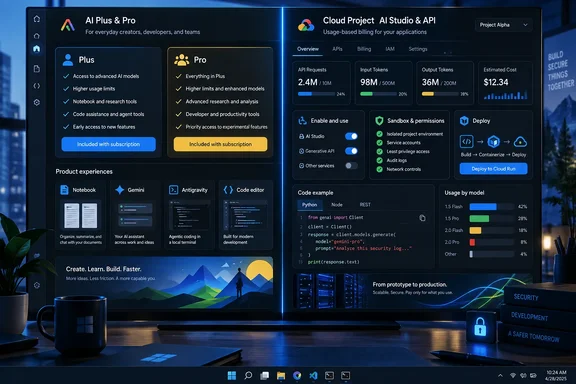
Google’s current U.S. pricing page lists Google AI Plus at $4.99 per month and Google AI Pro at $19.99 per month. Plus advertises twice the free-tier Gemini usage and 400GB of storage; Pro advertises four times the free-tier Gemini usage, 5TB of storage, more generous Notebook limits, entry-level access limits for Google Antigravity, and higher limits for Google’s Jules coding agent. The page makes the bundle look broad because it is broad, but its “higher” and “more” language leaves plenty of operational detail outside the comparison chart.
The practical lesson is less “look for free extras” than “treat each Google AI surface as a separate entitlement and security boundary.” NotebookLM, the Gemini consumer app, Antigravity, Flow, AI Studio, and the Gemini API increasingly share models and branding, but they do not share the same quotas, billing path, data policy, or deployment permissions.
NotebookLM’s limits make the Plus upgrade more concrete
The XDA writer’s stated reason for subscribing—hitting NotebookLM’s source ceiling—is supported by Google’s current Gemini Notebook documentation. Google says a standard account supports up to 50 sources per notebook, while Google AI Plus raises that to 100 and Google AI Pro raises it to 300. The plans also increase daily chat, report, flashcard, quiz, mind-map, audio overview, and video overview limits.
Those are meaningful changes for a researcher assembling product documentation, incident reports, project notes, or a large set of vendor PDFs. A 100-source notebook is materially different from a 50-source notebook when each source is a separate policy document, log analysis, or technical manual. Pro’s 300-source limit matters more for sustained research projects, but it costs four times as much as Plus in the United States.
Google changed Gemini Notebook usage limits on September 2, 2026, and explicitly labels the figures as subject to change. That is an important caveat for anyone buying a plan solely to solve a capacity problem: these are service allowances, not fixed software licensing rights. Administrators planning a repeatable team workflow should document the limit they need and reassess it before renewing rather than assume today’s quota remains in place.
Google’s own table also shows why “more NotebookLM” is an incomplete description of the purchase. Plus doubles daily chats from 50 to 200 and daily reports from 10 to 20; Pro raises those to 500 and 100, respectively. The consumer plan page compresses those numbers into broad benefit language, so the help documentation is the more useful place to evaluate whether an upgrade actually resolves a bottleneck.
Google AI Pro bundles tools that run code and commands
Google introduced Antigravity in November 2025 as an agentic development platform designed to plan, execute, and verify multi-step software tasks across an editor, terminal, and browser. Its IDE experience is familiar to Visual Studio Code users, and Google now offers extensions for VS Code as well as its own agent-first environment.
XDA’s description of Antigravity doing PC administration and productivity work should be read literally, not as a metaphor for autocomplete. An agent that can inspect project files, generate scripts, run shell commands, connect to Model Context Protocol servers, and control a browser has a far larger blast radius than a code-completion extension.
Google AI Pro includes what Google calls “entry rate limits” for Antigravity, while its Ultra tier advertises higher or highest limits. XDA reports that Pro changes the author’s quota behavior to a five-hour refresh cycle and offers a credit pool for overages. Google’s public plan comparison confirms the access tier but does not publish those specific refresh timings or individual quota counts. That makes the five-hour detail an XDA-reported account rather than a broadly documented service guarantee.
For Windows users, the more consequential part is Antigravity’s permission configuration. Google’s Antigravity documentation says that on Windows users can choose among Request Review, Proceed in Sandbox, and Always Proceed behavior for terminal commands. Non-workspace access is restricted by default, but it can be enabled; the “Always Proceed” setting can run commands without prompts except where an explicit deny rule exists.
That means a sensible Windows setup should start conservatively:
- Keep terminal execution set to Request Review or Proceed in Sandbox until the project’s tasks and prompts are predictable.
- Leave non-workspace file access disabled so the agent cannot casually reach user profiles, SSH material, browser data, or unrelated repositories.
- Use a dedicated repository and a disposable branch for agent-driven changes, then review the diff before merging.
- Deny destructive commands and privileged tools explicitly, rather than relying on a natural-language instruction telling the agent to be careful.
- Audit MCP servers as third-party integrations with their own permissions, credentials, and possible access to internal services.
Google’s current documentation says the Windows terminal sandbox uses AppContainer isolation. That is a useful guardrail, but it is not a substitute for scope control. If a user permits non-workspace access, elevated commands, or broad MCP access, the protection promised by a project directory boundary has already been weakened.
A GEMINI.md file helps with behavior, not enforcement
The XDA article says a GEMINI.md file at the workspace root keeps the agent aware of folder conventions and do-not-touch rules. Google’s documentation confirms that Antigravity supports Markdown-based rules, but the current implementation is more specific than the article suggests.
Global rules live in ~/.gemini/GEMINI.md. Workspace rules now default to the .agents/rules directory at the workspace or Git root, although Google retains backward support for older rule locations. These files can reduce repetitive prompting and make an agent’s behavior more consistent across sessions, especially for repository conventions, test commands, and coding standards.
They should not be confused with technical access controls. A rule such as “never modify production configuration” is guidance supplied to the model. A deny rule for writes to a production configuration path, a restricted service account, a sandbox boundary, or a protected branch is an enforceable control. Teams using Antigravity for operational tasks should use both, and should make the permission policy the final authority.
AI Studio’s paid tier is a separate purchase decision
The most important correction to the “one subscription opened everything” narrative concerns Google AI Studio. XDA says Google AI Pro brings higher AI Studio usage and access to advanced models such as Gemini 3.1 Pro and Nano Banana Pro. The first half of that claim does not match Google’s developer billing documentation.
Google says AI Studio and the Gemini API use a project-level billing system. New projects begin on a free tier. To access higher rate limits, advanced paid models, and paid-service data terms, a developer must link a billing account to the Google Cloud project and prepay or use postpay billing as available. Google AI Studio’s paid usage tier is based on billing-account history and spend, with separate Tier 1, Tier 2, and Tier 3 qualifications.
In other words, a Google AI Pro subscription may improve a person’s consumer Gemini experience and grant bundled access to Antigravity, NotebookLM, Flow, and Google apps. It does not eliminate the need to establish API billing for a project that needs paid Gemini API capacity. Developers should expect a separate budget, quota dashboard, and billing control for applications they deploy.
This division also affects privacy expectations. Google’s Gemini API pricing documentation says free-tier content may be used to improve Google products, while paid-tier content is not. That distinction is especially relevant when an AI Studio prototype moves from harmless test data to internal source code, customer material, system logs, or business documents. A Pro subscription badge on a personal Google account is not evidence that a particular AI Studio project is operating under paid API terms.
Google does offer a Cloud Starter Tier that can deploy up to two full-stack applications directly from AI Studio without setting up a conventional Google Cloud project or billing account. It is a useful on-ramp for experiments, but it should not be mistaken for a production entitlement or a replacement for an organization’s normal Cloud governance.
AI Studio’s Build mode is powerful enough to need review
The XDA piece is accurate that AI Studio’s Build mode uses the Antigravity agent harness. Google says the feature maintains project context, manages multiple files, and verifies code updates. It can generate web applications with a Node.js backend, deploy eligible web projects to Cloud Run, and create native Android projects in Kotlin and Jetpack Compose.
For Windows developers, the Android path is particularly accessible: Google provides a browser-based emulator, a way to install builds on a physical device through browser-based ADB, and support for Play Store internal testing. But there is a detail missing from XDA’s description: Google’s Android documentation says GitHub export is not yet available for Android projects. Web projects and Android projects therefore do not have identical export and deployment workflows.
The larger risk is moving too quickly from prompt to public deployment. A generated web app can include server-side calls, package dependencies, and deployment configuration, even if it began as a rough prototype. Before sending one to Cloud Run, inspect the generated source, verify environment-variable handling, rotate any credentials exposed during testing, examine dependency versions, and apply an organization’s usual code-review process. “Verified execution” describes the agent’s attempt to validate its work; it is not a security review.
Flow Music is a genuine additional benefit of the plans, with Google offering 200 Flow credits for Plus and 1,000 for Pro. It may be worthwhile for creative work, but it has little bearing on whether an IT professional should pay for Pro. The subscription’s operational value rests primarily on Notebook capacity, consumer Gemini use, agent quotas, and access to tools that can affect local or cloud environments.
Google is selling a bundle where the most visible extras are creative features, while the most consequential extras for Windows power users are the tools that can read files, issue commands, generate applications, and deploy code. The subscription can be worthwhile—but only after the buyer separates personal-plan allowances from project billing, and convenience from permissions.
References
- I got a Google AI subscription for NotebookLM, and keep finding features I didn't know I was paying for XDA · 2026-09-17T14:31:16+00:00