

Chrome’s Scheduled Restart would turn postponement into a conditional action
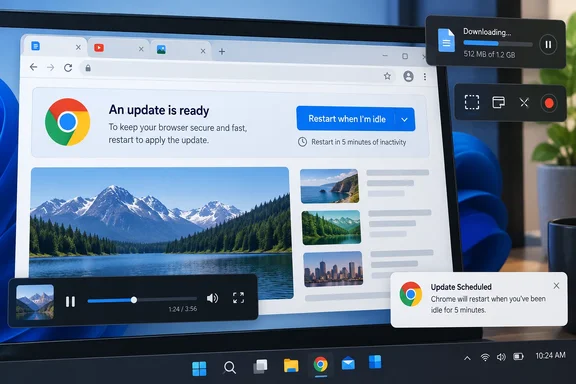
Windows Report describes Chromium development work under the name “queued-restarts,” with merged changes covering restart choices, reminders, telemetry and visual feedback. According to its reporting, Chrome’s “Relaunch Recommended” prompt would offer “Restart when I’m idle” alongside “Restart now.”
That would give postponement a more definite outcome. Instead of leaving the user to remember to relaunch later, Chrome could receive permission to restart once its inactivity and activity checks allow it. The practical benefit would be delegating the timing of an already-needed restart to the browser.
According to Windows Report, the current implementation waits for approximately five minutes of inactivity. That is an eligibility threshold, not a promise that the browser will restart exactly five minutes after the user selects the option: the same report describes additional checks that can prevent the restart.
The proposed interface would also acknowledge that decision. Windows Report says a confirmation toast and an App Menu indicator are being added, including the string “Update Scheduled.” Its reporting describes reminder logic that accounts for daily quiet periods and presents the prompt when a user opens a New Tab Page, providing a possible opportunity to ask between browsing tasks.
Those interface details and the five-minute threshold remain single-source reporting rather than independently confirmed release behavior. Google’s published update strategy supports the broader direction, but does not establish that this particular prompt will ship. There is no established stable-channel version or verified enabling procedure to recommend.
Chrome’s idle checks would protect some ongoing tasks, not promise universal safety
A browser can be busy while its user is doing nothing. The reported restart checks address that problem by looking beyond inactivity alone.
According to Windows Report, Chrome’s current implementation would prevent an idle restart during:
- An active file download.
- Audio or video playback.
- Video capture or screen capture.
These conditions are important to understanding what the feature would actually do. Under the reported design, a pause in user interaction would not by itself be sufficient to restart a browser that is still playing media or capturing the screen. Chrome would need both an idle interval and the absence of the specified blockers.
The same logic creates a trade-off. As an inference from those reported conditions, an activity that blocks restarting could keep a queued update waiting beyond five minutes. That would be an expected consequence of protecting the activity, rather than evidence that the scheduler had failed.
The protections should not be read as a guarantee that every kind of unfinished work is covered. The reporting does not establish precisely how Chrome measures inactivity or whether it detects other application-specific reasons to defer a restart. Users should therefore avoid treating “Restart when I’m idle” as a promise that all work in every open website can survive an automatic relaunch.
For Windows users, the familiar part is the opportunity to defer an interruption. The specific mechanism described here concerns restarting Chrome when conditions permit; it does not describe scheduling a Windows reboot or choosing an exact clock time.
Chrome’s security update is unfinished until the new code is running
Google’s Chrome Security Team explained the underlying problem in its July 30, 2026 post, “Stronger with every update.” Chrome downloads and stages new browser binaries in the background, but ordinarily activates the update at the next browser restart. Downloading the fix and running the fixed browser are separate milestones.
Google identifies the wait for users to restart as a contributor to N-day exploitation risk: exposure to vulnerabilities that are already known and for which fixes may already exist. Faster bug discovery and faster delivery cannot completely solve that last step if the user continues running the older browser session.
Scheduled Restart would address that final handoff. It would leave the basic update mechanism intact while giving Chrome a way to complete it at a less disruptive moment. Its potential security value comes from shortening the period between an update becoming ready and the browser actually relaunching—not from the scheduling confirmation itself.
“Update Scheduled” would not mean “update completed.” That distinction matters both to individuals deciding whether they have finished updating and to administrators assessing whether a browser fleet is running the intended versions.
There is no published measurement here showing how much the reported feature would reduce restart delays. The supported conclusion is narrower: it targets a delay Google has explicitly identified, using a proposed interaction that could remove the need for a second user decision.
Chrome’s other restart projects show the direction, not this feature’s availability
Google has already described several approaches to reducing update disruption, and keeping them separate helps explain where Scheduled Restart would fit.
One is a shipping, platform-specific example. Google says Chrome 150 on macOS can automatically restart for a pending update when the application remains running but has no open windows. Ars Technica also reported that “zero window restart” behavior on July 30. It takes advantage of a macOS application state; it is not evidence that the reported five-minute idle option is available on Windows.
Another is dynamic patching, which Google describes as research and development. The proposed mechanism would use Chrome’s multi-process design to replace background child processes, including renderer and GPU processes, with updated binaries. Google’s stated aim is to avoid a full browser restart in many cases.
The reported Scheduled Restart feature takes a different route: it still restarts the browser, but tries to choose a better moment. Dynamic patching seeks to reduce the need for a full restart; idle scheduling seeks to make a necessary restart easier to complete.
Google is also exploring better session restoration by saving more state locally. That work belongs to the same effort to make restarting less disruptive, but it does not establish a universal restoration guarantee for the new scheduler. The existing macOS feature, dynamic-patching research and Windows Report’s account of Scheduled Restart are distinct developments with different evidence and availability boundaries.
Chrome administrators should keep relaunch enforcement separate from idle scheduling
For managed PCs, a proposed user-facing convenience should not be mistaken for an update-compliance policy. Google already documents controls for recommending or enforcing browser relaunches, and the relationship between those controls and the reported idle option has not been established.
Google’s “Manage Chrome updates” instructions apply to Windows and macOS computers managed through Chrome Enterprise Core. They describe three relaunch-notification choices with materially different consequences:
| Existing managed setting | Documented behavior |
|---|---|
| No relaunch notification | Chrome indicates the need to relaunch through subtle menu changes without displaying notifications. |
| Show notification recommending relaunch | Users receive recurring recommendations, but can dismiss them and continue using the old browser version. |
| Force relaunch after a period | Users receive recurring messages and can continue working until the configured period ends, when Chrome automatically relaunches. |
For the forced-relaunch option, Google also documents a configurable notification period and a relaunch window with a start time and duration. Those are administrative controls over the completion of an update. They should not be conflated with the approximately five-minute idle threshold described in Windows Report’s development-code reporting.
The distinction is operationally useful. A recommendation leaves the final timing with the user. Enforcement places a limit on postponement. An idle scheduler would attempt to find a convenient opportunity, but the available evidence does not show that it replaces either policy or changes which one takes precedence.
Google’s July security post recommends using Chrome Enterprise Core or Premium dashboards to track browser versions across a fleet. That remains a more meaningful completion signal than a user having accepted a scheduling prompt. Until Google documents how the new feature interacts with management settings, administrators have no basis for weakening an existing relaunch policy in anticipation of it.
What this means for Chrome users and IT teams
Keep completing pending Chrome updates through the available relaunch controls; there is no verified reason to wait for Scheduled Restart or alter a managed deployment around it.
- Stable Chrome users should treat the idle-restart option as an in-development feature, not a setting they are expected to find today.
- Google’s current guidance is to use the update message in Chrome’s top-right corner to keep the browser current; a reported future scheduling option does not replace that available action.
- If the described feature reaches users, “Restart when I’m idle” would authorize a conditional restart rather than reserve a particular time.
- The reported download, playback and capture checks cover specific activities; they should not be treated as assurance that every unfinished browser task is protected.
- Administrators should retain their established relaunch controls and track browser versions rather than count a scheduled restart as a completed update.
Chrome’s proposed idle scheduler offers a practical way to make a necessary interruption easier to accept. Its value would be in turning “later” into a browser-managed opportunity to finish patching, while respecting the activities it can detect. Until Google establishes availability and management behavior, the concrete decision remains unchanged: complete the pending relaunch, and judge update success by the browser that is running afterward.
References
- Chrome may soon let you schedule update restarts for when you’re idle Windows Report · 2026-09-22T10:32:23+00:00
- Manage Chrome updates (Chrome Enterprise Core) - Chrome Enterprise and Education Help support.google.com
- Stronger with every update: How we’re making Chrome and the web safer in the AI Era blog.google