

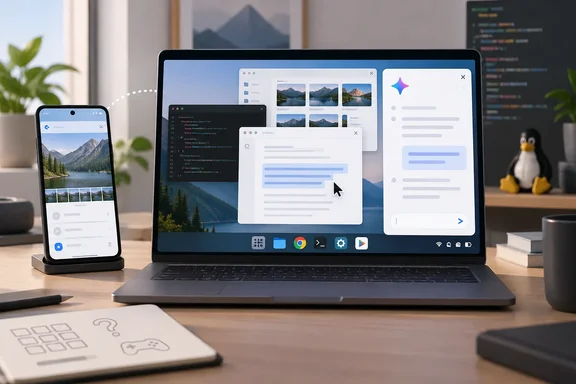
What Googlebook OS is, and what Google says it is
Google's developer documentation says Googlebooks are built on the Android technology stack and ChromeOS desktop foundations. The operating system is heavily integrated with Gemini, and the headline demo is "Magic Pointer", where shaking the cursor lets you select on-screen items and prompt Gemini.
Thurrott describes the OS as an iPadOS-like offshoot of Android. He says it succeeds Chrome OS, includes the full desktop Chrome browser, and runs on both x86-64 and Arm64 chips. Google's September launch coverage lines up with the chip claim. 9to5Google reported that launch devices use Intel Core Ultra Series 3 or Snapdragon X Elite chips with 40+ TOPS NPUs, and that the OS is optimized for both ARM and x86.
Lenovo's launch details are in its own press release. The Googlebook 15 shipped October 4, 2026 at a starting price of $1,099.99, with an Intel Core Ultra 5 325, up to 32GB of memory and a 15.3-inch OLED touchscreen. Those are Lenovo's specifications and claims. Thurrott's piece is about software, not those numbers.
Desktop feel: familiar, with a few oddities
Thurrott says setup was quick, assuming you have a modern Android phone. He signed in with a Pixel 11 Pro XL and postponed transferring data and apps. His setup impressions therefore don't cover a full migration.
The desktop will be recognizable to Windows and Chrome OS users:
- There is a taskbar-like area and a Start-like launcher.
- Apps open in floating windows that can be resized, maximized and minimized.
- There are snap-style controls and keyboard shortcuts.
- Thurrott's early impression is that window resizing feels more precise and desktop-like than on Chrome OS. That is his subjective view, not a measurement.
Some differences stand out. Chrome OS put Quick Settings in the taskbar, much like Windows. Googlebook OS follows Android and puts them in the upper-right of the screen. Thurrott says he is mostly fine with that. The date and time sit in the upper-left, and he calls that placement strange and unlike any other desktop or mobile platform.
The app-choice problem
Thurrott's biggest early complaint is one Chromebook owners will know. Web apps and Android apps are both first-class options, and many apps exist in both forms. It is never clear which to pick. Linux apps add a third option. He also says Google has admitted that some Android apps won't run well on Intel-based Googlebooks like this one.
That is his account of a Google statement, not a published compatibility list. Treat it as a caution, not a verdict on any given app.
Magic Cursor, Magic Pointer and the Click to Do comparison
Thurrott calls the marquee feature Magic Cursor. Google's materials call it Magic Pointer, so you will see both names. Thurrott describes how it works:
- You shake the mouse over something on screen, or press G + g.
- Small Gemini windows appear beside the cursor.
- You can ask about nearby text or images, select several objects, or choose pre-built prompts such as "Summarize the key features" and "Describe this scene".
- Without that trigger, the cursor behaves as it does elsewhere.
Thurrott sees it as Google's answer to Click to Do on Copilot+ PCs. The invocation differs. Click to Do uses the Windows key plus a click. This is a feature-level comparison, not a claim that the two are built the same way.
Google's own examples include scheduling a marathon training plan into Calendar and checking a suspicious email for spam. Google says the feature only acts when summoned by a wiggle and stays off otherwise. Those are vendor claims. 9to5Google's hands-on found that prompt responses appear in the Android Gemini app. That suggests how much of the AI layer is plain Android.
Proactive Assistance is still murky
Thurrott also saw a feature called Proactive Assistance, which he says appears infrequently. It showed up in right-click menus in compatible apps such as Messages and Screenshots, and he mentions something called Desktop System Intelligence. He says apps appear to need native support. He could not yet say when it triggers. Don't treat its coverage or frequency as settled.
"Intelligence System" versus operating system
Google's May announcement says it is moving "from an operating system to an intelligence system". Thurrott rejects that framing. He argues the OS still has "OS" in its name and that nothing here couldn't be added to Chrome OS or stock Android. He compares Gemini's integration to Internet Explorer in the Windows antitrust era.
He cites UX expert Scott Jenson, a former Google mobile UX lead. Jenson sees Magic Cursor as a way to "sneak AI in" to a classic desktop. Thurrott's own view is that interim steps are reasonable, since users rejected Windows 8's clean break from muscle memory.
The skeptics have a point, and so does Google. Gemini is built into the platform. But a shake gesture that opens a chat window is a different thing from rethinking the desktop. Thurrott also notes the Copilot+ PC parallel and says that platform hasn't resonated with customers. That is his opinion.
Phone integration: where Windows readers should look
Thurrott contrasts this with Phone Link in Windows 11. He says Phone Link gives different capabilities depending on the phone. iPhones get the most basic experience. Even on Android, he says, screen and app remoting only work with modern Samsung flagships, which leaves Pixel owners out.
Googlebook OS offers more consistent Android integration, which Google calls "Better Together". Thurrott lists these features:
- Continuing tasks across devices. He says the more common flow is phone first, then Googlebook.
- An All apps view of the phone from a taskbar pop-up.
- Running phone apps in a floating, resizable window.
- Android-to-Android features such as Quick Share.
Google's developer documentation backs the continuity piece. Android developers can use "Continue On" so users pick up tasks from their phone directly from the Googlebook taskbar. 9to5Google also reported a "Cast My Apps" option for people who don't want to install the Android app on the laptop.
The one-app limit
The key hands-on limitation is that Thurrott can stream only one phone-based app at a time. Opening a second phone app reuses the existing window. His example is Duolingo running in a phone-shaped window with Apple Music beside it in a larger one. That doesn't work, unless one of the apps is installed directly on the Googlebook.
This applies to streamed phone apps, not local Android apps. He suggests it may be a stopgap, since most apps should run natively. iPhone linking is supported with reduced functionality, but he hasn't tested it yet.
Lenovo's product page reportedly says phone integration needs supported devices running Android 17 or later. I haven't verified that page myself. Check the exact device requirements before buying.
Linux and developers: a promising feature with one failed test
Googlebook OS has a pre-installed Terminal app, which Chrome OS did not. On first launch it prompts you to install the Linux subsystem. Thurrott reports a 621 MB download and no errors.
Then he tried the Linux version of Typora, an app that gave him mixed results on Chromebooks:
- Typora did not appear in the launcher.
- A
typoraentry was visible in/bin. - He could not get it to launch.
He says this feels familiar and plans to dig in. This shows one app failing to launch on his setup. It is not evidence that Linux apps fail in general.
Google's pitch for developers is stronger on paper. Computerworld reports Googlebooks offer a Debian Linux environment through the built-in Terminal app. 9to5Google reports the Linux environment is isolated by a pKVM hypervisor and meant for developer tools, code repositories, networks and autonomous agents. Google also names agentic coding tools such as Claude Code and Antigravity CLI. Those are vendor capabilities. They don't resolve Thurrott's Typora problem.
What this means for Windows users
Thurrott's bottom line is that Googlebook OS is a curiosity. It feels like a continuation of Chrome OS, not a leap like iPadOS 26 was for the iPad. He says that is partly because Chrome OS had already built the basics.
Here is what Windows and IT readers can take away:
- Phone integration is the sharpest contrast. If you've been frustrated by how Phone Link varies by handset, Google's approach is more uniform across Android phones. Phone-app streaming has a one-app limit for now.
- AI features are converging. Magic Cursor and Click to Do aim at the same job with different gestures. Whether either becomes a daily habit is untested.
- App sprawl is a real management question. Web, Android and Linux versions of the same app complicate choices for users and admins.
- Linux support is real but unproven here. One launch failure is a data point, not a trend.
Thurrott says more coverage is coming, including iPhone linking, Proactive Assistance and the Typora issue. Until then, treat these as first-week impressions on a newly shipped laptop.
References
- Lenovo Googlebook 15: Software First Impressions - Thurrott.com Thurrott.com · 2026-10-05T19:18:42+00:00
- Googlebook OS hands-on: It’s Android, stupid 9to5google.com
- Google fully details Googlebooks: $899+, October launch, & more 9to5google.com