

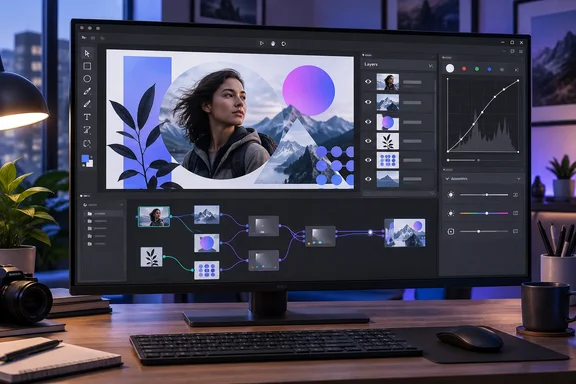
In a September 20 feature, XDA Developers describes using the browser-based editor for vector illustration, image adjustments, and mixed raster-vector compositions. Graphite’s official repository confirms the underlying design: a vector and raster graphics engine combining layer-based compositing with nondestructive, node-based generative design. This is an assessment of an existing application, rather than an announcement of a new release.
What the shared workspace changes
Raster images contain pixels; vector artwork describes shapes and paths. A composition might need both: a photograph beneath an illustrated border, for example, with a shaped crop and color adjustments.
The useful part of Graphite’s approach is that its conventional editing tools sit above a shared node graph. A node represents an operation or an element of the artwork, and connections describe how those elements are processed together. Graphite’s repository explains that its tools wrap this graph, offering a visual editing workflow without requiring users to construct every operation through nodes.
That gives the application two complementary interfaces. Layers help organize the composition, while the graph exposes the operations producing it. The practical attraction is being able to change the recipe behind an effect rather than repeatedly rebuilding its result.
XDA describes a representative workflow:
- Place a photograph on the canvas alongside vector artwork.
- Use a vector shape with a Clipping Mask node to control which part of the photograph remains visible.
- Apply a Curves node to adjust the photograph.
- Add procedurally repeated vector patterns over the composition.
According to XDA, replacing the photograph can preserve the mask, adjustments, and vector overlay. The specific workflow and tool behavior are supported by XDA’s account alone, not by an independently corroborated test; the official repository confirms the broader nondestructive architecture.
For suitable designs, the benefit is clear: intermediate edits can remain inside one document instead of becoming another exported asset to update elsewhere. Final delivery still requires an appropriate output file. The consolidation concerns the editing process, not the elimination of exports altogether.
Why nodes can be useful without taking over the interface
Procedural design is particularly helpful when artwork contains repetition. XDA gives the example of a Circular Repeat node that distributes a shape around a circle: changing the count from 25 copies to 10 changes a parameter instead of requiring a fresh round of manual placement.
Graphite’s official description supports the general principle of node-based generative design, although that particular node example comes from XDA. The reader value lies in retaining the relationship between the original shape and its repetitions. A parameter-driven arrangement can be revised as an arrangement, rather than treated as a collection of unrelated objects.
The same principle applies to image adjustments. According to XDA, Graphite offers nodes for Curves, Levels, Hue/Saturation, Brightness/Contrast, and other color adjustments. In a nondestructive workflow, the operation remains editable rather than permanently replacing the starting image’s appearance.
Users do not have to make the graph their primary workspace. Graphite’s documented architecture puts ordinary tools over the procedural engine, and XDA reports working mainly through layers before opening the graph for more specialized operations. That is a meaningful accessibility advantage for someone interested in procedural graphics but accustomed to a conventional graphics editor.
Where the Adobe comparison stops
Workflow overlap is narrower than application replacement. Graphite’s repository says the project began as a vector editor and lists photo editing, digital painting, desktop publishing, and other disciplines as additional competencies on its roadmap. Those ambitions should not be read as a completed professional toolset.
XDA’s assessment puts vector work ahead of raster editing in the current experience. It reports familiar path and shape tools, Boolean operations, fills, strokes, and SVG import and export. On the raster side, it describes basic compositing and adjustments as useful, while characterizing the brush engine and filters as comparatively early.
The compatibility and production limits reported by XDA are especially important when deciding what work to move:
| Work requirement | Reported boundary |
|---|---|
| Continue editing an Illustrator document | XDA reports that Graphite cannot open .ai files. |
| Exchange vector artwork | XDA reports working SVG import and export. |
| Bring photographs into a composition | XDA reports PNG and JPG import. |
| Perform detailed photo retouching | XDA reports no healing brush or clone stamp, with limited selection tools. |
| Prepare print-production artwork | XDA reports missing CMYK support and print-bleed setup. |
These are XDA’s reported limitations, not a separately verified compatibility matrix. They nevertheless explain why successfully making a mixed-media composition does not establish that an entire Photoshop or Illustrator workload can move with it.
For a Windows user making screen-oriented illustrations or experimenting with reusable graphic compositions, Graphite’s shared layer-and-node model is a concrete reason to explore it. For work dependent on Illustrator documents, precise retouching, or print-production controls, the reported gaps remain reasons to retain the existing tools. The strongest case for Graphite is bringing suitable vector and raster operations into one editable composition—not replacing every job performed by two mature applications.
References
- I stopped exporting from Photoshop and Illustrator, and one open-source app now handles both jobs XDA · 2026-09-20T21:30:16+00:00
- Your procedural toolbox for 2D content creation github.com