

Three screens, three different questions
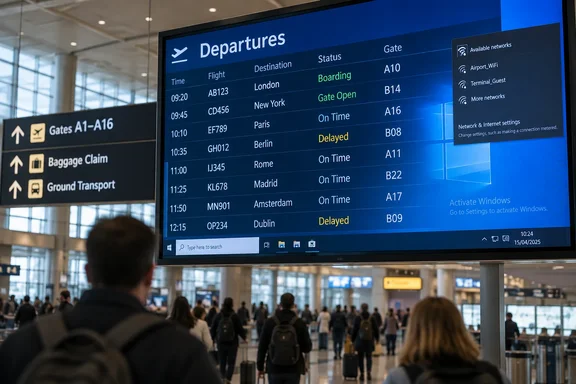
On one departures display, a Windows activation watermark appeared behind the flight information. On another, pages were dated September 21 and September 12. A later screen exposed a network dialog, taskbar and Start button that The Register said resembled Windows 7. These are observations from separate reader sightings, not a diagnosis of one shared fault.
The distinctions matter. An activation message does not prove that Windows was pirated, or identify its version. Older dates raise a sensible question about how recently the display was refreshed, but do not establish whether its flight listings were wrong—or whether the issue was the clock, the displayed content or its updates. And a familiar-looking desktop is a clue, not confirmation of the installed OS. The reporting does not establish an operational disruption or a cyberattack.
There is precedent for the visible message, if not necessarily the same cause. The Register previously reported an activation watermark on a Terminal 5 check-in-area display. Nothing in the two accounts establishes that it was the same screen, operator or underlying problem.
Why the Windows 7 resemblance matters
Microsoft says Windows 7 reached end of support on January 14, 2020. An unsupported Windows installation can keep running, but it no longer receives Microsoft’s ordinary security fixes and software updates. If the later Heathrow screen really is backed by Windows 7, that would warrant a closer look by its operator. The photograph alone cannot tell us whether that machine is network-connected, what data it handles or what protections surround it.
For administrators of public-facing Windows signage, the useful lesson is to check three separate things: the device’s actual Windows version and support status, its activation state, and whether the information shown is refreshing as intended. A tidy-looking display is no substitute for those checks; an untidy one is not, by itself, proof that the information is false.
For passengers, a board with conflicting dates deserves a second look through the airport’s other flight-information channels. For everyone else, Heathrow has offered a reminder that when signage slips, the desktop behind the curtain can become part of the show.
References
- What eldritch horror lurks behind Heathrow's information screens? The Register · 2026-09-29T09:15:00+00:00
- Unexpected item in the bagging area as Windows Activation error pops up at check-in theregister.com

