

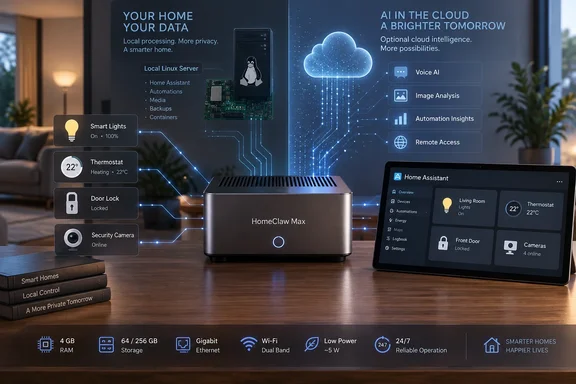
But the reporting around the device leaves a more important question unresolved than its 4 GB memory specification: whether HomeClaw Max is a newly differentiated product or a crowdfunding version of the existing LinknLink HomeClaw gateway already listed in the company’s store.
Notebookcheck first reported on September 18 that the Max is available through Kickstarter, with a 64 GB model at roughly $100 before shipping and a 256 GB model around $170. It described a quad-core 1.8 GHz processor, 4 GB of RAM, 3–5 W typical power draw, and a network split in which the cheaper version tops out at 100 Mbps Ethernet while the higher-capacity unit gets Gigabit Ethernet.
LinknLink’s own product page, however, currently sells a device simply called HomeClaw. Its stated specifications overlap almost perfectly with the reported base Max configuration: a 1.8 GHz quad-core processor, 4 GB of RAM, 64 GB eMMC storage, Linux based on Lubuntu Server, Ethernet, Wi-Fi, Bluetooth, and typical power consumption of 3–5 W. The listed hardware model is H96Max M1Plus, and the store price is $79.99, although the page marks it sold out.
That makes the 256 GB version and Gigabit Ethernet the clearest apparent changes in the Max reporting. LinknLink has not published a direct comparison between the retail HomeClaw and HomeClaw Max, nor does its public store listing explain whether existing HomeClaw owners receive the same AI software stack, remote access arrangement, or future feature support.
The hardware is adequate for Home Assistant, not proof of local AI
For Home Assistant itself, this is unremarkable but plausible hardware. The Home Assistant project says a mini PC is a valid way to run its software, especially for users who want to add services beyond basic home automation. Its own Home Assistant Green appliance also uses 4 GB of RAM, showing that memory capacity alone is not a reason to dismiss HomeClaw as a Home Assistant host.
The complication is the AI pitch. OpenClaw is an agent framework, not a magic source of on-device model performance. An agent can accept a request, inspect context, call APIs, write configurations, and trigger tools—but it still needs a language model behind it. Running modern language models locally, maintaining Home Assistant, retaining automation history, and hosting add-ons simultaneously is a different workload from running a basic home-automation hub.
LinknLink calls HomeClaw a “local AI server,” but its public materials do not identify a local model, model size, inference speed, accelerator, or a supported offline workflow for the 4 GB system. Those omissions matter. Without that information, buyers should treat the device as an always-on agent host and Home Assistant gateway, rather than assume it can independently perform capable local AI inference.
The company’s separate LinkAI pricing page makes the likely division of labor clearer. It advertises token-based monthly plans for access to hosted models from multiple providers and says those plans work with HomeClaw. That does not disprove local processing for certain tasks; Home Assistant automations and device control can remain local. It does mean that the headline AI experience may depend on an external model service, usage credits, and an internet connection unless LinknLink documents otherwise.
For a buyer comparing this with a repurposed mini PC, NUC, or small Windows machine running WSL2, that distinction is central. The hardware purchase may remove setup friction, but it does not necessarily eliminate recurring AI costs or transfer all sensitive prompts and smart-home context to local processing.
The networking difference is more consequential than the storage upgrade
The 64 GB versus 256 GB choice is useful, particularly for users who expect to keep backups, camera-related integrations, databases, or extra containers on the box. But capacity is not the most consequential reported difference: Ethernet speed is.
A 100 Mbps port will handle ordinary Home Assistant traffic, including sensors, switches, lighting, thermostat events, Zigbee coordinators, and Matter controllers. It becomes harder to justify when a buyer adds network cameras, local video retention, NAS backups, media transfers, or large Home Assistant snapshots. Gigabit Ethernet will not make AI responses better, but it avoids making the gateway an avoidable bottleneck in a home network where a smart-home server can gradually become infrastructure.
The trouble is that LinknLink’s current HomeClaw product page only lists “Ethernet,” without stating 100 Mbps or Gigabit capability. Notebookcheck’s account is therefore the only detailed public reporting that differentiates the networking tiers. Prospective backers should verify the port speed in the final campaign specification rather than infer it from storage capacity or product photos.
The same caution applies to radios and expansion. LinknLink says its existing HomeClaw supports Matter and can use Zigbee and Z-Wave through compatible USB dongles. That is a workable design, but it means a radio coordinator may be an additional purchase, not something necessarily integrated into the Max. The reported Max configuration does not establish which dongles are included, which chipsets are supported, or whether Matter is handled as a controller, a bridge, or both.
An agent with home-control access needs a security model
Home Assistant’s flexibility is precisely what makes an AI agent attached to it more sensitive than a chatbot used for drafting text. A successful automation can unlock doors, operate gates, change heating schedules, turn appliances on and off, create remote-access integrations, or expose data from connected devices. A mistaken automation is not merely a bad answer in a chat window.
Home Assistant’s security guidance recommends strong unique passwords, multi-factor authentication, limited administrator access, regular updates, and a secure remote-access method rather than directly exposing the instance to the internet. Those are baseline protections for any installation; they become more important where a natural-language agent has access to the platform’s automation and integration capabilities.
LinknLink advertises free peer-to-peer remote access for HomeClaw and says users can run it without a cloud service. Those claims describe features, not the security architecture behind them. The public material reviewed for HomeClaw does not spell out how remote sessions are authenticated, whether agent actions require confirmation, what permissions OpenClaw and Hermes Agent receive by default, how credentials are stored, or whether a user can separate read-only status queries from commands that alter the home.
That is the product’s largest unanswered operational issue. “Describe the desired result” is appealing when the request is “turn on the porch light at sunset.” It needs clearer safeguards when the request could create an automation with access to locks, cameras, alarms, or household presence data.
The crowdfunding timetable is not yet cleanly documented
There is also a timing discrepancy. Notebookcheck says buyers can currently obtain HomeClaw Max by backing the Kickstarter campaign, with shipping planned from late October. A Kickstarter tracking listing indexed separately describes HomeClaw Max as an upcoming LinknLink project “launching soon in October.” Those accounts cannot both describe the campaign’s current status in the same way.
The primary Kickstarter campaign was not publicly surfaced in the material available at publication time, so the reported pricing, delivery target, and final configuration should be treated as crowdfunding claims rather than a confirmed retail launch. LinknLink’s own established HomeClaw product page is a more concrete record: it shows a $79.99 base gateway, but it was marked sold out when checked.
HomeClaw Max may prove useful for people who value a preconfigured Home Assistant appliance and want to experiment with agent-driven automation without deploying a separate server. Its low power draw is credible for a 24/7 gateway, and the Gigabit/256 GB version would address two limits of the existing base design. Until LinknLink publishes the final campaign page, a complete hardware comparison, and a clear explanation of where AI processing occurs, buyers should regard it as a convenience-focused smart-home server—not a demonstrated local AI appliance.
References
- "HomeClaw Max": New Mini-PC aims to combine Home Assistant and OpenClaw Notebookcheck · 2026-09-18T15:03:00+00:00