

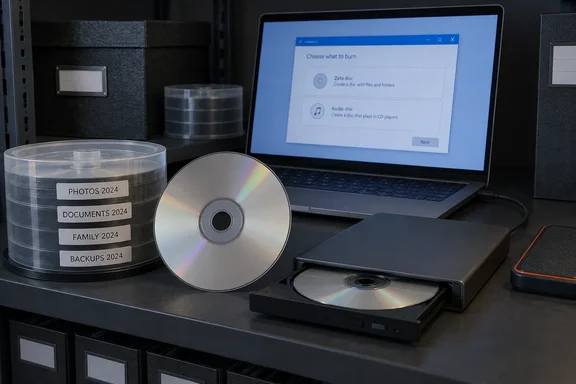
She's mostly right. There are two catches, though. Disc longevity research says the format is far from permanent, and Windows has a burn mode that can turn a "write-once" CD-R into something that acts much less like a frozen snapshot.
The pitch: a backup that can't be edited
White's argument rests on the basic difference between a CD-R or DVD-R and an SSD. You can rewrite an SSD as often as you like. A finalized write-once disc can't be changed. She sees that limit as the whole point for archiving: a burned disc is a snapshot of finished files, not another drive that stays editable forever.
In her account, a finished disc in a box is both offline and effectively immutable:
- Malware can't reach it while it sits on a shelf.
- Backup software can't overwrite or "sync away" its contents.
- You can't delete something by accident.
That matches what preservation experts say about the format. The Library of Congress describes recordable "R" formats as Write Once, Read Many (WORM) media. They use a photosensitive organic dye as the data layer. Rewritable "RW" discs instead use a phase-changing metal-alloy film that can be rewritten. So the "can't be changed" claim covers CD-R, DVD-R and DVD+R. It does not cover optical media in general, and certainly not a stack of DVD-RWs.
Section summary: For R-type discs, the write-once property is real and useful. An archive you physically can't edit is an archive ransomware can't encrypt while it's in a drawer.
The Windows catch: pick the right burn mode
The useful Windows detail is this: how you burn the disc decides whether you actually get that snapshot.
When you burn files from File Explorer, Windows asks how you want to use the disc and offers two choices. How-To Geek's Windows burning guide explains that "Like a USB flash drive" uses a live file system. It lets you write and erase files to the disc on-the-fly using a live file system without ever having to finalize or "master" the disc.
That's handy for convenience and bad for an immutable archive. The same guide notes that if you're using a write-only CD-R or DVD-R disc and you erase a file, the file will no longer appear in Windows, but space will still be taken up on the disc. The underlying data may still be there, but what Explorer shows you can change. O'Reilly's Windows Vista Annoyances described the same feature: you can eject a live-file-system CD-R, store it, and later put it back into your PC and burn more stuff onto it.
The other choice, "With a CD/DVD player" (Mastered), is the one White's argument actually needs. Buffalo's knowledge base says this mode allows you to burn files to the disc and then closes the disc to allow it to be read by most computers and newer CD, DVD, and Blu-ray Disc players. How-To Geek's guide adds that live-file-system discs are typically not compatible with machines older than Windows XP. Old machines matter less than they used to, but the point stands: mastered discs are the more portable format.
How to burn a sealed archive disc in Windows
- Prepare the files first. Put the finished set in one folder and check that it fits the disc. White cites a 4.7GB maximum for a DVD-R. A WindowsForum guide puts a standard CD-R at ~700 MB.
- Use write-once media. CD-R, DVD-R or DVD+R, not an RW disc.
- Insert the disc and choose "Burn files to disc." The Burn a Disc dialog appears.
- Type a disc title you'll still understand in ten years.
- Select "With a CD/DVD player." Do not choose "Like a USB flash drive."
- Add your files and burn. In mastered mode, files are first temporarily copied to a staging area on your hard disk first, then they are written to the disc all at once.
- Check the result. Eject the disc, put it back in, and open a few files. This tip is general practice rather than a sourced procedure: if you want proof, compare file hashes from the source folder and the disc with PowerShell's
Get-FileHash.
Drivers are rarely a problem. How-To Geek notes that Windows 10 works with most CD-R/W, DVD-R/W, and Blu-ray (BD) drives automatically through Plug and Play, so external USB burners usually just work.
Section summary: The snapshot only exists if you master the disc. A live-file-system CD-R can still take new files, and deleting a file hides it from Explorer even though the data stays on the disc.
Where the pitch goes too far
At one point White writes that a disc can keep files as they are "for the rest of time." Preservation research disagrees.
The Library of Congress warns that recordable discs deteriorate like any other material. Aging, storage environment and handling can damage them and cause data loss. Its research also found that recordable discs tend to degrade faster than pressed ROM discs.
A joint Library of Congress and NIST study, started in 2004, used accelerated aging to estimate disc lifespans:
| Finding | What it means |
|---|---|
| All tested CDs had estimated life expectancies above 30 years | Encouraging, but only an estimate for those specific products |
| Most tested DVDs exceeded 30 years, with large variation between products | Brand and batch quality matter |
| Estimates assume 25°C and 50% relative humidity | Hot attics and damp basements shorten the odds |
| Light, corrosive gases, contaminants, mishandling and drive differences weren't modeled | Real-world conditions can be worse than the lab |
The Library also lists other factors that affect longevity: manufacturing quality, labels and markings, how well the disc suits the burner, how good the original burn was, and how old the blank disc was when you burned it. It calls the estimates a broad guide rather than a lifetime promise. The samples date from 2004 and don't settle how long today's blank media will last.
So "immutable" and "durable" are not the same thing. Nobody can edit a burned disc, but a cheap one stored badly can still lose the data.
Section summary: Write-once protects your files from being changed. It does not protect them from the disc itself failing.
One copy in a 3-2-1 plan, not the whole plan
To her credit, White says important files should still follow the 3-2-1 rule. Ransomware guidance supports that. NIST tells organizations to plan, implement and test backup and restoration, and to keep backups isolated so ransomware can't easily spread to them. A joint advisory from CISA, the FBI and HHS describes 3-2-1 as three copies of critical data, on at least two types of media, with at least one copy offline.
A mastered DVD-R fits neatly as the offline copy on a different medium. Neither NIST nor CISA names consumer discs as the preferred archive medium, though. Plenty of other setups can isolate or lock backups too. The fair comparison is a disc versus an ordinary rewritable SSD, not versus every possible SSD backup arrangement.
White's use cases are sensible: old photo scans, family photos, finished documents. These files are small, important and unlikely to change. Discs are a poor choice for anything you edit often or anything bigger than a few discs' worth. On speed, capacity and flexibility, White herself concedes SSDs are far better for nearly every other storage job.
The last risk: something to read the disc with
White ends with the most practical worry: finding a drive to read the disc years from now. She notes that desktop cases have largely dropped optical bays in favor of better airflow, and that laptops gave up built-in drives long ago. That matches what most people see, though it isn't hard market data.
The Library of Congress makes the same point more formally: discs depend on machines, and access depends on compatible hardware and software staying available. A sensible archiving routine looks like this:
- Keep a working external USB burner alongside the discs.
- Spot-check the discs regularly by reading files, not just checking that the burn finished.
- Copy the archive to newer storage before the discs or the drive become a problem.
- Store discs cool, dry and dark, as close as you can to the conditions the lab tests assumed.
The verdict
White's main point holds up. A mastered CD-R or DVD-R is a cheap, offline copy that can't be edited, and that's hard to get from a plain SSD plugged into the same PC that might one day be infected. The fine print matters, though:
- Use write-once media.
- Choose "With a CD/DVD player" rather than "Like a USB flash drive."
- Treat lifespan estimates as estimates.
- Keep a disc drive that can read the archive.
- Never let the disc be your only copy.
Done that way, a disc burner still earns a place on the shelf.
References
- Your old optical drives still have one storage trick SSDs can't quite replace How-To Geek · 2026-10-01T11:30:14+00:00
- CD / CD-R and DVD-R RW Longevity Research - Research Projects - Preservation Science (Preservation, Library of Congress) loc.gov
- KB5392 How to Burn Blu-ray Discs in Windows10 ... buffaloamericas.com