

What Intel's documents say
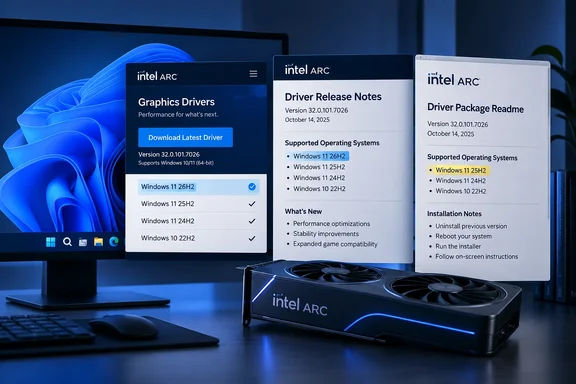
Intel's download page describes the package as Intel Graphics Driver 32.0.101.9034 for Arc B-Series, Arc A-Series and Core Ultra processors with Arc graphics. The page's OS support list ends with Windows 11 24H2, 25H2 and "September 2026 Update (26H2)". The page links to both the release notes PDF and the readme text file.
The release notes are dated October 1, 2026 and marked Non-WHQL. According to MIXED, which first flagged the discrepancy, those notes name the September 2026 Update (26H2) as the newest supported Windows build and tick it for all six product families they cover.
The readme tells a different story. MIXED reports that the readme's newest listed OS is the September 2025 Update (25H2) and that 26H2 doesn't appear in it at all. The readme does carry the matching version and build date. Both the page and the release notes were checked against Intel's live files, and the readme was the odd one out.
So this is a conflict inside one driver listing. It isn't two different drivers.
The "recycled readme" claim
MIXED goes further. It says the 9034 readme is nearly identical to the readme for the previous public Arc driver, 32.0.101.8974, which has a build date of 08/11/2026 and the same six operating systems. MIXED also says the two files are the same length and differ by only six characters, in the version number and build date.
I could not independently reproduce the byte-level comparison. Treat it as MIXED's finding, not a confirmed fact. If it holds, the likeliest explanation is a stale template that nobody updated. That is a guess on my part, and Intel has published nothing explaining the gap.
What this does and doesn't mean
- It does not show that the driver fails on 26H2. No source I found reports an installation failure or a crash tied to 26H2.
- It does not show that Intel dropped 26H2 support. Two of the three documents say the opposite.
- It is a documentation inconsistency. Intel hasn't said which document is authoritative. The page and release notes are the more current-looking pair, and the readme looks like the outlier.
- 26H2 isn't new in this driver. Guru3D notes that the preceding 9033 WHQL release's documentation already included Windows 11 26H2 support, so 9034 shouldn't be presented as adding it.
Platform lists differ too
MIXED also spotted a hardware mismatch. The release notes group Meteor Lake, Lunar Lake, Arrow Lake-S, Arrow Lake-H and Arrow Lake-U together, according to its reading. The page and readme end their Core Ultra list with Panther Lake and don't name Arrow Lake-U.
I've verified the page and readme wording against Intel's own text. The readme lists Meteor Lake, Lunar Lake, Arrow Lake-S, Arrow Lake-H and Panther Lake for Core Ultra and puts Wildcat Lake under Core.
This is a difference in how Intel enumerates platforms. Nothing here shows that any Arrow Lake-U system is incompatible.
The release itself
This is a game-readiness driver. Intel's notes say it adds Game On support for ACE COMBAT 8: WINGS OF THEVE and Gears of War: E-Day. Guru3D notes that no individual bug fixes or measured performance improvements are published for this release.
Known issues in the notes include:
- Gears of War: E-Day (DX12) may run slower than expected on Core Ultra Series 1 with built-in Arc GPUs.
- NBA 2K26 (DX12) may crash on first launch on those same Series 1 chips.
- Arena Breakout Infinite (DX12) may crash on Arc B-Series with Terrain Surface Subdivision turned on.
- The Procyon AI Image Generation and AI Text Generation benchmarks may fail to complete.
Practical guidance for Windows 11 users and admins
- Check the driver channel. This is a Non-WHQL release. Intel's page also carries a WHQL-certified 9033 build, which may suit cautious deployments better.
- Check your OEM first. Intel's page warns that installing the generic driver will overwrite a handpicked OEM graphics driver, and that corporate customers should use OEM drivers and report issues through their vendor. On a laptop with a Core Ultra chip, the maker's version may carry platform-specific fixes.
- Pilot on 26H2 before rollout. If you're deploying 26H2, test on a representative machine. A readme that stops at 25H2 is a reason to test, not a reason to panic.
- Treat the release notes as the working reference. They are the most detailed of the three documents and agree with the download page. Keep a note of the mismatch for any compliance or support records that cite the readme.
- Report the discrepancy to Intel. The page says graphics issues with generic drivers should be reported directly to Intel.
Bottom line
Intel's page and release notes say 9034 supports Windows 11 26H2, and the readme in the package doesn't. This looks like a housekeeping error rather than a compatibility warning, but Intel hasn't confirmed that. Until it does, test on your own hardware and don't rely on the readme alone for OS support.
References
- Intel's Arc driver page lists Windows 11 26H2, and the readme inside it stops at 25H2 - mixed-news.com mixed-news.com · 2026-10-06T13:23:51+00:00
- Download Intel ARC graphics driver 32.0.101.9034 guru3d.com
- Intel® Arc™ Graphics - Windows* intel.com