

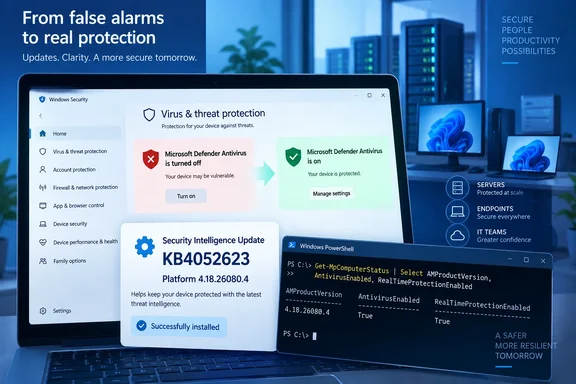
BleepingComputer first reported the resolution after Microsoft updated its Windows release-health documentation on Thursday. The important detail is that this is a Defender platform update—KB4052623—not a Windows cumulative update or a routine security-intelligence signature package. Microsoft’s Update Catalog independently lists KB4052623 version 4.18.26080.4 in the Current Channel (Broad) release ring with a September 17, 2026 date.
For affected machines, Microsoft had said Defender remained active and configured correctly despite the Windows Security notification. In other words, the alert itself was wrong; the reported condition was not, by itself, evidence that real-time antivirus protection had stopped. That distinction should prevent unnecessary remediation on otherwise healthy endpoints, but it does not justify treating every “antivirus off” message as harmless without checking the device state.
The alert reached far beyond Windows Insider builds
Microsoft formally logged the issue on August 28, but users had reported it in the Windows Insider Release Preview Channel as early as June. It eventually appeared across a notably broad set of supported operating systems: Windows 11 versions 23H2 through 26H1, Windows 10 versions 21H2 and 22H2, Windows 10 Enterprise LTSC releases, and Windows Server 2012 through Windows Server 2025.
The symptom was unusually persistent. Windows Security could tell a user to turn Defender on at startup and then repeat the warning intermittently, even when the product interface showed every relevant setting enabled. Microsoft also acknowledged that turning off notifications did not reliably suppress the false alert.
For a home PC, that is an irritating contradiction. For enterprise IT, it can become an operational problem: an endpoint that looks unhealthy to a user or a technician can trigger ticket volume, manual checks, and pressure to change a configuration that was already correct.
Reports from Intune administrators during the incident also suggested that some environments were seeing antivirus-related compliance problems alongside the user-facing warning. Microsoft’s public known-issue description focused on the Windows Security notification rather than documenting every management-plane effect, so administrators should not assume the platform update will retroactively clear every stale compliance evaluation at the same moment it arrives.
KB4052623 is the update to verify
The practical trap here is confusing three separate Microsoft Defender update streams:
- Security-intelligence updates refresh malware detections and signatures.
- Engine updates refresh the scanning engine.
- Platform updates refresh Defender’s product components and servicing code.
Microsoft documents KB4052623 as its recurring Defender Antivirus platform update. Version 4.18.26080.4 is therefore the relevant build for this particular false-positive notification. Running a signature update alone may bring definitions current without proving that the notification fix has been installed.
On a locally managed PC, Windows Update should normally deliver the broad-channel platform update. In managed environments, availability depends on the organization’s update path. WSUS, Microsoft Configuration Manager, update rings, and controlled deployment policies can all delay or filter platform updates. Microsoft’s own Defender deployment documentation notes that platform packages are released in phases and can appear separately from the definition updates administrators are used to approving.
That means a machine can be fully patched for the September Windows security release and still be on an older Defender platform build. Conversely, a machine that has received version 4.18.26080.4 may no longer need any Windows OS-level remediation for this particular warning.
Verify the platform version before changing policy
Administrators should check the installed platform version directly rather than relying on the Windows Security banner. In an elevated PowerShell session, run:
Get-MpComputerStatus | Format-Table AMProductVersion, AMRunningMode, AntivirusEnabled, RealTimeProtectionEnabled
The key value for this incident is AMProductVersion. Systems that have received Microsoft’s stated fix should report 4.18.26080.4 or a later platform version. Microsoft’s Defender documentation identifies AMProductVersion as the installed platform version, making it more useful here than the antivirus signature version.
The rest of the output provides the needed sanity check:
AMRunningModeofNormalindicates that Defender Antivirus is operating as the active antivirus product.AntivirusEnabledandRealTimeProtectionEnabledshould beTruewhen Defender is expected to provide active protection.Passive Modecan be legitimate on devices onboarded to Microsoft Defender for Endpoint that use another primary antivirus product.Not running, disabled protection flags, a missing Defender service, or outdated signatures require investigation regardless of whether the false-alert bug was present.
This is also why clicking “turn on” in the Windows Security notification was never a sound general fix. On devices where Defender was already active, it was an attempt to repair the display state rather than the antivirus state. On devices with a third-party antivirus, Defender might correctly operate in passive mode or be disabled by design, and forcing settings without understanding that configuration can create a different support issue.
Treat stale alerts and real protection failures differently
A device that keeps displaying the message after it receives version 4.18.26080.4 should be rebooted once and checked again through Get-MpComputerStatus. The update may have installed while Windows Security still holds an older notification state, particularly on machines that have been running for days.
If the platform version is older than 4.18.26080.4, the next step is to inspect the organization’s update deployment rather than repeatedly changing antivirus settings. WSUS and Configuration Manager administrators should confirm that the Current Channel (Broad) KB4052623 package has synchronized, been approved where required, and reached the affected device group. Microsoft’s Defender guidance specifically distinguishes platform updates from security-intelligence updates in those management tools.
If the platform is current but the command output says Defender is not active when it should be, this is no longer the known false-notification scenario. Check whether a non-Microsoft antivirus product was installed, whether Defender policy was intentionally disabled, whether the device is in passive mode through Defender for Endpoint, and whether the Defender service is healthy. The September fix addresses a bad alert; it does not correct genuine misconfiguration, damaged services, or a failed update installation.
The wider lesson from this incident is simple: Windows Security notifications are an important signal, not a conclusive diagnosis. When a security warning conflicts with the product’s own state and endpoint telemetry, the platform version and live protection status decide the case.
Organizations that saw this warning should now use version 4.18.26080.4 as the cutoff in their inventory and compliance reporting. Machines below that build remain candidates for the false alert; machines at or above it that still report antivirus disabled deserve a real security investigation rather than another attempt to dismiss the notification.
References
- Microsoft fixes bug behind ‘Defender Antivirus is turned off’ alerts BleepingComputer · 2026-09-18T08:16:32-04:00