

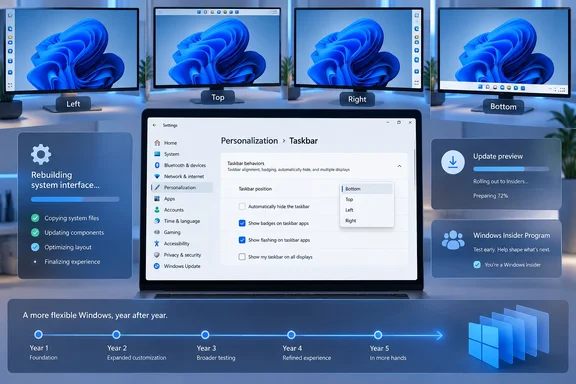
The distinction matters now because the feature is returning. Microsoft’s August 27 preview update, KB5120998, adds a Taskbar position setting to Windows 11 versions 24H2 and 25H2, letting users select the bottom, top, left, or right edge of the screen. It is a gradual rollout rather than a guaranteed change on every PC, so many fully patched systems will still not display the option immediately.
Roth’s explanation in 2022 was candid in one important respect: the team knew that a portion of users wanted a vertical or top-mounted taskbar, but internal data put them behind other requests. The technical challenge was real, yet Microsoft’s own record makes clear that priority, not impossibility, decided the outcome.
A new taskbar meant old behavior was no longer inherited
Windows 11 launched on October 5, 2021 with an extensively redesigned taskbar. It initially dropped more than movable placement: users could not drag a file onto a taskbar button to bring an app forward, right-clicking the taskbar could not open Task Manager, and ungrouped taskbar buttons with labels were absent. Microsoft restored some of those functions over subsequent updates, while the ability to place the taskbar at the top or sides remained missing until 2026.
In the 2022 AMA, Roth said the Windows 11 taskbar had been “rebuilt from scratch” and the team had to decide which capabilities made the initial cut. German technology publication Golem reported the same AMA at the time and described Microsoft’s position plainly: taskbar relocation was not a priority for the responsible product group.
That is stronger evidence than the usual claim that Microsoft simply “removed” a settings toggle. The old Windows taskbar had accumulated behavior over decades of Shell and Win32 development. Replacing a core shell surface means rebuilding its interactions with Start, Search, notification flyouts, tooltips, the system tray, touch layouts, multiple monitors, accessibility behavior, window management, and taskbar-button grouping.
A taskbar that remains at the bottom can make assumptions that a movable taskbar cannot. Start and Search need to open away from the screen edge rather than underneath the taskbar. Context menus, previews, overflow trays, notification surfaces, and animations need correct anchoring. A vertical taskbar also changes the available width of applications and makes labels, buttons, and compact layouts behave differently.
Microsoft did not publish a detailed technical postmortem identifying a single removed Win32 module or a specific application-compatibility failure that made alternate positions impossible. The public evidence supports a narrower conclusion: Windows 11’s new taskbar did not inherit the mature placement logic of its predecessor, and restoring it required Microsoft to rebuild and validate the surrounding shell behavior.
“App reflow” was an engineering cost, not a reason apps stopped working
Roth said moving the taskbar left or right created major reflow work because applications and Windows experiences would need to provide a good experience in those environments. That has sometimes been repeated as if ordinary Win32, UWP, and WinUI applications could not cope with a vertical taskbar.
That overstates the case.
Windows applications already operate across different monitor sizes, orientations, scaling levels, docking arrangements, and usable desktop areas. Well-behaved applications use Windows-provided work-area and display metrics rather than assuming that every desktop has the same free rectangle. A taskbar at the left edge reduces available width; at the top it reduces height. Software has handled similar constraints through resizable windows, display scaling, docks, panels, and secondary monitors for years.
The bigger workload was inside the Windows shell itself. Microsoft’s May Insider documentation confirms that taskbar placement required work on the parts users see immediately: flyouts, tooltips, animations, taskbar button labels, alignment, Start, and Search. The company specifically said that when the taskbar moves, those surfaces originate from the new edge rather than continuing to behave as if the bar were fixed at the bottom.
That helps explain why the return has taken multiple preview cycles. Microsoft began testing the capability in its Experimental Insider channel in May 2026, then expanded it through Beta and Release Preview builds. The company has also been explicit that the restored feature is incomplete in some configurations.
- The Search box is currently supported only when the taskbar is positioned at the top or bottom.
- The smaller taskbar option is likewise limited to top and bottom positions.
- Microsoft previously listed auto-hide and touch-optimized taskbar behavior as unsupported for alternate locations while those builds were being tested.
- Different taskbar positions on different monitors remain under evaluation rather than a committed feature.
Those limitations are the practical proof that this was more than moving a rectangle in Settings. They also show why “Microsoft finally brought it back” should not be confused with “Windows 10 behavior has returned in full.”
Microsoft’s own language changed from minority use to a top request
The more revealing change is not technical. It is how Microsoft described demand.
In 2022, Roth said telemetry showed that people who preferred alternate taskbar positions were a relatively small group compared with users asking for other improvements. Microsoft therefore focused its engineering resources elsewhere and had no plan or date for a side taskbar.
By March 2026, Windows chief Pavan Davuluri was calling taskbar repositioning one of the top requests Microsoft had heard. Two months later, Microsoft’s Windows Insider team called it one of the most requested features and said it was coming to Windows 11.
Both statements can be true. A feature can be used by a minority while still being one of the most persistent, visible complaints from power users. For developers working on ultrawide monitors, users who prefer labels over icons, people with accessibility needs, and anyone trying to preserve vertical space for code or documents, the orientation of the taskbar changes daily workflow. Usage share alone is a blunt tool for judging the cost of a regression.
Microsoft’s original product decision also created a feedback loop. A user who upgraded to Windows 11 could no longer choose a side taskbar at all, so telemetry from Windows 11 could not measure ongoing use of the feature. It could measure demand through Feedback Hub and other channels, but not the same behavior that Windows 10 had allowed by default.
The company has not disclosed the underlying telemetry, the threshold that caused taskbar placement to be deprioritized, or the engineering budget eventually assigned to restore it. Those omissions matter because “few people use it” became the public rationale for removing a long-standing personalization control, while Microsoft now describes the same control as a top request.
KB5120998 brings the setting closer, but not to every PC at once
For administrators and enthusiasts, the immediate question is whether the option is available now. Microsoft lists it in KB5120998, the August 27, 2026 optional preview update for Windows 11 24H2 and 25H2. The relevant OS builds are 26100.9278 for 24H2 and 26200.9278 for 25H2.
After the feature reaches a device, the setting appears under Settings > Personalization > Taskbar > Taskbar behaviors > Taskbar position. The available choices are Bottom, Top, Left, and Right.
But KB5120998 uses Microsoft’s gradual rollout mechanism. Installing the update does not ensure that the feature configuration has been enabled on a particular machine. This is especially important in managed fleets, where an optional preview update may not be approved at all and where feature enablement can vary across otherwise identical PCs.
Windows Insiders received earlier builds with the new taskbar, including Release Preview build 26100.9267 or 26200.9267 in mid-August. PCWorld reported in early August that the function had reached Beta testing. The August preview update moved it nearer to general Windows 11 availability, but Microsoft still characterizes feature delivery in phases.
The five-year gap, then, did not exist because Windows suddenly lost the fundamental ability to reserve space at another edge of the display. It existed because Windows 11 replaced a battle-tested taskbar, shipped a narrower first version, and spent years treating the missing flexibility as less important than other work. The rebuilt taskbar is finally gaining that capability back, but its remaining limitations show exactly where the original rewrite left functionality behind.
References
- The real reason your Windows 11 taskbar couldn’t move for 5 years PCWorld · 2026-09-17T16:53:37+00:00