

The email’s “more changes this fall” language should not be read as a dated release commitment for a broad Windows performance update. Microsoft has published no benchmark suite, no before-and-after figures, and no single fall KB package or build number that promises system-wide speed gains. What is documented is a collection of separate changes moving at different speeds through Insider testing and controlled rollout.
That distinction matters for users who are waiting for Windows 11 to suddenly feel like a different operating system. Some improvements have already reached the August optional update for Windows 11 24H2 and 25H2. Others remain preview-only, may be enabled for only some testers, and can still change before release.
The evidence supports targeted fixes, not a blanket speed claim
Windows Latest says Ash’s email followed smaller Windows Insider meetups and described feedback from people using Experimental builds. The outlet reported that Ash said testers could feel improvements in overall responsiveness and that Microsoft would share earlier design work with Insiders before features graduate to the Experimental channel.
Microsoft’s public record supports the broader quality initiative. In March, the Windows Insider Blog said the company was working on lower Windows memory use, better performance under load, faster app launches, reduced interaction latency, faster File Explorer operations, and faster file copying. In May, Ash wrote publicly that architectural work was beginning to unlock more consistent performance gains across File Explorer, search, and overall responsiveness.
But those are goals and qualitative assessments, not measurements. Microsoft has said File Explorer launches faster and that it has eliminated dozens of potential stalls behind freezes, delays, and flashes during browsing, renaming, navigation, and multi-select operations. It has not published cold-launch timings, CPU and memory traces, hardware test configurations, or comparative results against earlier Windows 11 builds.
That leaves a practical conclusion: there is credible evidence of focused responsiveness work, particularly in File Explorer and shell surfaces, but no public basis for treating “Windows 11 is faster” as a uniform result across PCs, workloads, storage configurations, or third-party shell extensions.
The email itself also cannot yet be independently checked in Microsoft’s public news archive. As of September 16, Marcus Ash’s public Windows Insider Blog author page lists posts through May 29, 2026. Windows Latest is therefore the sole published source for the email’s exact wording and its fall framing. The company’s existing documentation corroborates the development direction, but not a public rollout schedule for the email’s broader claim.
File Explorer is where Microsoft has put the clearest work
File Explorer is the strongest example of Microsoft’s performance push because the company has described both the problem and the work underway. Its August Windows Insider Blog post explicitly acknowledged the everyday annoyances users remember: slow right-click menus, Home views that flash or reload, and brief freezes during common file tasks.
Microsoft says it has profiled File Explorer’s responsiveness problems and removed potential stalls. Its stated focus is less on headline features than on the points where users lose time: opening Explorer, navigating folders, selecting files, renaming items, and waiting for the interface to settle.
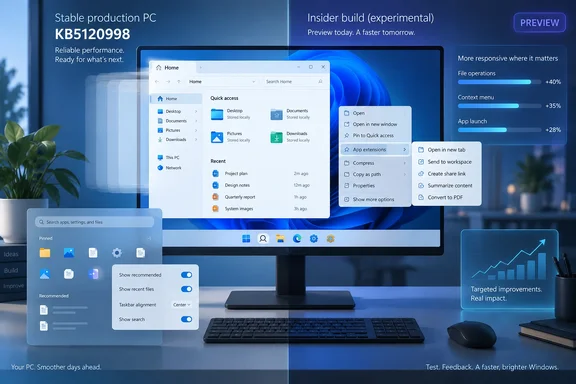
The production-facing piece has already started. The August 27 optional preview update, KB5120998, brought a faster and more responsive File Explorer Home experience to Windows 11 24H2 and 25H2. That package updates systems to builds 26100.9278 and 26200.9278, respectively. It is a gradual rollout, meaning two eligible machines with the same update installed can still receive different feature states.
The distinction between “Explorer” and “Explorer Home” is important. Microsoft’s public release notes promise a faster Home page; they do not promise that every folder, network share, archive handler, cloud provider, thumbnail generator, or third-party context-menu extension will become instant. Administrators dealing with slow Explorer launches on mapped drives or with heavy shell-extension loads should not assume this update cures those specific bottlenecks.
Windows Latest previously reported that Microsoft was improving File Explorer launch performance without relying solely on background preloading. Microsoft’s official documentation now backs the broader claim that Explorer is receiving foundational responsiveness work. The vendor has not, however, explained enough of the underlying changes to let IT teams predict which problematic configurations will benefit most.
The new right-click menu remains an Insider feature
The more dramatic File Explorer overhaul is the redesigned context menu. Microsoft began rolling it out to Windows 11 Insiders in August through Experimental build 26340.9212, associated with the 26H2 development track. The changes group application-added commands under an “App extensions” submenu and add settings that let users decide which built-in actions and extensions stay on the first-level menu.
That addresses two long-running Windows 11 complaints at once: the modern menu can be cluttered, and third-party extensions can make it feel slow or incomplete while commands populate. Microsoft says its new approach is designed to reduce delays and make right-clicking more predictable. Independent coverage from Windows Central and PC Gamer confirms the visible customization options and the new extension grouping in preview builds.
For technical users, the right-click redesign may be the more consequential improvement than a slightly faster launch animation. File-management tools, image editors, version-control clients, archive utilities, security products, and cloud sync software commonly add shell commands. A menu that gives users control over what is surfaced, rather than placing every extension at the top level, can reduce visual friction even before any measurable latency reduction is considered.
It is still premature to call the change broadly available. Microsoft’s September 11 Experimental build, 26340.9482, added a teaching tip for context-menu customization and the option to hide the “Customize menu” entry itself. The same build moved File Explorer’s This PC search to an indexer-based model, which Microsoft says is faster and consistent with search from File Explorer Home.
Those changes are explicitly subject to Controlled Feature Rollout. Microsoft warns in its Experimental release notes that features can be limited to a subset of Insiders, altered, removed, or never released beyond the preview program. That is a normal caution for pre-release software, but it directly undercuts any assumption that all of this will arrive in a single fall update.
Start and taskbar changes are already crossing into production
Ash’s reported claim that Start and taskbar work has begun rolling out broadly is substantially supported by Microsoft’s release documentation. KB5120998 includes the return of taskbar placement at the top, left, and right of the display, plus a smaller taskbar option. It also adds Start menu sizing choices, lets users hide their name and profile picture, renames “Recommended” to “Recent,” and provides individual toggles for Pinned, Recommended, and All sections.
These are not performance fixes in the narrow benchmark sense. They are usability changes that can make Windows feel less obstructive for people who work on smaller screens, ultrawide displays, or multi-monitor desks. A smaller taskbar can reclaim vertical pixels; a resizable Start menu can reduce unnecessary screen coverage; and moving the taskbar can restore a workflow many Windows 10 users expected to keep.
Microsoft is rolling these capabilities out gradually rather than simply enabling them for every eligible device on installation day. The company’s own explanation of Controlled Feature Rollout is unusually candid: staged delivery helps it watch quality and impact, but it also means users may not receive an announced feature immediately. That is why reports from users with the same OS build often conflict.
For home users, the sensible path is to install supported cumulative or optional preview updates only when comfortable with their known-issue profile, then allow the rollout to reach the device normally. For managed environments, it is better to validate these shell changes through existing pilot rings than to promote Experimental builds because a new menu looks faster.
Microsoft’s fall promise has no single finish line
The most revealing part of this story is not the claim that some testers perceive Windows as faster. It is that Microsoft is treating responsiveness, reliability, personal control, and feedback visibility as one connected repair project after several years in which Windows 11’s interface changes often felt imposed rather than refined.
The company has announced plans for clearer feedback grouping and better visibility into ideas that are being considered or actively developed. It has also reworked the Insider program so Experimental users can enable selected visible features through Feature flags, while Beta is positioned as the steadier channel closer to release. Those process changes explain why more work is appearing in public before it reaches a monthly Windows update.
What Microsoft has not supplied is equally clear: no performance baseline, no list of all affected Windows 11 versions, no hardware matrix, and no date when the redesigned context menu or the newer Explorer search behavior will reach general availability. “Fall” begins on September 22, 2026, but Microsoft has not attached that season to a named Windows 11 release.
For now, the tangible production result is KB5120998’s faster File Explorer Home page and new Start/taskbar controls on Windows 11 24H2 and 25H2, delivered in phases. The rest of the claimed speed-up remains a work in progress whose real test will be whether Microsoft turns its preview fixes into reliable, measurable improvements on ordinary managed and consumer PCs.