

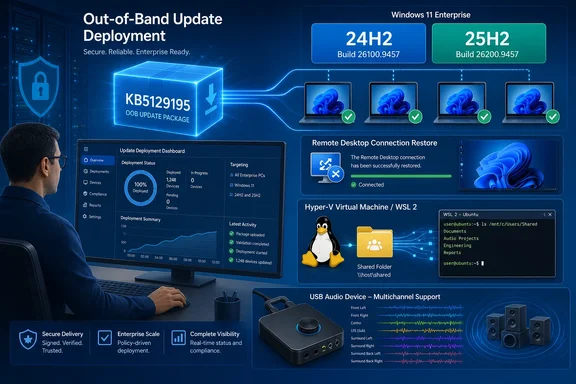
Microsoft’s support article also says KB5129195 adds protection for CVE-2026-62721, an elevation-of-privilege vulnerability in the Windows User-Mode Power Service. That makes this more than a conventional reliability hotfix: organizations that deferred the September cumulative update because of the Remote Desktop regression now have a replacement that retains the month’s prior fixes while adding a new security correction.
The patch arrives through Windows Update and Windows Update for Business under configured policies, and synchronizes to WSUS as a Security Updates classification. That delivery treatment is important. This is not merely an optional preview build for test machines; environments approving September security updates can receive it through their ordinary servicing process.
KB5129195 repairs the Windows 11 side of the RDS regression
The headline fix addresses the Remote Desktop Services failures that followed September’s Patch Tuesday updates. Microsoft’s Windows release-health documentation describes the symptom as RDP connections failing after several minutes, sign-in failures, hosts hanging during Remote Desktop configuration, and related management components becoming unresponsive. Microsoft Management Console, RDS Licensing Diagnoser, File Explorer, and even the Windows Update settings page could stall.
Independent reporting from BleepingComputer established that the wider incident was operationally serious on Windows Server estates as well: administrators described servers that accepted connections initially, then stopped accepting new RDP sessions after logouts or after several hours of use. Some reported that ordinary restarts were not enough and that they needed a hard reset; others said removing the September cumulative update restored functionality at the cost of removing the month’s security fixes.
KB5129195 is the Windows 11 24H2 and 25H2 remedy. It should not be read as a universal cure for every system caught in the September RDS incident. Microsoft’s own release-health dashboard lists affected client and server platforms far beyond these two Windows 11 releases. Administrators responsible for Windows Server RDS session hosts need to identify the separate out-of-band update assigned to their server version rather than assuming a Windows 11 package addresses a server-side deployment.
There is also a documentation error worth catching before it becomes a ticketing or change-management problem. The KB5129195 support page says the RDS issue followed KB5122880, but Microsoft’s release-health entry for Windows 11 24H2 identifies the originating September 8 update as KB5124008, build 26100.9445. KB5122880 is the corresponding Windows 11 23H2 update. The fix itself is correctly targeted at 24H2 and 25H2, but the wrong originating KB in the support article can send admins looking in the wrong compliance report or uninstall history.
For incident records, use the build and product line rather than the stray reference: Windows 11 24H2 and 25H2 systems affected by the September regression came from the KB5124008 servicing branch and should end up on build 26100.9457 or 26200.9457 after KB5129195.
Hyper-V and WSL users get the Plan9 share repair
KB5129195 also resolves a failure in host-folder integration for applications using Host Compute Service-managed virtual machines and Plan9 file sharing. Affected Linux guests could boot normally, but folders exposed from the Windows host did not appear inside the guest or could not be opened.
The distinction between HCS-managed environments and ordinary Hyper-V VMs is useful. Microsoft’s release-health documentation says standard Hyper-V virtual machines that do not rely on Plan9 host shares are not affected. The regression instead hits tools and sandbox-style workflows that rely on this integration layer, including Windows Subsystem for Linux and Claude Cowork, according to Microsoft.
For developers, this symptom can look like an application or distribution-specific mount problem: the VM launches, Linux itself is responsive, yet expected project folders are absent. Recreating the virtual machine, changing Linux permissions, or remounting a host path will not correct an OS-level regression in the host sharing path. KB5129195 is therefore the preferred remediation for affected Windows 11 24H2 and 25H2 clients, rather than an improvised workaround inside the guest.
The update’s timing also matters for managed developer workstations. A machine may have been kept on the September security update because it fixed an unrelated issue, while its WSL workflow silently broke afterward. Administrators should include a basic host-to-guest folder access check in their post-deployment validation, especially where developer images use managed Windows Update rings.
The audio correction is partial, not a general USB-audio fix
Microsoft says KB5129195 fixes one narrow audio failure: USB Audio Class 1.0 devices that worked in normal stereo could fail when users selected multichannel modes, including eight-channel or 3D audio. Users whose hardware failed only when switching from two-channel output to surround or spatial configurations should retest after the update.
But the update does not resolve every audio defect caused by the September release. Microsoft continues to list a known issue in which USB Audio Class 1.0 devices may show Device Manager Code 10, produce no sound, leave volume controls stuck at zero, or make sound settings unavailable. The company says it is still working on a resolution.
That separation is easy to miss because the affected hardware class is the same. A successful update should be expected to restore the multichannel-mode scenario cited in the release notes; it is not evidence that an adapter or DAC with Code 10 will begin working again. Support teams should collect the Device Manager status and the selected channel mode before concluding that KB5129195 failed to install or failed to address a documented fix.
As a temporary operational measure, Microsoft’s release-health entry says some users have restored sound in the multichannel-only scenario by moving back to two-channel output. That is a workaround for the configuration-specific failure, not a fix for the unresolved no-output and Code 10 cases.
Deployment details matter for offline servicing
For normally managed devices, the clean path is to allow Windows Update, Windows Update for Business, or WSUS to deploy KB5129195. Because it is cumulative, it includes the preceding servicing content as well as the new corrections. Microsoft also notes that the package contains Copilot+ PC AI component updates, although those components do not install on ordinary Windows client PCs or on Windows Server.
Manual deployment deserves more care. Microsoft requires a checkpoint cumulative update, KB5043080, before the target KB5129195 package when that checkpoint is not already installed. This applies to both architectures:
- Arm64 installations use
windows11.0-kb5043080-arm64.msubeforewindows11.0-kb5129195-arm64.msu. - x64 installations use
windows11.0-kb5043080-x64.msubeforewindows11.0-kb5129195-x64.msu.
Administrators using the Microsoft Update Catalog should keep the required packages together in an otherwise empty folder. Installing the MSUs individually requires the checkpoint package first. DISM can instead process the target package and scan its package path for the needed checkpoint update, which is safer for repeatable offline-media servicing and reduces the chance that an operator reverses the order.
Images that also receive Dynamic Update packages need another check: Microsoft advises using packages from the same release month as KB5129195. If the matching Safe OS Dynamic Update or Setup Dynamic Update is unavailable, Microsoft says to use the most recently released version. That guidance is especially relevant for organizations maintaining custom Windows 11 media, where mismatched servicing components can turn a straightforward quality update into setup-time troubleshooting.
What to validate after installation
The practical priority is higher for organizations that installed the September 8 cumulative update and enabled RDS on Windows 11 endpoints, run WSL or another HCS-managed Linux VM workflow, or use USB Audio Class 1.0 hardware in multichannel configurations. Test the exact path that failed rather than relying solely on a successful reboot.
A focused post-install check should include an RDP sign-in and disconnect/reconnect cycle, access to a host-shared directory from the affected Linux guest, and playback in the previously failing multichannel mode. For managed fleets, confirm the resulting build number: 26100.9457 for Windows 11 24H2 and 26200.9457 for Windows 11 25H2.
KB5129195 closes the immediate Windows 11 gap created by September’s regression, but it leaves the broader USB Audio Class 1.0 Code 10 and no-output issue unresolved. Teams that depend on those devices should install the OOB update for its security and fixed-feature benefits, then keep their workaround and monitoring in place until Microsoft publishes the separate audio resolution.