

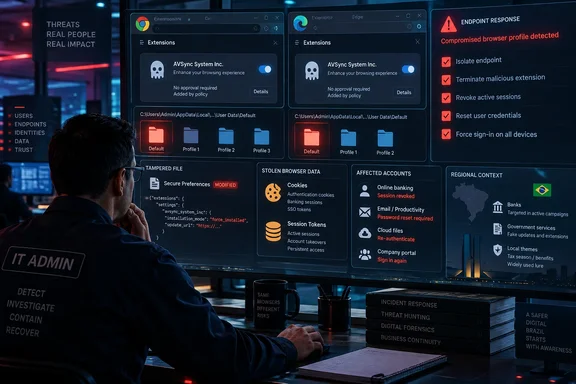
Elastic published the technical analysis on September 14, and BleepingComputer and The Hacker News subsequently reported the campaign. Elastic’s evidence places the active targeting overwhelmingly in Brazil, where attackers use fake documents and lures impersonating Brazilian banks. But the technique applies to Windows installations of Chrome and Edge generally, and it turns a one-time user execution event into persistent browser-level access to passwords, cookies, active sessions, page content, and typed data.
The distinction changes the defensive response. Removing an unfamiliar extension is necessary, but it is not sufficient when the installer that inserted it may still be present, scheduled to run, and able to reinstall or update it.
Chromium integrity checks are being forged, not merely disabled
KREMLIN begins when a victim manually opens a JavaScript file masquerading as a receipt, invoice, banking record, or corporate document. The file displays a fake error, then performs sandbox and virtual-machine checks while it downloads Node.js and pulls in later payload stages. Elastic says the operation has run seven campaigns over roughly 15 months, beginning in May 2025.
The final installer waits for Chrome or Edge to close. If the browser stays open after the user has been idle, it can terminate the process, copy the extension into local browser-profile directories, and edit Chromium’s Secure Preferences file. That file records extension settings and has integrity protections designed to alert the browser when an outside process has changed sensitive preferences.
KREMLIN’s notable capability is that it generates the validation data Chromium expects after those edits. It obtains cryptographic material used by the browser, including the newer App-Bound encryption key, then recreates the HMAC and encrypted-hash values that protect the preference entries. On Chromium versions 144 and newer, Elastic says the malware accounts for the additional encrypted-hash checks as well.
This is a documented attack path sometimes called Phantom Extension or GhostChrome-X. It is not a browser zero-day, and the reporting does not show that Chrome or Edge’s extension stores were compromised. The malware needs prior code execution on Windows to perform the profile manipulation. Still, once that foothold exists, the normal browser prompt is absent and the extension can appear to Chromium as a legitimate locally configured component.
That is a more serious outcome than ordinary browser hijacking. Browser extension permissions are deliberately broad because extensions are meant to integrate with sites and browser data. A malicious extension operating with access to tabs, cookies, storage, and network-request APIs can work inside the same browsing session the user uses for banking, Microsoft 365, SSO portals, and internal web applications.
The AVSync extension can steal sessions as well as passwords
The extension examined by Elastic identifies itself as AVSync System Inc. and uses the extension ID ndpbidppejfanjbhfgjlohfanbfbklff in the campaign researchers analyzed. It has a version reported as 1.0.0, although defenders should not treat that version number as a safe boundary: the installer checks an attacker-controlled server for updates and replaces the local extension when the version changes.
Its capabilities go well beyond collecting stored credentials. Elastic found commands to capture screenshots, enumerate open tabs, gather cookies plus local and session storage, retrieve page HTML, collect browsing history, and capture form input through keylogging. It can also intercept HTTP request data and redirect users or inject attacker-supplied HTML into visited sites.
For incident responders, stolen cookies and session storage deserve the same urgency as stolen passwords. A session token can let an attacker reuse an authenticated browser session where a password reset alone does not immediately revoke access. The appropriate containment work therefore includes invalidating active sessions in affected identity systems, reviewing account sign-ins and token use, and resetting credentials that were entered in the compromised browser.
The extension communicates through a WebSocket channel and also disguises periodic requests as CSS fetches. That gives operators a live path to decide which sites to monitor, redirect, or keylog rather than relying only on a static collection rule set bundled with the initial payload.
Elastic also found the standalone KREMLIN tooling can archive browser databases, cookies, extension files, and cryptographic key material from local browser profiles. In other words, the extension is not the campaign’s sole collection mechanism. Treat a detection as endpoint compromise with browser-session exposure, not as an isolated unwanted add-on.
Ethereum configuration makes domain blocking a short-lived control
The attackers use Ethereum smart contracts as dead-drop resolvers: the malware queries contract data to obtain current payload and command-and-control locations. Elastic tied changes in those smart-contract values to infrastructure updates through August 2026, including a change to one of the primary payload locations on August 13.
That design does not make the operation invulnerable to disruption, but it makes a simple domain block fragile. The server address is no longer necessarily hard-coded into every sample, and the actor can update configuration through a blockchain transaction without redistributing the original JavaScript lure.
Elastic took an unusual defensive step by registering a domain KREMLIN uses as an anti-analysis network canary. The malware interprets successful access to the domain as a sign that it is under analysis and stops progressing. Elastic reported 1,515 infected systems checking in to that canary at the time of publication, with 98.75% located in Brazil.
That action has bought defenders time, not removed the malware. Elastic explicitly says affected systems remain infected with the final KREMLIN component. The canary intervention prevents the loader from continuing in the observed chain, but it does not clean scheduled tasks, malicious binaries, altered browser profiles, stolen credentials, or extensions already installed.
The Brazilian focus should guide threat prioritization, particularly for organizations with staff, contractors, financial relationships, or banking activity in Brazil. It should not be misread as a geographic protection for other Windows users. The installation method depends on a compromised Windows endpoint and Chromium profile files, neither of which is unique to Brazilian banks.
What Windows administrators should check now
The most practical starting point is to inventory Chrome and Edge extensions across managed Windows devices, then investigate extensions that appeared outside normal software or browser-management workflows. Microsoft Defender Vulnerability Management’s DeviceTvmBrowserExtensions table can expose installed extensions with fields for browser, extension ID, name, version, activation status, and installation time. Microsoft’s Edge management service also offers an extension-monitoring inventory for managed Windows profiles.
Search for the AVSync name and the reported extension ID, but do not stop there. The actor has changed infrastructure and delivered multiple campaign variants. Review extensions installed close to suspicious JavaScript execution, Node.js downloads, unexpected browser termination, or scheduled-task creation. Local inspection should include every browser profile on the device rather than only the currently signed-in user’s default profile.
A defensible response to a positive hit should include the following actions:
- Isolate the endpoint and preserve the browser profile, scheduled-task configuration, and relevant process telemetry before deleting evidence needed to identify the initial infection path.
- Disable and remove the malicious extension from Chrome and Edge, then hunt for its installation directory and any modifications to
Secure Preferencesacross user profiles. - Identify and remove the loader and persistence mechanism, because an extension deleted while KREMLIN remains installed can be restored on the next run.
- Reset passwords entered on the device and revoke active sessions or refresh tokens for affected banking, corporate SSO, Microsoft 365, email, VPN, and other high-value accounts.
- Review sign-in and network logs for token replay, new sessions, suspicious OAuth activity, or anomalous activity after the likely infection date.
Organizations that permit arbitrary browser extensions should also reassess that policy. Microsoft documents that Edge can block all extensions except an allowlist, block extensions by permissions, and restrict which sites extensions can interact with. Google Chrome Enterprise provides comparable extension-management controls. These policies do not undo a compromised endpoint by themselves, but they reduce the legitimate extension surface and make unauthorized additions easier to spot.
A strict allowlist has a trade-off: it can disrupt employees who depend on niche add-ons. The better enterprise approach is usually to define a reviewed set of approved extensions, monitor the rest, and sharply limit extensions able to read or alter data on identity, finance, administrative, and internal business sites.
The browser warning never arrives
KREMLIN is a reminder that extension safety prompts protect users only while the browser remains the decision-maker. Once malware can run locally under the user context, obtain browser-held key material, and write a cryptographically valid profile change, the prompt that normally separates a useful extension from a dangerous one never appears.
Elastic’s disruption appears to have interrupted the currently observed campaign, but its own telemetry shows that more than 1,500 systems had already contacted the canary. For Windows defenders, the immediate job is to find endpoints where an extension named AVSync—or another unapproved extension with an unexplained installation path—has quietly become part of the browser’s trusted state.
References
- Malware bypasses browser checks to force install Chrome, Edge extensions BleepingComputer · 2026-09-16T14:50:53-04:00