

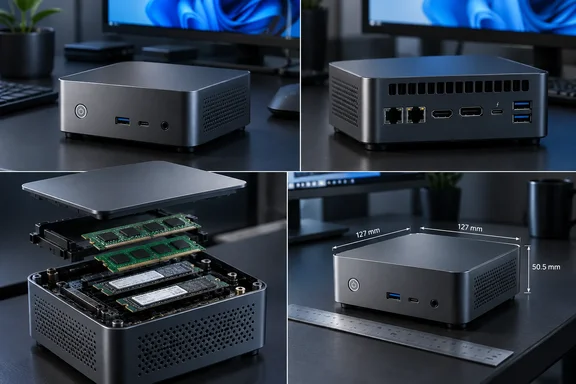
MaxTang T1-AL50 puts expansion ahead of a new processor generation
The T1-AL50 uses Intel’s 12th- and 13th-generation mobile processors. MaxTang lists seven options: Core i5-1240P, i5-1340P, i7-1260P, i7-1360P, i5-13420H, i5-13500H and i7-12700H. That makes the model name a platform designation, so a quotation for a “T1-AL50” needs an accompanying processor specification.
The Core i7-12700H highlighted in the announcement is a 12th-generation Alder Lake chip that Intel launched in the first quarter of 2022. It contains six Performance-cores and eight Efficient-cores, supports 20 threads and has a maximum turbo frequency of 4.70 GHz. Buyers should distinguish the newly reported PC from the age of its processor architecture.
MaxTang positions the machine for business desktops, meeting systems, digital signage and commercial edge computing. Its approximately 371-gram weight applies to the barebone system, while its small enclosure uses active cooling. Those qualifications are relevant when specifying a finished installation: the published weight is not a complete configured-system figure, and this is a fan-cooled computer.
The Core i7-12700H specification leaves sustained performance open
Intel specifies a 45-watt processor base power and a 115-watt maximum turbo power for the i7-12700H. These are processor specifications, not measurements of the T1-AL50’s electrical consumption or evidence that MaxTang operates it at the maximum turbo limit. Intel’s 4.70 GHz figure likewise describes maximum turbo frequency, not a promised sustained speed across every core.
For someone buying a machine for lengthy builds or other sustained workloads, the practical inference is straightforward: the processor name alone is insufficient to rank this PC’s performance. The announcement and product listing provide no sustained-load measurements or fan-noise results. A purchasing evaluation should therefore separate the confirmed CPU configuration from performance expectations that still require testing.
MaxTang also offers P-series configurations, describing the platform as spanning 28-watt and 45-watt processor classes. Those options broaden the configuration choices, but the listing supplies no measured comparison between them in this enclosure. There is consequently no evidence-backed basis yet for declaring one T1-AL50 configuration the best balance of noise, speed and cost.
DDR4 and two M.2 slots make configuration worth checking carefully
MaxTang specifies two DDR4 SO-DIMM memory slots with support for up to 64 GB in dual-channel operation. The memory is therefore replaceable, and the system has a documented capacity ceiling. Although Intel’s processor specification includes support for several memory technologies, the T1-AL50 implements DDR4; the CPU’s capabilities do not turn these into DDR5 slots.
The two storage positions also have different compatibility boundaries:
| Expansion position | MaxTang’s documented support |
|---|---|
| First M.2 Key M 2280 slot | NVMe SSD. |
| Second M.2 Key M 2280 slot | NVMe or SATA SSD. |
| Separate M.2 Key E 2230 slot | Optional Wi-Fi and Bluetooth module. |
These distinctions should appear on a configuration order, particularly when reusing a SATA M.2 drive. The wireless expansion position is separate from the two storage slots, but its presence does not establish that a wireless module is included.
A useful implication of the two storage positions is that buyers can specify separate system and data drives without relying exclusively on external storage. MaxTang does not identify the PCIe generation and lane allocation of both slots in its accessible listing, however, so maximum SSD throughput should not be inferred from the processor specification. Likewise, a purchase intended for wireless deployment should explicitly include the module and required antenna hardware.
Dual 2.5GbE and Thunderbolt 4 broaden the connections
The T1-AL50’s two 2.5GbE RJ-45 ports are particularly relevant to deployments requiring two physical wired connections. MaxTang explicitly describes separate network connections as a supported application of the hardware. For that requirement, the machine offers a concrete configuration advantage: both Ethernet interfaces are built into the enclosure.
Display connectivity consists of HDMI, DisplayPort and Thunderbolt 4. MaxTang explicitly leaves simultaneous-output combinations and maximum resolutions unspecified for the selected configuration. A multi-monitor purchase therefore needs confirmation of the actual monitor arrangement—resolution, refresh rate and simultaneous operation—before those three connectors are treated as a guaranteed display configuration.
There is also a USB discrepancy worth resolving. XiaomiToday’s narrative describes three USB 3.2 Type-A ports and one USB 2.0 Type-A port across the front and rear, while its specification table and MaxTang’s official text list four USB 3.2 ports. The documentation disagrees on the rear port’s generation; buyers with bandwidth-sensitive peripherals should obtain confirmation for the delivered unit instead of relying on the port count alone.
What this means for T1-AL50 buyers
Shortlist the T1-AL50 if its internal expansion and built-in connections match a specific requirement, but obtain an itemized configuration before making a price comparison. MaxTang lists Windows 10/11 64-bit and Linux 64-bit support; that operating-system compatibility statement does not identify an included Windows edition or license.
- Ask for the exact processor model, installed memory and SSD configuration, because MaxTang lists multiple CPU options and expandable memory and storage.
- Specify NVMe for the first storage slot; reserve a SATA M.2 drive for the slot that explicitly supports it.
- Include Wi-Fi, Bluetooth and antenna requirements in the order rather than treating the optional wireless slot as a complete wireless installation.
- Confirm the intended simultaneous display configuration and resolve the USB-generation discrepancy before buying peripherals around the machine.
- Compare the delivered price, including any required operating-system license and components, once pricing and configuration availability are established.
The T1-AL50 gives buyers a documented combination of replaceable memory, two internal SSD positions, Thunderbolt 4 and dual 2.5GbE in a small enclosure. That is enough to justify consideration for a connection-heavy compact desktop. A firm recommendation can follow when an actual priced configuration makes it possible to judge what buyers receive—and, for sustained workloads, how that configuration performs.