

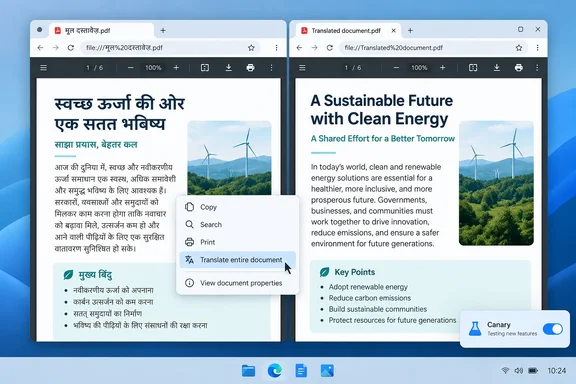
According to a hands-on report from Windows Report published October 7, 2026, the latest Edge Canary build adds a context-menu command that translates an entire PDF and opens the translated version in a new tab. The original stays open in its original language.
What changed in Edge Canary
Windows Report's reporter opened a 10-page Hindi question paper in Edge Canary and right-clicked inside the document without selecting any text. The context menu showed a new option labeled "Translate document to English."
Here is what happened next, as Windows Report describes it:
- Clicking the option opened a new tab.
- Edge showed the status message "Translating a copy of your document," followed by "This may take a moment."
- The translated PDF then loaded in that tab.
- The original Hindi PDF was still available.
The reporter says the 10-page document translated successfully and the copy appeared "shortly afterward." No timing, build number or quality assessment was given. This is one successful test of one Hindi-to-English document. It doesn't tell us how the feature handles other language pairs, very large files, scanned PDFs or complex layouts.
Section summary: Edge Canary now has a right-click command that produces a full translated copy of a PDF. The evidence is a single test, so treat it as an early demonstration.
How it differs from today's PDF translation
Edge's current approach works one selection at a time. Microsoft's Edge policy documentation says users can translate selected text in a PDF from the PDF toolbar and the right-click context menu. At Build 2025, Neowin described the same workflow: select a portion of text, then either right-click it and use the "Translate selection" option or use the Translate option from the PDF toolbar. The translation then appears in a side pane.
That works for a paragraph or two. For a 40-page manual, you end up selecting, translating and scrolling over and over. The Canary feature changes two things:
| Current selection translation | Canary whole-document translation | |
|---|---|---|
| Scope | Highlighted text only | Entire PDF |
| Trigger | PDF toolbar or right-click on a selection | Right-click anywhere in the document |
| Output | Text in a side pane | Separate translated PDF copy in a new tab |
| Original document | Stays in the current tab | Remains available separately |
| Status | Documented, shipping capability | Canary experiment |
The long road from Build 2025
Microsoft has been promising this for a while. In its Build 2025 blog post on May 19, 2025, the Edge team said readers would be able to translate entire PDF documents into their preferred language "with just a few clicks" and that the result would be new documents. The post also said PDF translation would be "generally available soon" and could be tried in Canary.
Some coverage at the time gave a specific date. Heise reported that the company promises that the function will be available in the final version of the browser from June, and Neowin wrote that Microsoft hopes it will be generally available next month, in case no breaking bug is detected by then during beta testing. Nearly 16 months later, Windows Report still describes the feature as a Canary test. "Soon" has turned out to be fairly flexible.
Getting it into Canary was also bumpy. PCWorld noted at launch that Microsoft said the feature was in Canary, adding: "but I haven't been able to find it." The groundwork goes back even further. In September 2024, Windows Latest found Canary feature flags msPdfLanguageDetection and msFullPdfTranslate, which it tried and failed to force-enable.
The trigger has also changed. Microsoft's Build-era description, as quoted by Neowin, said users would "open a PDF in Edge, click the Translate icon in the Edge address bar and quickly create a new document fully translated into the language of choice." Windows Report found the command in the PDF's right-click menu instead. That doesn't mean the address-bar route is gone. It does show that the interface is still changing, as you'd expect in Canary.
Section summary: The feature was announced in May 2025 with a target of roughly June 2025, but it is still experimental in October 2026. Its user interface has changed along the way.
The language-count question
Build-era coverage widely repeated Microsoft's claim that Edge would "translate full pages of PDFs from more than 70 languages." Windows Report also says Edge supports PDF text translation in more than 70 languages. The only target language Windows Report actually observed in the new feature is English, from a menu item that literally reads "Translate document to English." Until Microsoft documents the shipped version, don't assume the Canary build offers every target language or lets you pick one from that menu.
Edge vs. Chrome: two approaches
Windows Report says Google is running its own PDF translation experiment in Chrome Canary. Chrome's version reportedly shows translated PDF text in Reading mode, while Edge creates a full translated copy of the document. We couldn't find a primary Google source to confirm the Chrome details, so treat this comparison as Windows Report's.
If the descriptions are accurate, the two approaches suit different jobs. A Reading mode view is fine for skimming. A translated document is closer to something you can page through or reference next to the original. Whether Edge's copy keeps tables, images, form fields or page layout is still unknown, and that's what will decide whether it's actually more useful.
What we don't know yet
Many practical questions remain open, and the available sources answer none of them:
- Layout fidelity: Do columns, tables, images, links and annotations survive?
- Scanned PDFs: Does it work on image-only documents that have no text layer?
- Saving: Is the copy saved to disk automatically, or only opened in a tab until you save it?
- Limits: Are there caps on page count or file size?
- Privacy: Where is the document processed, and what happens to the content?
- Accuracy: How good is the translation for technical, legal or medical text?
The privacy question matters most for business users. Before anyone sends a confidential contract through a browser translation service, someone should be able to explain where the data goes. Microsoft hasn't published that information for this feature yet.
What IT administrators should know
This is a Canary experiment, not a stable-channel feature, so don't promise it to users or add it to training materials yet.
The existing administrative control is the TranslateEnabled policy. According to Microsoft Learn:
- It enables the integrated Microsoft translation service in Edge, including selected-text translation in PDFs.
- If left unconfigured, it is enabled by default, and users choose whether to use translation.
- Setting it to disabled turns off all built-in translate features.
- The Group Policy path is Administrative Templates/Microsoft Edge. The ADMX file is MSEdge.admx.
- The registry value is
TranslateEnabled(REG_DWORD) underSOFTWARE\Policies\Microsoft\Edge, or underSOFTWARE\Policies\Microsoft\Edge\Recommendedfor the recommended version. - It is supported on Windows and macOS from Edge 77, Android from 30, and iOS from 84.
Microsoft's documentation doesn't yet say whether this policy covers the new whole-document command. "All built-in translate features" suggests it would, but test it on your own Edge builds before you rely on it, especially if your data-handling rules restrict sending documents to cloud translation services.
Who benefits, and the usual caveats
Students with foreign-language study materials, people stuck with a device manual in the wrong language, and global teams passing reports around should all find this useful. Getting a whole translated document from one right-click is much quicker than translating paragraph by paragraph or copying text into a separate translator.
Machine translation is still a starting point, not a final answer. As How-To Geek put it when the feature was announced, very few statements can be translated word for word and keep the same meaning. For anything with legal, medical or safety consequences, check key passages against the original or get a qualified human translator.
The feature is in Canary, and its interface has already changed once since Build 2025. Expect the menu wording and behavior to change before it reaches the stable channel.
References
- Microsoft Edge Can Now Translate Entire PDFs Into New Copies Windows Report · 2026-10-07T13:20:53+00:00
- Microsoft Edge getting full document PDF translation. Summaries, task automation also coming - Neowin neowin.net
- Build 2025: Microsoft's Edge browser translates entire PDFs with one click heise.de