

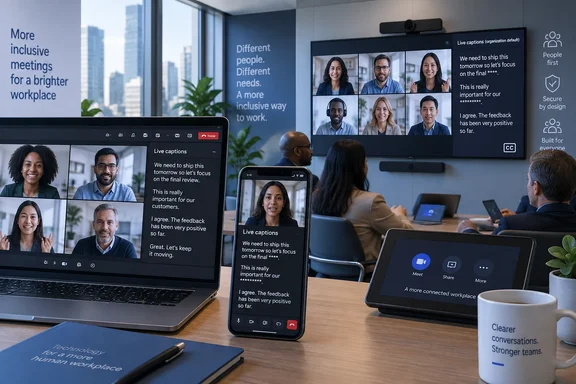
The practical limit is important: Teams is not overriding choices users already made. Anyone who had previously turned profanity filtering on or off retains that setting. The newly uncensored default applies only to accounts without an existing preference, creating the likelihood that two people in the same meeting can see differently filtered captions.
Microsoft says the switch is intended to improve accessibility and align with EU requirements. Its notice does not identify a specific EU regulation, member-state rule, accessibility standard, or enforcement action behind the change. Administrators should therefore treat the regulatory explanation as Microsoft’s stated rationale, rather than evidence that every organization must expose uncensored captions by default.
A captioning change, not a transcription-policy change
This is a change to the display of live captions—the real-time text visible while someone is speaking—not an announced overhaul of Teams’ recording, retention, eDiscovery, or compliance settings. Microsoft’s documentation distinguishes captions from the policies that enable transcription and recording in Teams calls and meetings. Those controls remain relevant for organizations that decide whether Teams can produce spoken-word text in the first place.
That distinction will matter for compliance teams. A tenant that permits live captions but blocks cloud recording may still encounter uncensored words on participants’ screens during a call. Conversely, an organization that requires or retains meeting transcripts should not assume this default switch automatically makes saved transcripts uncensored; Microsoft’s roadmap entry does not make that promise.
Microsoft has previously described profanity filtering as a control for both live captions and live transcription, but the current announcement specifically frames the new default around captions. The company has not published a matching explanation of how the new default interacts with post-meeting transcript rendering, exports, recap content, or third-party compliance capture. Those are separate products and workflows, and admins should test them rather than infer behavior from the caption setting.
Microsoft is prioritizing fidelity for users who rely on captions
The accessibility case is straightforward. A filter that replaces spoken words with asterisks changes the information delivered to a person relying on captions, sometimes removing tone, emphasis, quoted language, or the precise wording of a conversation. Microsoft’s 2023 Teams announcement, which introduced the user-facing filter control, acknowledged that turning the setting off allows captions and live transcription to display spoken words as-is.
Caption accuracy is not only about profanity. Automated filters can make wrong decisions when a technical term, name, regional expression, or partial recognition resembles blocked language. Microsoft community posts from Teams users have documented instances where caption filtering obscured words that were not intended as profanity. Those reports do not establish a broad reliability failure, but they explain why an opt-in censorship model is more useful for accessibility than a hard-coded default.
The new default does not make Teams captions a verbatim record. Speech recognition can still mishear speakers, struggle with crosstalk, abbreviations, poor microphones, accents, specialized vocabulary, and switching languages. Removing a profanity mask preserves more of what Teams recognized; it does not guarantee that the recognized text was correct.
For users who depend on captions for workplace participation, training, support calls, or incident response, the change eliminates an extra layer of transformation between the speaker and the text on screen. In technical meetings, that can be consequential: obscured wording during a production outage, customer escalation, safety review, or legal discussion may be less useful than plainly displayed language, even where the language is uncomfortable.
The setting remains a user preference
The operational complication is that Microsoft previously said the profanity-filter toggle was a user-level preference, not a setting controlled by the meeting organizer or tenant administrator. The new roadmap notice tells users to update their preference in Teams settings, but it does not announce a new policy, PowerShell control, Teams admin center option, or meeting template setting that lets an organization force filtering back on.
That leaves admins with a communications task rather than a configuration task. Teams administrators can govern whether captions and transcription are available through calling and meeting policies, but the available Microsoft material does not show a tenant-wide switch for this specific filtering preference. Disabling captions altogether would be a much broader—and potentially accessibility-hostile—response to a concern about uncensored words.
Organizations with strict workplace-content rules should not tell staff that the new default affects every account. It does not. Existing preferences persist, so the visible effect will be uneven and may emerge gradually as users join captioned meetings from new clients, reset profiles, or encounter the option for the first time.
A useful internal notice should explain three points plainly:
- Users who never changed the setting may now see unfiltered language in Teams live captions.
- Users who prefer masked captions can turn on the filter themselves in Teams’ captions and transcripts or accessibility settings, depending on the client interface.
- The setting affects what that user sees in live captions; it is not a declaration that the organization approves of offensive language in meetings.
That framing is more accurate than describing the rollout as Teams “removing” profanity filtering. The filter remains available. Microsoft has changed the default state for people who had not expressed a preference.
Teams Rooms and government clouds broaden the deployment
Microsoft’s inclusion of Teams Rooms deserves attention because meeting-room devices are frequently shared endpoints. A personal desktop user can adjust an individual preference privately, while a conference room can be used by rotating employees, visitors, contractors, and customers. The roadmap says the change covers Microsoft Teams Rooms devices, but it does not spell out whose preference governs captions displayed on a shared room system or whether a room account can preconfigure the experience.
That missing implementation detail is significant for organizations that use Teams Rooms in executive boardrooms, public-sector meeting spaces, classrooms, clinical environments, or customer briefing centers. Administrators should validate the behavior on an actual room device before assuming that the experience mirrors the desktop client. They should also check whether captions displayed on the room front-of-room screen could be visible to people who are not authenticated Teams users.
The rollout also includes Worldwide commercial tenants and GCC, GCC High, and DoD. Microsoft’s published schedule placed commercial rollout in mid-June 2026 and government-cloud rollout from mid- through late June. By the September 2 roadmap update, the feature was listed as launched. That means this is no longer a future-warning item: organizations that have not discussed it may already have users encountering the changed default.
Microsoft did not publish adoption figures, telemetry, a list of excluded client builds, or a support matrix identifying whether every listed platform received the switch at the same time. In a mixed estate—especially one with Teams Rooms, managed Windows desktops, mobile clients, and virtual desktop infrastructure—testing is the only way to determine whether the behavior is consistent.
What IT teams should verify now
The immediate risk is not a security exposure in the usual sense. It is an expectation gap: employees may assume captions will conceal explicit words because that was Teams’ historic default, while new or reset users can now receive the unfiltered text. For organizations that support caption-dependent users, the larger risk runs in the other direction—reinstating filtering indiscriminately could make the spoken content less accessible.
IT teams should test the setting with a controlled Teams meeting on the Windows desktop client, Teams on the web, a mobile client, and any deployed Teams Rooms hardware. Confirm what appears in live captions with the filter on and off, then separately inspect the meeting transcript, recording recap, exports, and any compliance archive. Those are the artifacts likely to matter after a dispute, audit, or HR investigation.
Help-desk teams should also update their scripts. The answer to “Why can I see that word in captions?” is now likely to be a preference explanation rather than an incident: Teams preserves a prior selection, but otherwise defaults to showing recognized speech without profanity masking. The user can restore filtering without waiting for an administrator or meeting organizer.
Microsoft has made a defensible accessibility-oriented default change, but it has not supplied the policy controls or documentation detail that enterprise administrators would need to manage the experience centrally. Until that changes, the concrete consequence is simple: caption behavior will be decided account by account, and organizations that care about consistency will need to communicate, test, and document the choice themselves.
References
- Microsoft Teams: Profanity filter is disabled by default for captions Microsoft 365 Roadmap · 2026-09-02T22:56:59.2759925Z