

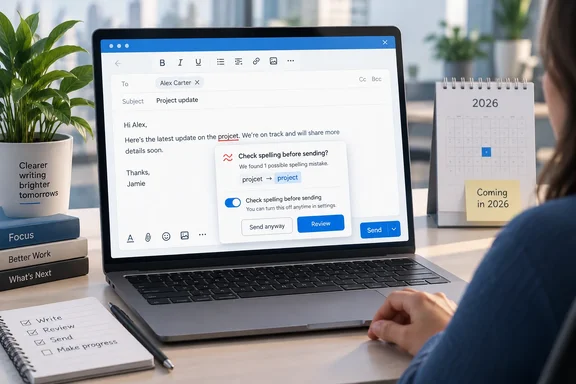
In Microsoft 365 Message Center notice MC1479509, Microsoft says New Outlook will offer automatic spell check before sending emails, rolling out worldwide from mid-October to mid-December 2026. Microsoft's own description reads: "If you don't want to check spelling manually for every message—or you're worried you might forget!—you can set Outlook to check spelling for you every time before sending emails."
What's actually changing
New Outlook already checks spelling. Microsoft Editor underlines mistakes while you type. What it doesn't have is a final check at the moment you click Send, which Classic Outlook has offered for years.
According to the notice:
- Users can configure Outlook to check spelling automatically before sending email.
- This can help reduce spelling mistakes in sent messages without requiring users to manually start spell check for each message.
- The capability will roll out automatically during the scheduled rollout window.
The wording matters. Users can turn it on. Microsoft does not say it will be on by default, and nothing in the notice says Outlook will correct errors automatically, block a message from sending, or check grammar. The stated scope is spelling. Windows Latest, which spotted the admin center update, also reports that Microsoft won't force the feature on and that users will be able to enable it in Settings.
Summary: This is an optional spell check that runs before a message goes out. It doesn't correct anything for you, and there's no sign it will be switched on without your say.
Why this gap existed
This isn't new technology. It's Microsoft restoring something New Outlook left out. Classic Outlook has long had an "Always check spelling before sending" checkbox. A Microsoft support moderator answering on Microsoft Q&A in December 2025 explained that in Classic Outlook the option sat in Mail settings as "Check spelling before sending." In New Outlook, spelling and grammar moved into Microsoft Editor inside the compose window.
Users have been unhappy about this for a long time. In a Q&A thread from 2024, a community responder confirmed that this option is not available in New Outlook. The person asking described the problem well: "when you write a very long email, you might miss that and the automatic spell check in the older version is a good backstop to that." Another thread in 2025 put it more bluntly, saying the in-line tools work as designed but do not force a full spell check before sending, and calling it a feature that is missing in "new outlook" that they need to bring back.
Why does this matter? Red underlines only work if you look at them. A pre-send check stops you whether you're paying attention or not.
Who gets it, and when
The notice says the feature covers New Outlook for Windows and Outlook on the web. It lists Exchange Online as the service. Outlook for Mac and the mobile apps aren't mentioned, so don't assume they're included. Classic Outlook doesn't need it because it already has the checkbox.
The rollout is staggered:
| Ring | Rollout begins | Expected completion |
|---|---|---|
| Targeted Release (Worldwide) | Mid-October 2026 | Late October 2026 |
| General Availability (Worldwide) | Mid-November 2026 | Early December 2026 |
| General Availability (GCC) | Mid-November 2026 | Mid-December 2026 |
| GCC High | Mid-November 2026 | Mid-December 2026 |
| DoD | Mid-November 2026 | Mid-December 2026 |
For the worldwide rings, the notice states that Targeted Release (Worldwide): We will begin rolling out on mid October 2026 and expect to complete by late October 2026. General availability runs from mid-November to early December. The mid-December finish applies to the government clouds, not to most commercial tenants. A roadmap roundup from Planet Technologies lists the item as Message ID: MC1479509 Service: Exchange Online Category: Plan for Change, and its weekly summary gives Microsoft 365 Roadmap ID 571310 with an October 2026 tag.
These are planned dates, and Microsoft often shifts rollout windows. As of late September 2026, the feature hasn't started rolling out to anyone.
Summary: Targeted Release tenants should see it in October, most commercial users by early December, and government clouds by mid-December.
What IT admins need to do (not much)
This one needs almost no work from admins. The notice states No admin action is required. It recommends that organizations inform users that they can enable spell check before sending if they want Outlook to review spelling automatically. Update internal Outlook training or help desk guidance if it describes message composition settings. It also reports no compliance considerations.
Daniel Bradley, a Microsoft MVP writing at Our Cloud Network, points out a practical gap: Microsoft have not published its exact settings path or the review shown when Outlook finds a mistake. He gives two recommendations:
- Put the feature on your support team's radar and update your user guidance when Microsoft documents the new control.
- If you deploy a third-party product only to catch spelling mistakes before Send, test Outlook's native option before renewing it.
The second point could save money for organizations whose proofing add-on does little more than catch typos. Test first, though. We don't yet know how the prompt behaves, how it handles custom vocabulary, or whether it fits every workflow.
Some groundwork for help desks before the ticket questions start:
- Put the menu path in your docs only once the setting ships. Until Microsoft documents it, don't guess at labels.
- Plan for the "I can't find it" tickets. Staggered rollouts mean two people on the same team may see different options for weeks.
- Check the Editor privacy settings now. Microsoft's Q&A guidance says Editor's cloud-based corrections depend on "Optional connected experiences" and "Experiences that analyze your content" under Settings > General > Privacy and data. Microsoft hasn't said whether the new pre-send check depends on them too, but if Editor's corrections are already missing for some users, they're worth checking first.
What to do until it arrives
For now, New Outlook users have to rely on Editor. Microsoft's support guidance says to open the (...) overflow menu while drafting, choose Editor, and then proceed to Editor → Editor Settings. From there you can turn on spelling and grammar checks and manage proofing languages. One catch: The proofing language selection that is done within email composition will only apply to that specific email draft.
A few other New Outlook features help in the meantime:
- Personal dictionary: Microsoft's New Outlook release notes list a personal dictionary under Editor settings to improve spell check and text suggestions. Add product names, acronyms and colleagues' surnames so Editor stops flagging them.
- Delay send: The January 2026 release notes say New Outlook increased the delay-send options from 10 seconds to 30 seconds, giving you more time to undo a send. It won't find typos for you, but it gives you a short chance to cancel a message you already regret.
The false-positive question
Why make this optional? Windows Latest notes that plenty of people don't mind small errors, and that Editor sometimes flags words that aren't wrong. Its example: a British English writer typing "colour" could be nudged toward "color" if their preferred style is set to American English. Microsoft hasn't documented that exact case for the new feature, but anyone who writes in more than one variety of English or in a technical field knows the problem. A prompt that stops you on every message for words that are spelled correctly would get switched off quickly. Keeping it opt-in is the sensible choice.
The bigger Outlook picture
Windows Latest also reported two other Outlook changes from the same round of admin center notices. Classic Outlook is getting a Copilot feature called User Initiated Insights, which lets you select text and choose "Explain this." New Outlook is getting a theme that looks more like Classic Outlook. The spell check fits the same pattern. Microsoft is trying to remove the reasons people give for staying on Classic Outlook, and this is one of the easiest to fix.
Windows Latest makes a fair point, though. Many holdouts aren't staying for how Classic looks. They're staying because New Outlook still lacks advanced features they rely on. Bringing back the spell check is a good step, but it won't win over admins who depend on Classic-only capabilities.
Bottom line
This is a small update that fixes a real complaint. New Outlook for Windows and Outlook on the web will get an optional pre-send spell check. It starts with Targeted Release in mid-October 2026 and is expected to reach most commercial tenants by early December, with government clouds following by mid-December. Admins don't need to deploy anything, but it's worth telling users it's coming and updating help-desk guides once Microsoft publishes the setting's location. It still won't catch a message sent to the wrong recipient.
Update: Additional details (October 7, 2026)
Neowin reports that Outlook’s pre-send spell check will rely on Microsoft Office Connected Experiences, likely through Microsoft Editor. That means users whose organizations disable Connected Experiences may need them enabled before the new check can work.
This fills in an unresolved point from the original announcement: Microsoft had not said whether the pre-send option depended on Editor-related privacy and connectivity settings.
References
- Microsoft adding very handy email feature to New Outlook that works automatically Neowin · 2026-10-07T10:30:02+00:00
- MC1479509 - Spell check before sending emails in new Outlook | Microsoft 365 Message Center Archive message.cengizyilmaz.net
- How to spell check before sending emails in Outlook | Microsoft Support support.microsoft.com