

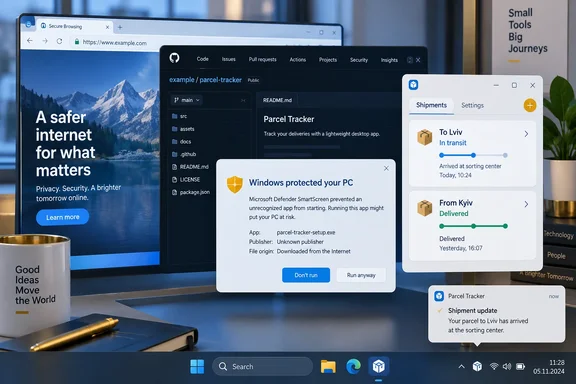
The utility, published September 18 by the developer behind the FakerFox GitHub account and reported by dev.ua, sits in the Windows notification area, can remain above other windows, and checks incoming and outgoing Nova Poshta shipments about every five minutes. It logs into the official Nova Poshta customer cabinet inside the app, then sends Windows notifications when a shipment’s status changes.
That is a useful answer to a narrow desktop problem: people waiting for deliveries can see an arrival alert without repeatedly opening a browser tab or reaching for a phone. But Nova Parcel’s Windows build is an experimental Electron application that depends on Nova Poshta’s web-cabinet behavior rather than a documented desktop integration. Readers should treat it as a technically transparent personal tool, not as an official Nova Poshta client or a deployment-ready Windows app.
The Windows build is a tray application, not a Windows widget
The “widget” label needs some qualification. Nova Parcel is not a Windows Widgets board extension, nor does it integrate with the Windows 11 widgets feed. Its own Windows documentation describes it as a separate compact Electron window with a system-tray icon; closing the window sends it to the tray, where it continues checking parcel status until the user exits the application.
Version 0.3.0 supports 64-bit editions of Windows 10 and Windows 11. It separates incoming and outgoing shipments, permits a tracking number to be entered manually, stores the window’s position and size, offers optional startup with Windows, and can pin the parcel window above other applications. When a parcel moves into the ready-for-pickup state, the app is designed to open the relevant incoming or outgoing tab once, while other changes generate ordinary Windows notifications.
The release’s claims are supported by the project’s public source rather than merely a feature list. The Windows app packages Electron 44.4.1 with an NSIS installer configured for a per-user install. That means it does not require administrator rights and normally installs only for the current Windows account, creating Start menu and desktop shortcuts. For someone using a personal laptop, that is less invasive than a machine-wide installer. For an IT administrator, it also means this is not yet a conventional managed deployment with a signed MSIX package, Store listing, or documented enterprise installation channel.
dev.ua describes the project as open source, but the repository’s Windows package metadata says UNLICENSED and marks the package private. The code is publicly viewable on GitHub, yet the project does not include a license granting the normal rights to use, redistribute, modify, or publish derivatives. The Open Source Initiative’s definition requires those permissions; public source visibility alone does not provide them. That leaves Nova Parcel as source-available but not presently open-source licensed in the ordinary legal sense.
Nova Parcel uses the official account, but not an official desktop API integration
The most consequential technical choice is how Nova Parcel retrieves the parcel list. The application opens Nova Poshta’s official customer site at new.novaposhta.ua for phone-number login. Its accompanying JavaScript then runs only on that official web origin, reads the account’s existing web session, and queries Nova Poshta’s api.novaposhta.ua endpoint for incoming shipments, outgoing shipments, and tracking statuses.
The project’s author has limited the requests in the bridge code to three methods: getIncomingDocumentsByPhone, getOutgoingDocumentsByPhone, and getStatusDocuments. The script rejects calls outside that allowlist and sends no write requests. It also reduces the returned data to what the app needs, including the waybill number, status, description, destination location, and scheduled delivery date.
This architecture supports the developer’s central privacy claim in a specific sense: there is no Nova Parcel-operated relay server in the data path. Shipment requests go from the app to Nova Poshta, and local state is written under %APPDATA%\Nova Parcel, including the parcel list, preferences, and an isolated Chromium browser profile holding the Nova Poshta session. The app’s source also sets restrictive permissions when writing its JSON files.
But “the native code does not receive tokens” should not be read as “the application never touches an authenticated session.” The bridge script accesses the web cabinet’s OAuth access token from the official site’s local storage and attaches it to requests made directly to Nova Poshta’s API. That is a reasonable implementation distinction—Nova Parcel does not copy the token into its own settings JSON or send it to a third party—but the app still runs code within an authenticated Nova Poshta web session.
Nova Poshta’s official developer materials confirm that its API supports real-time shipment movement status and status-change notifications, and that API access is token-based. Nova Parcel, however, is not using a documented partner OAuth client registration. Its own documentation says the integration could stop working if Nova Poshta changes its website or response format. The source reinforces that caveat: it detects unexpected data structures and reports that the Nova Poshta response format has changed rather than attempting to guess.
For a personal utility, that trade-off is understandable. For anyone relying on delivery status operationally—such as a small business coordinating pickups—it is a reason not to make this the sole alerting channel.
The Electron security posture is better than a casual prototype, but it remains unreviewed
Electron apps that embed remote websites deserve particular scrutiny because a mistake can expose desktop capabilities to web content. Nova Parcel’s public Windows source shows several safeguards aligned with Electron’s own security guidance.
The local UI runs with Node.js integration disabled, context isolation enabled, Electron sandboxing enabled, and web security enabled. The application blocks navigation from its local window, denies new windows, and rejects permission requests. Its privileged IPC handlers also test that calls originate from its own local UI before carrying out actions such as changing preferences, copying a tracking number, or quitting the app.
The login side is separately handled: the source says the Nova Poshta page runs without Node.js access or native IPC access, while a minimal bridge extracts shipment data. This is important because Electron advises developers loading remote content to disable Node integration and enable context isolation; Nova Parcel’s configuration follows that model.
Those are good signs, but they are not an external security audit. The repository says its automated checks cover parcel-state logic, notification deduplication, state restoration, account switching, bridge behavior, Electron window isolation, and a packaged-app smoke test. It also acknowledges that actual SMS sign-in and notification delivery on a personal Windows PC require manual verification after installation. The project states that real parcel-status transitions were tested with synthetic data during development, rather than observed end-to-end from a live change.
In other words, the source makes the tool inspectable, but no independent review was located confirming its security design or release binary. The project is only six commits deep, has no listed issues, no forks, and a small number of stars at publication. That is normal for a just-released hobby utility; it also means there is little public operational history to lean on.
Windows will warn because the installer has no publisher signature
Nova Parcel’s release notes and Windows README both state that Nova-Parcel-Setup-0.3.0-x64.exe lacks a publisher’s digital signature. The author provides a SHA-256 checksum alongside the download, which lets technically inclined users verify that their installer matches the file published in the GitHub release. A checksum is useful for integrity verification, but it does not establish the identity of the publisher in the way Authenticode signing does.
Microsoft’s SmartScreen guidance says unsigned executable files can trigger the “Windows protected your PC” warning, forcing the user to choose “Run anyway”; in managed environments, policy can prevent that route altogether. Microsoft also notes that Smart App Control on Windows 11 can block unsigned executables unless they have a positive reputation.
That practical constraint limits Nova Parcel’s immediate audience. A user who deliberately downloads the installer from the project’s GitHub release, checks the published SHA-256 hash, and accepts that it is an early experimental build can make an informed choice. Users receiving the file from a chat, a reposted archive, or an unsolicited message should not bypass SmartScreen merely because the application displays a familiar delivery brand.
Nova Parcel’s own source confirms that the app is unofficial. Nova Poshta has not announced it as an endorsed Windows client, and the project does not claim to be one. The correct first-run expectation is an unknown-publisher prompt, not a smooth consumer-app installation.
A useful idea that still needs a release-grade finish
Nova Parcel delivers a focused Windows feature set that Nova Poshta’s browser-based customer cabinet does not: an always-available tray companion that turns changes in delivery status into desktop notifications. Its local-first architecture and visible source code offer more transparency than many one-off shipment trackers.
Before it can be recommended broadly, though, the project needs basic release housekeeping: a clear software license, an Authenticode-signed Windows installer, and a more durable documented integration path than borrowing the web cabinet’s current session and internal request patterns. Until then, the code offers a credible personal experiment for advanced users, while the unsigned executable and fragile integration make it a poor fit for managed PCs or anyone unwilling to audit what they install.
References
- Ukrainian developer coded a desktop widget for tracking Nova Poshta parcels - dev.ua dev.ua · Fri, 18 Sep 2026 09:14:00 GMT