

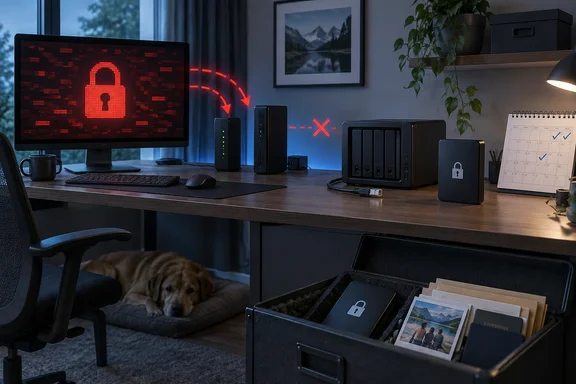
The important refinement is that the device itself is not what makes this strategy trustworthy. The separation is the protection. A spare PC running TrueNAS, an old Synology, a USB hard drive dock, or a single encrypted external disk can all serve the same role if no computer, cloud account, backup agent, or network share can write to it unattended.
For Windows users who already have OneDrive, File History, a daily NAS job, or a cloud backup plan, an offline copy should be treated as a recovery tier with a different purpose: preserving a known-good version long enough for a human being to notice that everything else has gone wrong.
Always-on backup systems faithfully copy bad changes
Modern backup products are designed to reduce data loss between the moment a file changes and the next backup. That is normally the right goal. A laptop fails, a Word document is overwritten, or a folder disappears, and the most recent copy is available quickly.
The same automation becomes a liability when the source change is destructive. A sync client can propagate an accidental deletion. A buggy migration can replace a photo library with an empty directory. An attacker who gains access to a Windows account, a NAS administrator account, or a backup management console may be able to delete recovery points before deploying ransomware.
How-To Geek’s author frames the powered-off NAS as a “backup of last resort,” updated monthly or when important documents change. That cadence is unsuitable for active work files, but it is sensible for data whose value is measured in years rather than minutes. Photos from a deceased relative, scanned legal records, tax returns, family archives, and a password-manager emergency kit do not necessarily need a new restore point every night. They need one that survives a catastrophe in the primary backup chain.
This is also where many home setups blur the line between synchronization and backup. OneDrive, Google Drive, Dropbox, Synology Drive, and shared folders are valuable for keeping current files available across devices. They are not automatically historical archives. Version history and recycle bins can help, but they have retention limits, administrative controls, and sometimes account-level failure modes. A local offline copy introduces a recovery point that is deliberately outside that machinery.
CISA’s ransomware guidance reaches the same conclusion for organizations: maintain offline, encrypted backups and test them regularly, because ransomware often searches for accessible backups to encrypt or delete. The agency’s consumer guidance is even more direct about external drives: do not leave one connected when it is not actively backing up data.
An “offline NAS” is cold storage, not a second primary NAS
Calling the device a NAS can be misleading. A network-attached storage system is generally built to be online. Once it is serving SMB shares to Windows PCs, accepting remote access, running packages, and receiving automated backups, it is part of the environment an intrusion can reach.
For a true offline copy, disconnecting the Ethernet cable is the key step; powering the device down adds protection against remote access and reduces exposure to electrical events. The storage should be connected only for a controlled transfer, then shut down and physically separated again. If the device wakes automatically for backup jobs, remains reachable through Wi-Fi, or is mounted permanently as a drive in Windows, it is no longer an air-gapped recovery copy in the practical sense.
The simplest design is often better than a full NAS appliance:
- A USB hard drive stored unplugged can be enough for a small collection of irreplaceable files.
- An old PC or retired Synology can make sense when the archive is large enough to need multiple disks, checksums, or a familiar web interface.
- A second copy stored away from the home is necessary if fire, flooding, theft, or a power event affecting the whole building is part of the threat model.
That last point is the missing caveat in the personal setup described by How-To Geek. Offline storage protects against network-borne attacks and many operational mistakes; it does not protect against a house fire, burglary, or a drive that simply fails on the shelf. Keeping the only offline disk beside the always-on NAS creates two different recovery behaviors in the same physical disaster zone.
The practical target is the familiar 3-2-1 model: at least three copies of important data, on two types of storage, with one copy kept off-site. CISA has also advised organizations to use a physically separate, segmented, secure location for recovery data. For a household, “off-site” can mean an encrypted drive held at a trusted relative’s home, a safe-deposit arrangement, or carefully configured cloud storage with versioning and account protection.
The backup schedule should match what you can afford to lose
A monthly offline backup gives an attacker or sync failure less opportunity to corrupt every available copy, but it also means accepting up to a month of lost changes. That is fine only when the operator understands the trade.
A useful approach is to divide Windows data into two classes. Active work, project folders, and current personal files need frequent backup and preferably versioning. The archive tier needs deliberate, less-frequent copying and a longer retention window. Mixing the two leads to either unnecessary inconvenience or unacceptable data loss.
For example, a home user could keep daily File History or an image backup for a Windows 11 PC, use a cloud provider for files that need access away from home, and maintain a quarterly offline archive of family media and critical records. During tax season, the archive gets another update after the final return and supporting documents are saved. After importing a batch of phone photos or scanning family material, it gets another.
The routine matters more than the hardware. A blank calendar reminder that is never acted on is not a backup policy. Put the job on a recurring schedule, record what was copied, and note the last successful restore test. The archive should also include the material required to read it later: a list of contents, encryption and recovery instructions kept securely, and any specialized software or export formats needed for proprietary data.
For Windows systems, do not assume that copying Documents, Pictures, and Desktop captures everything important. Browser profiles, email archives, application databases, virtual machines, BitLocker recovery information, software licenses, and password-manager recovery material may sit elsewhere. A bare-metal system image can be useful, but it is a different job from an archive of personal records. Keep the critical data set understandable and independently restorable rather than burying it inside an opaque backup format alone.
Encryption and restore testing decide whether the copy is usable
An unplugged disk containing passports, Social Security documents, tax returns, and medical records is safer from ransomware but still creates a physical-security problem. If it is stolen, the same offline design that protected it from remote compromise can make an exposure difficult to detect.
Encrypt the offline archive. BitLocker To Go can encrypt removable storage used with Windows, while NAS platforms and backup tools offer their own encryption methods. The recovery key or passphrase must be stored separately from the device and in a form that will be available during an emergency. A password saved only in the Windows profile whose recovery is being attempted is not a recovery plan.
Then test it. NIST and CISA both emphasize backup restoration testing, and it is the part home users skip most often. A successful copy job proves only that a tool wrote bytes to a disk. It does not prove that the archive can be unlocked, that files are intact, that the backup software’s catalog is usable, or that the person responsible remembers the procedure.
A basic test is enough to expose most problems: connect the offline device to a clean Windows PC, restore a representative photo, a PDF, a folder with nested files, and any critical application export into a temporary location. Open them. Confirm dates and file counts. If the archive uses encryption, verify the recovery path without relying on cached credentials.
Checksums add another layer for large media collections or files that will sit untouched for years. Tools such as Get-FileHash in PowerShell can record and later verify SHA-256 hashes, while storage systems with checksumming file systems can detect some silent corruption. They do not replace another copy, but they can reveal whether the one you have is degrading before an emergency forces you to rely on it.
Powered-off storage reduces exposure, not responsibility
How-To Geek is right that disconnected hardware cannot be reached by ransomware while it is actually disconnected. It is also right that an offline archive is insulated from an always-on backup system’s rapid propagation of mistakes. Those benefits are real, and they are why government ransomware guidance continues to recommend offline copies.
But the conclusion should be more disciplined than “buy another NAS and turn it off.” An offline device is only as strong as its update routine, physical storage location, encryption, and restore test. The archive can be stale, incomplete, unreadable, or destroyed in the same event as the main computer.
For Windows households and small offices, the best use of an offline NAS is therefore narrow and valuable: make it the protected home for data you cannot recreate, update it on a schedule tied to real life, encrypt it, test it, and keep another copy away from the building. When an always-on system copies the wrong change everywhere else, that restrained, inconvenient copy is the one that can still matter.
References
- I started keeping an "offline" NAS. It’s the only backup I actually trust How-To Geek · 2026-09-17T22:00:13+00:00