

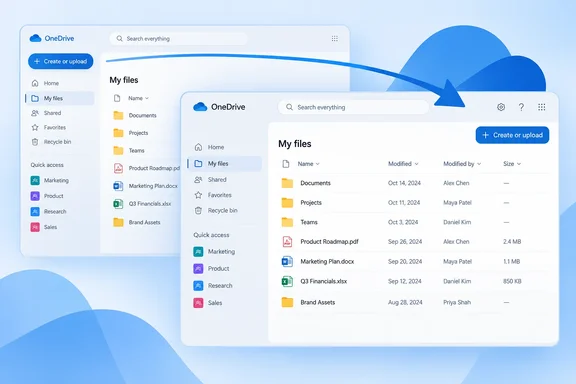
The good news first: only the button's location changes. Microsoft says the options for creating files and folders and uploading content stay the same.
What's changing
The roadmap item says three things:
- Old location: the left navigation pane in OneDrive for the web.
- New location: the right side of the page.
- Same menu: the create and upload options don't change.
The entry doesn't announce new menu items, permission changes or changes to how files are stored. If you know where the button used to be, the only thing you need to learn is where it is now.
How the button works today
The current placement is well documented in how-to guides, which helps explain who will notice the move. Computerworld's OneDrive cheat sheet tells readers that to upload a file from a PC, you click the + Create or upload button at the upper left. From that menu, click either Files upload or Folder upload, and the + Create or upload menu also has options to create a Word document, Excel spreadsheet, PowerPoint presentation, or other Microsoft 365 file formats. University IT guides list more options in the same menu. The University of Connecticut tells users to click Create or upload and choose Link to add a web shortcut inside OneDrive.
All of those options should stay put after the move. What will change is the directions. "Click the button at the upper left" stops being true once the button sits on the right.
One more detail from Computerworld still matters after the move: OneDrive will upload or create files and folders wherever you happen to be in your folder hierarchy when you click + Create or upload. Nothing on the roadmap suggests that behavior will change, so check which folder you're in before you click.
A possible fix for hidden buttons
There may be a small usability gain here. Because the button currently lives in the left pane, collapsing that pane can hide it. A SysTools guide on creating OneDrive folders warns that users may need to expand the side pane if the button doesn't appear: "Click on the + Create or upload button (If you dont see it, expand the side pane)."
Once the button sits on the right side of the page, it should no longer depend on whether the navigation pane is open. That's my reading of the new layout, not something Microsoft has said. Microsoft hasn't published screenshots or design details, so treat it as likely rather than confirmed.
Summary: The menu stays the same, but the button moves. Any instructions that say "upper left" will need updating.
Rollout details and what's unknown
The roadmap metadata gives the following:
| Field | Value |
|---|---|
| Roadmap ID | 572683 |
| Product | OneDrive |
| Platform | Web |
| Status | In development |
| Release rings | Targeted Release, General Availability |
| Cloud instance | Worldwide (Standard Multi-Tenant) |
| Estimated GA | October 2026 |
October 2026 is an estimate, not a firm date. Microsoft's roadmap page says it provides estimated release dates, and all of its information is subject to change. Because the item includes Targeted Release, organizations enrolled in that ring will probably see the new layout before everyone else.
The roadmap entry doesn't cover:
- Exact start or end dates for the rollout
- Whether it rolls out in stages within each ring
- The exact visual design, or which page views get the new placement
- Whether personal accounts or the GCC, GCC High and DoD clouds are affected (only Worldwide multi-tenant is listed)
- Any accessibility changes, such as keyboard focus order or screen reader behavior
- An admin setting to delay or turn off the change
Don't plan around an opt-out. Microsoft hasn't announced one.
What IT teams and help desks should do
This is a small change, but it can still cause tickets. Simple steps:
- Find your OneDrive web docs. Search your knowledge base and onboarding material for "Create or upload," "upper left" and "left pane."
- Wait before redoing screenshots. Update them once the new layout shows up in your tenant, not based on what you expect it to look like.
- Use Targeted Release users to check first. If some of your staff are in Targeted Release, they should see the change first. Ask them to confirm where the button ends up.
- Tell users the menu hasn't changed. The message is simple: the button moved, and everything inside it works the same.
- Check accessibility yourself. If your organization supports keyboard-only or screen reader users, test how the new placement behaves. Microsoft hasn't documented this.
Why Microsoft is doing this
Microsoft wants OneDrive and SharePoint to look and work alike. Both store files on the same platform, and many business users switch between their own OneDrive files and team SharePoint libraries all day. When the same job has its button in a different place in each app, people slow down for a moment and some end up calling the help desk.
There is a downside. OneDrive's left-pane button worked like a launcher in many consumer apps, and people who learned that layout will reach for the wrong side of the screen for a while. Microsoft is betting that one layout across both apps is worth some short-term confusion. For people who mostly use SharePoint, that's probably a good trade. For people who mostly use OneDrive, it means getting used to a new spot.
Bottom line: Microsoft plans to move the OneDrive web Create or upload button from the left pane to the right side of the page, with general availability estimated for October 2026. The menu is unchanged. The main work for IT teams is updating documentation, and the main adjustment for users is looking to the right instead of the left.
References
- OneDrive: Updated placement of the Create or upload button for Web Microsoft 365 Roadmap · 2026-09-30T23:31:03.389585Z
- Microsoft OneDrive cheat sheet: Using OneDrive for Web computerworld.com
- How to Create a Folder in OneDrive Web, Desktop, & Mobile systoolsgroup.com