

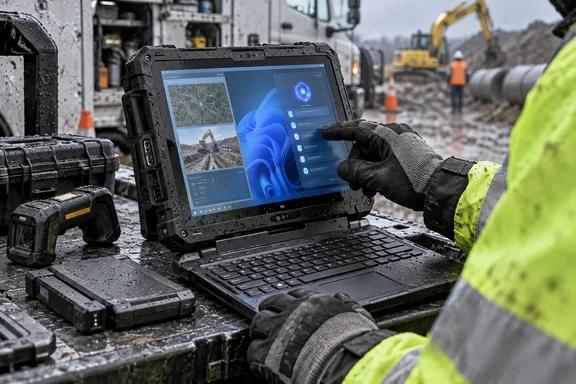
Panasonic announced the FZ-34 on September 15, while PC Watch, ITmedia PC USER, and MyNavi TECH+ independently reported the October Japanese launch and the Core Ultra 5 335 configuration. Panasonic has named two Japanese SKUs—FZ-34CY90XAJ and the 5G-equipped FZ-34CY90HAJ—but it has not announced a U.S. launch date, U.S. configurations, or a list price. PC Watch and MyNavi report that Japanese pricing is open, which in this category generally means an integrator quote rather than a retail purchase decision.
That missing commercial information is material. Toughbooks are commonly bought as managed deployments with docks, vehicle mounts, barcode hardware, cellular service, spare batteries, and support coverage; the base device is only part of the eventual bill. For now, the FZ-34 is a verified Japanese product announcement, not evidence that a comparable U.S. TOUGHBOOK 33 replacement is immediately available.
The Copilot+ claim rests on the processor’s NPU
Panasonic says the FZ-34 is its first TOUGHBOOK compatible with Microsoft’s Copilot+ PC category. Intel’s specification for the Core Ultra 5 335 supports the central part of that claim: its neural processing unit, or NPU, is rated for 47 INT8 TOPS. Microsoft’s baseline for Copilot+ PCs is an NPU capable of more than 40 TOPS, alongside at least 16GB of DDR5 or LPDDR5 memory and 256GB of SSD or UFS storage.
The 47-TOPS rating is consequential for fleet buyers because the NPU can handle certain AI operations without continually pushing work to a cloud service or leaning on the main CPU. Microsoft identifies features such as improved Windows search, Click to Do, Live Captions translation, Windows Studio Effects, and some image tools as Copilot+ PC experiences, though feature availability still varies by region, language, application, and device configuration.
There is an important qualification in Microsoft’s own documentation. Its currently listed Intel Copilot+ platforms name Core Ultra 200V and 300V series processors, while Panasonic’s FZ-34 uses a Core Ultra 5 335, part of Intel’s Core Ultra Series 3 family rather than a 300V-branded part. Intel confirms the chip exceeds the NPU threshold, and Panasonic is making the compatibility announcement, but Microsoft’s public compatibility wording does not yet explicitly call out the 335 model number.
For IT administrators, that makes this a device to validate against the exact Windows image and regional feature set intended for deployment, rather than assuming every feature demonstrated on a consumer Copilot+ PC will appear on day one. Panasonic has established the product’s category claim; it has not published a feature-by-feature matrix for the FZ-34.
The more practical point is that Copilot+ hardware is a capability floor, not a field-workflow solution on its own. An inspection team will gain little from an NPU unless the organization has software that can use local inference for document retrieval, image classification, transcription, translation, or form processing—and has decided how captured site data may be stored and processed.
Ruggedness and runtime remain the real purchasing case
The FZ-34 is a detachable 2-in-1, rather than a conventional clamshell, with the 12.4-inch display able to operate independently as a tablet. Panasonic says the tablet section weighs about 1.4 kilograms, supports glove operation and digitizer input, and can automatically distinguish finger, glove, and wet-screen touch conditions. The 1,920 × 1,280 display reaches 1,000 nits, a specification that matters more at an outdoor substation or construction site than at a desk.
Panasonic’s formal durability claims are stronger and more specific than the usual “rugged” marketing shorthand. The full configuration is rated IP65, while the tablet alone is rated IP66; Panasonic also cites a 180 cm tablet drop test across 26 orientations onto plywood under MIL-STD-810H procedures, as well as operation from -10°C to 50°C. ITmedia PC USER independently reported those figures.
Those ratings should not be read as a warranty against failure. Panasonic’s release specifically says the shock, vibration, dust, water, and environmental test results do not guarantee that the device will not be damaged or fail. That is standard but worth remembering when this hardware is considered for safety-critical or revenue-critical workflows: environmental ratings describe a test regime, not a substitute for spares, backup procedures, mobile-device management, or application resilience.
The battery specification also tells a clearer story than its 39.3Wh capacity alone. Panasonic rates the standard pack at roughly 13 hours of video playback under the JEITA 3.0 test method, and up to roughly 26 hours with the optional second battery. It says the system supports hot-swapping, so a worker can replace a battery without shutting down Windows. The company also says the FZ-34 is the first TOUGHBOOK to use a pouch-cell battery intended to resist charge degradation over time.
For a managed field deployment, hot-swap capability may be the FZ-34’s most immediately useful improvement. It permits a technician to maintain an active VPN connection, mapping session, remote-support call, or data-collection app through a battery change—provided the organization buys and stages spare packs. Panasonic’s runtime figures are video-playback measurements; actual endurance will fall with 5G, maximum display brightness, external USB equipment, long video calls, and sustained local AI workloads.
Modular I/O is designed for existing field systems
The FZ-34’s connectivity is deliberately broader than that of a typical Copilot+ notebook. The base unit includes two Thunderbolt 4 ports, two USB-A ports rated at 5Gbps, another USB-A port at USB 2.0 speed, two 1GbE Ethernet ports, HDMI, an SD UHS-I reader, a serial COM port, and a 3.5 mm audio jack. Wi-Fi 7 is supported, and the FZ-34CY90HAJ adds 5G WAN.
The serial port and dual Ethernet deserve more attention than the AI headline. Field environments still use serial-connected instruments, wired diagnostic hardware, industrial networks, and isolated on-site equipment that do not migrate on a consumer-PC timetable. The FZ-34 can potentially consolidate a tablet, a conventional notebook, and an assortment of USB dongles—but only after an organization tests its particular adapters, drivers, power draw, and docking setup.
Panasonic also retains three rear expansion areas for options including IC-card readers, barcode readers, additional interfaces, and a second battery. The company says the modules can be added after purchase, which could extend the physical life of a deployment when an inspection process changes or a new authentication requirement arrives.
That flexibility has a management cost. Administrators should standardize approved module combinations before imaging devices, document which ports and readers are installed on which asset class, and confirm that servicing a module does not disrupt endpoint-management baselines. A physical configuration that varies technician by technician can create as much support overhead as it solves.
It replaces the CF-339 in Japan, but migration details are sparse
PC Watch identifies the FZ-34 as the successor to Panasonic’s CF-339 and reports Panasonic’s claim of a 40% higher PCMark 10 score compared with the preceding Core i5-1345U-based system. That benchmark result is vendor-provided comparative material, not an independent field test, but the platform jump is credible on paper: Intel lists the Core Ultra 5 335 as an eight-core mobile processor with a 25W base power rating, 55W maximum turbo power, Thunderbolt 4 support, and enterprise-management features including Intel AMT eligibility.
Panasonic’s strongest migration argument is therefore a combination of processor modernization, locally accelerated AI capability, longer claimed runtime, and continued modular expansion—not a radical redesign of the way Toughbooks are managed. ITmedia reports that the keyboard unit remains compatible with the previous model, although the keyboard portion itself is new. That can reduce accessory churn for Japanese CF-339 customers, but Panasonic has not published a broad compatibility table covering docks, vehicle cradles, expansion modules, or peripherals.
Organizations evaluating a replacement cycle should ask Panasonic or their integrator for four things before committing: the exact Windows edition and memory/storage configuration, a regional Copilot+ feature matrix, accessory compatibility with the installed base, and expected driver and firmware servicing terms. None of those are resolved by the NPU specification.
The FZ-34’s October launch gives Panasonic a credible answer to buyers who need both Windows on-device AI capability and a machine that can survive actual field conditions. But until Panasonic publishes pricing and availability beyond Japan, the immediate consequence for U.S. administrators is planning—not procurement.