

Calling it a patch for a 27-year-old game needs one qualification: Black Isle’s original Planescape: Torment reached U.S. PCs on December 10, 1999, while Beamdog’s Enhanced Edition arrived on April 11, 2017. This is still a remarkable maintenance window, but the software receiving the patch is the nine-year-old remaster, not the untouched 1999 executable. For Windows players who use high-resolution displays, multiple PCs, or modded installs, that distinction does not make the update less useful—it explains why the changes are practical compatibility work instead of a nostalgia-driven bug-fix sweep.
The key point is that this is not merely a new language pack or a minor mobile update. Beamdog is porting parts of the technical foundation used in this year’s 2.7 updates for Baldur’s Gate: Enhanced Edition, Baldur’s Gate II: Enhanced Edition, and Icewind Dale: Enhanced Edition into Planescape: Torment. The company describes the current Planescape build as a release candidate for a forthcoming live patch, but has not published a date for when it will leave the road_to_3.2 beta branch.
UI scaling finally becomes a supported setting
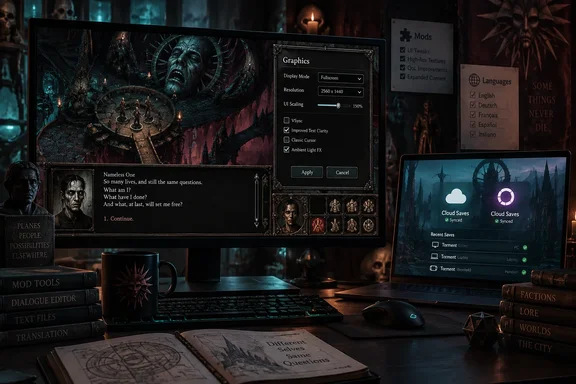
The most visible Windows change is a new Scale UI option under Graphics settings. When enabled, the game’s interface resizes to better fit the game window; when disabled, it remains at its intended 1024×768 size regardless of the window resolution.
That sounds simple, but it corrects an awkward limitation in the Enhanced Edition’s own approach to modern displays. Beamdog says the game previously always attempted to scale the interface to fit the screen and gave players no in-game choice. On a 1080p, 1440p, or 4K monitor, a forced scaling decision is rarely ideal: some players want readable text and large controls, while others want the original composition and do not want the UI spread across a wide desktop.
The new toggle is more than an aesthetic setting. Planescape: Torment is a text-heavy RPG where the dialogue window, journal, inventory, party portraits, and combat log are the game’s primary controls. A UI that is either too small to read comfortably or scaled in an unwanted way creates friction for every hour of play. The official option should also prove preferable to manually editing configuration files or relying on old UI workarounds designed for earlier builds.
There is a catch for purists: enabling Scale UI does not recreate a native widescreen interface or redraw the original art assets. It changes interface scaling relative to the game window. Players expecting a complete high-DPI remake should temper expectations; players who have struggled with the Enhanced Edition’s existing display behavior have a far more targeted fix.
Steam Cloud is being moved—but existing settings can override it
Beamdog says Steam Cloud save control is moving from Planescape: Torment’s own Gameplay Options menu to Steam’s client-side account and per-game settings. That aligns the game with the normal Steam behavior users expect, and it should make cloud status easier to find when setting up a new PC, Steam Deck, or Windows installation.
But the migration has an important wrinkle that the short version of the announcement can obscure. If Steam Cloud was already enabled from inside the game before installing this beta, Planescape: Torment will continue syncing saves even if Steam’s Cloud setting is disabled. Beamdog says the legacy in-game option must be turned off once before it disappears from the menu; after that, Steam’s client settings become the control point.
For anyone trying the beta, that means Steam’s checkbox is not necessarily the final authority until the legacy setting has been cleared. It is an unusual transitional state, and it matters most to users who deliberately keep cloud sync disabled to avoid overwriting a preferred local save, moving saves between branches, or testing mods.
Before opting into the beta, back up the local save folder—normally under Documents\Planescape Torment - Enhanced Edition on Windows. Then verify which save is newest before allowing a newly configured machine to sync. Beamdog is fixing cloud behavior, but any cloud migration is exactly when old saves and configuration differences can become visible.
GOG saves and modded dialogue get concrete fixes
Beamdog’s release candidate also says GOG Galaxy Cloud saves are now functioning properly. The announcement does not specify the prior failure mode, how broadly it occurred, or whether old cloud conflicts will be automatically resolved. That leaves GOG players with a straightforward but cautious course: preserve a copy of local saves, install the beta only if they are prepared to test it, and confirm that a new save appears correctly after a manual Galaxy sync.
The update also changes the handling of dialog.tlk, the central text resource containing much of the game’s dialogue and interface language. In build 3.2.1, modders can place a language-specific replacement in an override subfolder rather than forcing one global replacement file. A French override, for example, can coexist with a fallback file for other languages.
That is modest news for an unmodded Windows installation, but it reduces a longstanding source of friction for translation and text-mod projects. Beamdog’s larger 2026 Infinity Engine update work has focused on making community localizations easier to integrate and maintain. In Planescape, where the writing is the principal reason many players return, making text assets easier to override is more consequential than it would be in a combat-first RPG.
This is version 3.2.1, not a literal 2.7 patch
There is a naming point worth clearing up. Beamdog says the update brings Planescape: Torment: Enhanced Edition to the same patch level as the 2.7 updates for its sibling Infinity Engine games. The Planescape beta is nevertheless identified in Beamdog’s notes as 3.2.1, following an initial 3.2.0 beta published in August.
That is not a contradiction. It means the company is carrying over selected technical work from the 2.7 effort without renumbering Planescape to match the Baldur’s Gate and Icewind Dale releases. The first 3.2.0 beta already added community-localized languages, native Apple Silicon support for macOS, a move from libssl to OpenSSL for better Linux compatibility, and per-language font-size settings. The September release candidate adds the display, cloud, Android data-access, iOS, and modding refinements on top.
Windows users therefore should not read “same patch level” as a promise that every feature and fix from the other Enhanced Editions has arrived. Beamdog explicitly said in August that not all 2.7 features were included in Planescape’s initial beta and that further work would follow. The current release candidate is a substantial maintenance update, but it is not a commitment to feature parity in every area.
How to test without mistaking beta for release
The PC beta is available through Steam’s road_to_3.2 branch and GOG Galaxy’s RoadTo3.2 channel. Opting in is voluntary; standard installs remain on the live branch until Beamdog promotes the patch.
For most players, waiting for the live build is sensible. The release-candidate label indicates Beamdog considers the update close to release, but it is still soliciting bug reports and has not announced a rollout date. Players with a clear problem—unusable interface scaling, unreliable GOG cloud saves, or a dialogue mod that needs language-specific override behavior—have a concrete reason to test, provided they make a backup first.
The useful outcome is not simply that Planescape: Torment remains installable in 2026. Beamdog is addressing the mundane problems that decide whether an old PC RPG is comfortable to play on current hardware: display scaling, sync behavior, readable text, and access to the files enthusiasts actually modify. When the patch reaches the stable branch, the immediate consequence for Windows players should be fewer reasons to choose between preserving the game’s original presentation and making it work cleanly on a modern desktop.
References
- It rules that a 27-year-old RPG, one of the greatest of all time, is still getting patches PC Gamer · 2026-09-19T14:00:00+00:00