

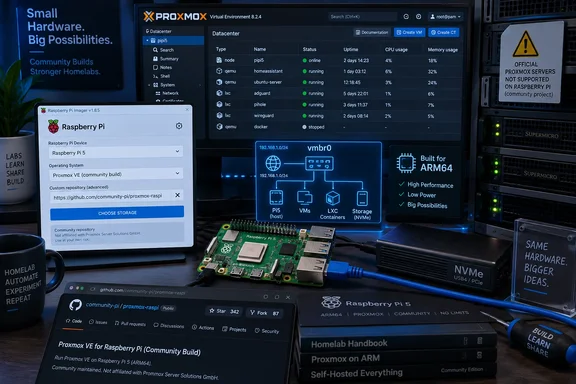
XDA-Developers highlighted the project after its creator, GitHub user meteyou, posted it to the Raspberry Pi and Proxmox communities. The repository confirms the basic design: image builds are produced through GitHub Actions with CustoPiZer, a tool for modifying Raspberry Pi OS images before distribution. Raspberry Pi Imager can then apply normal first-boot settings — hostname, account, password, SSH keys, locale — when the user adds the project’s release manifest as a custom repository.
For someone with an unused Pi 5, an Ethernet cable, and a lightweight lab workload, that reduces setup friction substantially. It is also a very fresh project: its public changelog shows the first releases, versions 0.0.2 and 0.0.3, dated September 19, 2026, just one day before this report. The project has already recorded fixes around image downloads and network startup, a reminder that it should be treated as a lab image rather than an appliance ready for unattended duty.
The important correction: ARM64 support does not mean Raspberry Pi support
Proxmox VE 9.2 gained an official ARM64 build on August 5, 2026. That is a consequential change for ARM server users: Proxmox says the release shares its code base, package repositories, release lifecycle, and core management tooling with the x86-64 edition. It brings KVM virtual machines, LXC containers, storage tooling, clustering, and the Proxmox web interface to supported 64-bit ARM machines.
However, Proxmox’s own ARM64 announcement draws a boundary that the Pi project crosses. The vendor officially supports NVIDIA Grace Hopper and NVIDIA Vera systems, while other UEFI-based ARM hardware receives best-effort treatment. Its host requirements call for UEFI boot and ACPI hardware description.
A standard Raspberry Pi is device-tree based, not an ACPI/UEFI server platform. Proxmox’s FAQ explicitly says Raspberry Pi and similar single-board computers are unsupported. The project works by retaining Raspberry Pi OS and its board-specific boot and kernel environment, then installing the Proxmox management stack on top. That is a smart adaptation of the new ARM64 packages, but it is materially different from booting the official Proxmox ARM installer onto validated hardware.
This distinction affects expectations when an update, kernel change, storage quirk, or VM problem arrives. Proxmox support will not treat a Pi 5 deployment as a supported node, and any incompatibility involving the Raspberry Pi boot chain, device tree, network stack, or peripheral drivers lands with the community image maintainer or the person running it.
What the image changes on the Pi
The project does more than preinstall packages. Its README says it removes NetworkManager, disables cloud-init network configuration, and configures ifupdown2 with a vmbr0 Linux bridge over the Pi’s eth0 Ethernet interface. The bridge acquires an address through DHCP, and the project recommends creating a DHCP reservation so that the Proxmox host keeps a predictable management address.
That design addresses a real Proxmox requirement. Virtual machines and containers normally connect through a host bridge, which makes the host’s physical Ethernet link behave like an uplink for attached guests. The project also keeps the host’s /etc/hosts mapping synchronized with the bridge address, because Proxmox services can refuse to start when the hostname resolves only to a loopback address such as 127.0.1.1.
The practical result is that a user can flash the image, enter first-boot credentials in Raspberry Pi Imager, plug in Ethernet, and reach the Proxmox web interface without hand-editing a network configuration. That convenience is the project’s core contribution. It does not change the underlying constraints of a Pi-class host.
Wi-Fi is absent by design, not an overlooked option
The no-Wi-Fi warning deserves more emphasis than it received in the initial coverage. The repository says Wi-Fi settings entered in Raspberry Pi Imager are silently ignored. This is not simply because the image author has not added wireless drivers: the supplied design depends on bridging guest traffic onto eth0, and a normal Wi-Fi client interface cannot generally participate in a transparent Ethernet bridge the way a wired NIC can.
A wireless-only Pi can still be used for server workloads with routing, NAT, or more specialized networking arrangements. But that would be a different network design from the ready-made vmbr0 configuration this image ships. It would also require more hands-on administration — precisely what the image is intended to avoid.
Anyone testing the image should connect Ethernet before the first boot, as the maintainer advises. They should also use a router reservation or another planned addressing method before adding VMs, containers, DNS records, backup jobs, or management bookmarks that assume a stable host IP.
ARM guests are the sensible target
A Raspberry Pi 5 is an ARM64 machine. That means the natural guests are ARM64 Linux containers and ARM64 virtual machines. Proxmox’s own ARM64 documentation says guests run on nodes matching their architecture, and live migration works only between nodes of the same architecture. A Pi node should therefore not be viewed as a drop-in expansion of an existing Intel or AMD Proxmox cluster.
It can join a mixed-architecture cluster at a technical level, according to Proxmox, but that arrangement is not officially supported. More importantly, it does not make workloads portable between x86-64 and ARM64 nodes. A Linux container image must have an ARM64 build; a virtual machine needs an ARM-capable guest operating system and firmware setup. Existing Windows x86 virtual machines, ordinary x86 Linux VMs, and x86 appliance images do not become native Pi workloads merely because the Proxmox web UI can see both nodes.
For Windows administrators, that puts the Pi firmly in the experimental and Linux-services category. It can be a tidy home for ARM64-aware containers, DNS filtering, monitoring, development test services, build agents, or a small self-hosted automation stack. It is a poor choice for running the Windows VM inventory already hosted on an Intel NUC, a mini PC, or rack hardware.
Storage and memory remain the hard limits
The image lowers the installation barrier; it cannot supply server-class memory capacity, redundant storage, PCIe expansion, remote management, or a supported recovery path. The Pi 5’s four Cortex-A76 cores are respectable for small services, and an NVMe drive connected through the board’s PCIe lane is dramatically preferable to relying on a microSD card for active VM or container storage. But none of that turns the board into a replacement for even a modest x86 mini PC.
Memory is likely to become the first bottleneck. Proxmox itself consumes resources, and each VM needs reserved RAM, while containers remain lighter but still compete for cache and service memory. A Pi with 8GB can make a credible container host or training platform; a high-memory Pi can stretch further, but its cost quickly weakens the value argument against used business desktops and low-power mini PCs.
The current repository also makes no claim of production support, hardware qualification, long-term maintenance guarantees, signed-image verification, or a tested upgrade policy. Its public GitHub Actions history shows that the release automation is active, but also that the project has only recently been assembled and has already encountered startup failures during early workflow runs. That is normal for a new personal project. It is not a reason to dismiss it — it is a reason to keep it away from workloads whose recovery plan cannot be “reflash and rebuild.”
A good homelab shortcut, with a clear boundary
Proxmox Pi OS is useful because it turns the Pi 5 into a quick, approachable ARM64 Proxmox lab node rather than a multi-hour exercise in package installation and network debugging. The image’s Ethernet-first setup is deliberate, its custom Raspberry Pi Imager integration is a genuine usability improvement, and its source repository gives technically confident users a way to inspect how the image is assembled.
The honest deployment advice is simple: use it for learning Proxmox, running ARM-native containers, validating automation, or putting already-owned hardware back to work. Keep important VMs, Windows workloads, clustered production services, and anything requiring vendor-backed support on supported x86-64 hardware or one of Proxmox’s validated ARM server platforms.
References
- You, too, can turn your spare Raspberry Pi 5 into a Proxmox virtualization host XDA · 2026-09-20T05:22:38+00:00