

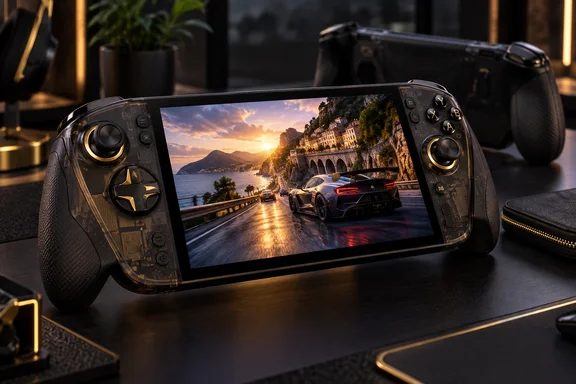
The ROG Xbox Ally X20 puts its premium into the screen and controls
The X20 is ASUS’s ROG 20th-anniversary handheld, officially identified as the ROG Xbox Ally X20 (2026), model RC74XA. Its translucent black enclosure, gold accents and anniversary badge give it a collector-oriented identity. Beneath that treatment, however, are changes that affect how games look and how the machine feels in use.
Microsoft’s comparison of the Xbox Ally family shows why the X20 should be evaluated as a refinement of the Xbox Ally X. Both list AMD’s Ryzen AI Z2 Extreme processor, 24GB of memory, a 1TB SSD and Windows 11 Home. The conspicuous display change is from a 7-inch, 1920×1080, 120Hz screen on the Xbox Ally X to a 7.4-inch OLED screen with the same resolution and refresh rate on the X20.
That is a more useful starting point than treating the anniversary branding as a generational leap. The screen grows, OLED arrives, and the controls change; the listed processor, memory capacity and storage capacity do not move up a tier. ASUS also describes revised cooling, but supplies no comparative measurements here that would establish how much faster, quieter or more consistent the X20 becomes under sustained load.
| Documented feature | ROG Xbox Ally X | ROG Xbox Ally X20 |
|---|---|---|
| Processor | AMD Ryzen AI Z2 Extreme | AMD Ryzen AI Z2 Extreme |
| Memory capacity | 24GB | 24GB |
| SSD capacity | 1TB | 1TB |
| Screen size | 7 inches | 7.4 inches |
| Resolution and refresh rate | 1920×1080, 120Hz | 1920×1080, 120Hz |
| X20’s highlighted changes | Microsoft lists the established Xbox Ally X configuration. | Microsoft highlights OLED, HDR, TMR joysticks, rubberized grips, a transforming D-pad and revised buttons. |
The price puts substantial pressure on those refinements. ASUS’s US listing shows $1,299.99 for the standalone X20. In separate August hands-on coverage, Tom’s Guide described the device as carrying a $300 increase and considered the OLED display persuasive enough to make that premium more palatable. That is another reviewer’s value judgment, rather than evidence of a corresponding increase in processing power.
Dwiar reports UK pricing of £1,299 and a glasses bundle priced at $2,299.99 or £2,299.99. Those bundle and UK figures remain attributed to TechRadar: the official ASUS US specification listing establishes the standalone US price, while the ASUS product page labels the associated bundle “Coming Soon.” The hands-on enthusiasm should not be mistaken for confirmation that every purchase configuration is available in every region.
The X20’s OLED upgrade needs the right brightness comparison
The strongest case for the X20 is the part of the device a player looks at throughout a session. ASUS specifies a 7.4-inch OLED panel with HDR, 100% DCI-P3 color coverage, Dolby Vision support and FreeSync Premium Pro. Dwiar’s description of more vibrant colors and stronger contrast is consistent with the kind of improvement ASUS is selling, although his report does not contain instrumented display measurements.
The brightness figures need more care than the headline maximum suggests. ASUS lists 600 nits for SDR and up to 1,400 nits for HDR, and its product description explicitly discusses bright HDR highlights. The 1,400-nit figure therefore should not be read as the brightness of every game, every menu or the whole screen in ordinary use. Dwiar’s suggestion that the maximum leaves players covered in all situations goes further than the specification establishes.
ASUS also claims a 65% reduction in environmental reflections compared with a standard OLED screen without its anti-reflection coating. That comparison gives the claim a defined baseline, but it remains a manufacturer claim. It does not establish how readable the X20 will be in a particular outdoor setting, nor does it replace a measured comparison at matched brightness.
The other meaningful display feature is variable refresh rate, or VRR, which allows the screen’s refresh timing to follow changing game output. ASUS states a 30Hz–120Hz VRR range for the X20’s FreeSync Premium Pro implementation. This is relevant to a handheld because the benefit is available across a range of game frame rates; the screen does not have to operate only at its 120Hz ceiling.
A 120Hz screen nevertheless does not establish that demanding games will run at 120 frames per second. Nor does retaining 1920×1080 establish that every demonstration rendered the game internally at that resolution. Those are separate properties of the display and the game configuration. For an Xbox Ally X owner, the supported upgrade argument is better image presentation and a larger viewing area—not a higher listed resolution or refresh-rate ceiling.
The Xbox Ally X20 improves grip without becoming a lightweight
Dwiar’s most useful observation concerns a problem that specifications rarely settle: whether a handheld is comfortable enough to keep using. He says bulky, heavy devices have previously discouraged him from committing to handheld PC gaming, yet the X20’s tactile back and rubberized grips made a strong impression during his Gamescom session. That is a relevant firsthand reaction from someone whose existing objection was physical comfort.
ASUS lists the X20 at 756 grams, or 1.67 pounds. The device therefore remains substantial even if its contours and surface texture make it easier to hold. The defensible conclusion is that Dwiar found this particular design more agreeable during a short session, not that ASUS has eliminated fatigue for everyone. His experience does not establish comfort over a long evening, and a textured grip does not establish protection against drops or travel damage.
The stick revision is more concrete. ASUS specifies TMR—tunnel magnetoresistance—joysticks and describes magnetic sensors for detecting movement, a tight 3% deadzone and an algorithm intended to eliminate four-axis snapping and improve diagonal inputs. These are the manufacturer’s stated mechanisms behind the control changes. Dwiar reports that the sticks felt smoother and more responsive than those on his PlayStation Portal or a Steam Deck, but he supplies no latency measurements.
It is also worth separating the sensing technology from a lifetime guarantee. ASUS markets the sticks as having “no risk of stick drift,” while Dwiar praises their durability. Neither a specification listing nor a brief hands-on session establishes long-term reliability. Buyers can reasonably count TMR sticks as a documented hardware change without treating the broader durability language as the result of an endurance test.
The D-pad offers an unusually specific adjustment that ASUS explains directly. Slightly lifting it and rotating it 90 degrees changes its configuration between four-way and eight-way directional input, without tools or replacement parts. Rounded ABXY buttons, reshaped bumpers and revised trigger travel round out the physical changes; Dwiar liked their feel but still wanted microswitch face buttons. The X20’s controls are consequently a particular set of design choices, rather than an upgrade every player will necessarily prefer.
Forza Horizon 5 shows the X20’s appeal, not its performance ceiling
Dwiar reports that Forza Horizon 5 ran “comfortably north of 60 frames per second” and looked noticeably better than on the PlayStation Portal he normally uses. That is the clearest game-specific observation in his account. It supports the narrower conclusion that the demonstration looked good and felt convincing to him.
It cannot support a reproducible performance comparison. His report does not disclose the graphics preset, internal rendering resolution, upscaling configuration, power mode or session duration. It also does not provide frame-time data, which would show how consistently frames arrived rather than merely whether the displayed rate exceeded 60.
The Portal comparison should remain similarly bounded. Dwiar is describing a visual preference based on his experience, not presenting a matched test with documented settings and conditions. It would be misleading to turn that preference into a quantified performance advantage over the Portal or a general claim of superiority over Steam Deck hardware.
ASUS’s specifications give the X20 a substantial handheld-PC configuration: an eight-core, 16-thread Ryzen AI Z2 Extreme, 24GB of LPDDR5X memory and a 1TB PCIe 4.0 SSD. Those details establish what is inside the machine. Because Microsoft lists the same processor and the same memory and storage capacities for the Xbox Ally X, they do not explain a new generational performance advantage.
The cooling revision and 80Wh battery are more relevant to questions the demonstration leaves unanswered. ASUS says its revised cooling directs air toward the processor through a new internal channel and uses high-flow fans, but no comparative sustained-performance or noise results accompany that description. Likewise, 80Wh establishes battery capacity, not how many hours a particular game will last. Measured runtime and sustained performance remain the important missing evidence for anyone whose buying decision depends on long sessions away from a charger.
Windows 11 gives the Xbox Ally X20 flexibility with defined boundaries
The Xbox name can obscure what the X20 actually runs: Windows 11 Home. Microsoft describes an Xbox mode that the device can start into, a collective library of supported games from Xbox and other PC storefronts, and a controller-oriented interface. ASUS also supplies Armoury Crate Special Edition for handheld library navigation and device controls.
That software arrangement is relevant to existing PC players because access is not confined to one storefront. It does not mean every game is compatible, included or covered by an existing console purchase. Microsoft’s own wording refers to supported games, and its Play Anywhere promise applies to eligible titles rather than an entire Xbox account indiscriminately.
Three ways of playing need to stay separate:
- Xbox Play Anywhere allows an eligible owned game to be played across Xbox consoles, Windows PCs and supported handhelds without another purchase, with supported progress carrying across devices.
- Xbox Cloud Gaming streams supported titles, including selected games a user owns or buys, subject to subscription, region, device and internet requirements.
- Xbox remote play accesses games installed on an Xbox console remotely and requires an internet connection.
Those boundaries affect the value of the hardware. A buyer interested in downloading PC games is evaluating the X20’s local processor, storage and display. Someone mainly interested in streaming is placing more of the purchase’s value on its screen, controls and access to the relevant service. The presence of all three routes does not make their game libraries, licensing or connectivity requirements interchangeable.
ASUS specifies two months of Xbox Game Pass Premium in eligible markets. Its terms require a valid payment method and say the subscription continues at the regular price unless canceled, with conversion rules for existing subscriptions. That is a limited subscription offer, not a permanent game library or a promise that every desired PC game is included.
The X20’s physical shortcuts reduce trips through menus
The documented button behavior provides practical context for the handheld interface. It also shows what can be operated directly without inventing a setup procedure that the hands-on account did not test.
- Press the Xbox button once to open Game Bar and access its tools and widgets. Hold it to navigate between open applications.
- Press the Command Center button once to open Command Center. Hold it to open Armoury Crate.
- Press the Action button once to take a screenshot. Hold it to start screen recording.
These shortcuts support ASUS’s controller-first pitch, but they do not establish that every launcher, sign-in screen or game behaves equally well with a controller. Dwiar’s Gamescom account evaluates the device in play; it does not document a clean installation, account setup or a representative selection of third-party launchers. A prospective Windows handheld convert should distinguish an appealing gaming session from evidence that the whole PC workflow has become console-simple.
The Xbox Ally X20 purchase turns on display value and personal fit
Prospective buyers should decide whether OLED and the revised controls solve their particular objections to handheld PCs before paying the X20 premium. Existing Xbox Ally X owners have an especially clear comparison: Microsoft’s specifications show the same processor and the same memory and storage capacities, so an upgrade needs to be justified by the screen, controls or other documented refinements.
For someone who shares Dwiar’s discomfort with bulky handhelds, his reaction is encouraging but highly personal. Where an opportunity to handle the X20 exists, its 756-gram weight, grip shape, button reach and adjustable D-pad are more useful things to assess than the gold detailing. A favorable short impression can establish initial comfort; it cannot establish how the device will feel after an extended session.
The glasses bundle deserves a separate decision. TechRadar reports a much higher combined price, but its account does not establish the glasses’ image quality, comfort, compatibility boundaries or practical advantage over the built-in OLED screen. Paying for the handheld’s improved display and paying for an additional viewing device are different purchases, and the evidence here supports evaluating only the former in detail.
- Treat the X20 as a display-and-controls upgrade over the Xbox Ally X, because Microsoft lists the same processor and the same memory and storage capacities for both.
- Compare ASUS’s 600-nit SDR specification separately from its 1,400-nit HDR maximum rather than assuming the peak figure applies throughout ordinary use.
- Regard the reported Forza Horizon 5 result as a demonstration impression, not a guaranteed frame rate at an established graphics preset.
- Look for measured battery life and sustained-performance results before buying specifically for long, demanding sessions away from mains power.
- Confirm that the games you intend to play are supported through the relevant PC storefront, Play Anywhere entitlement, cloud service or remote-play route.
- Account for the Game Pass offer’s eligibility and automatic renewal, and establish whether the regional package includes a charger; ASUS explicitly says charger inclusion varies.
The ROG Xbox Ally X20 has a credible route to winning over reluctant handheld-PC buyers: make the screen more rewarding to look at and the hardware more agreeable to hold. Dwiar’s experience shows that this combination can be persuasive, while the official specifications keep the buying argument grounded in refinement rather than a new performance class. At $1,299.99, the sensible commitment is to those tangible improvements; buyers who need proof of endurance or a substantial speed increase should wait for measurements that answer those questions.