

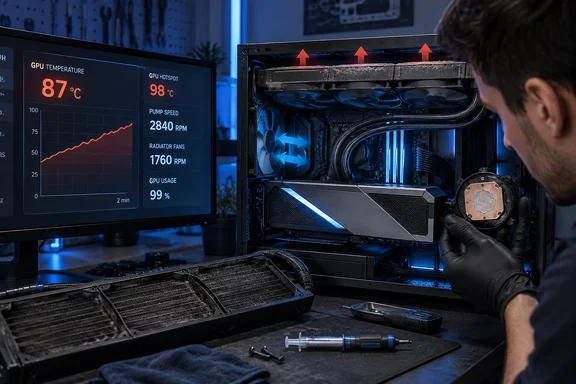
The RTX 4090 Neptune OC-V was built around a 360 mm radiator, three 120 mm fans, and a pump integrated into the graphics-card assembly. NVIDIA listed the model among its launch-era custom RTX 4090 cards as a 2.1-slot design with a separate 360 mm radiator. That arrangement makes the GPU itself dramatically slimmer than the 3.5- and 4-slot air coolers common on premium RTX 4090 boards—but it shifts the space requirement into the rest of the case.
For someone using a Phanteks P500A, as the XDA writer describes, that can mean the front radiator position is no longer available for a CPU liquid cooler. It also makes a later move to a 420 mm Arctic Liquid Freezer III less straightforward, even though the chassis supports a front-mounted 420 mm unit. The radiator is not an accessory attached to the GPU; it is part of the GPU’s cooling system and must be treated as a permanent case-layout constraint for as long as the card remains installed.
An 85–88°C GPU temperature is close to NVIDIA’s limit, not an automatic failure
NVIDIA specifies a maximum GPU temperature of 90°C for the GeForce RTX 4090. The company says its GPUs will reduce performance to bring temperatures back under the maximum specification, and can shut the system down if temperature continues rising despite throttling.
That puts the reported 85–88°C core temperatures in an important middle ground. They are not evidence that the GPU has already been damaged, and the word alarming overstates the immediate danger. They are, however, much too close to the thermal limit for a card that reportedly operated around 60–65°C when new, particularly one using a 360 mm AIO cooler.
The key issue is the 20°C-plus change from the card’s own baseline, not a universal rule that every RTX 4090 must remain below a particular number. Room temperature, case airflow, power limit, game workload, radiator orientation, fan curves, and whether the reading is GPU core, hotspot, or memory temperature can all move the result. A GPU core reading of 85°C does not tell an owner whether the cold plate has poor contact, whether radiator fans are underperforming, or whether coolant flow has degraded.
Early reviews of the Neptune showed why the card attracted attention in the first place. NVIDIA described it as a liquid-cooled model intended for buyers seeking lower temperatures and greater overclocking headroom, while a 2022 GamerSky test recorded a 55°C GPU temperature during a demanding FurMark run in a cool 18°C room. That single test cannot establish what every Neptune should do in every case, but it confirms that the design had significant thermal capacity when new.
A card now approaching 90°C under gaming load needs attention before the owner chooses between re-pasting and replacing it.
Check the radiator and pump before opening the graphics card
The XDA account treats a fresh thermal paste application as the likely answer. It may be part of the eventual repair, but it should not be the first conclusion. A sealed GPU AIO contains more potential points of failure than an air cooler: radiator fans, fan control, pump speed, coolant condition, tubing, cold-plate contact, and the radiator’s ability to exchange heat with the surrounding air.
Owners should first establish whether the system is moving heat out of the loop.
- Record GPU core temperature, hotspot temperature, GPU power draw, clock speed, radiator-fan RPM, and pump RPM during the same repeatable game benchmark or stress test.
- Inspect both sides of the radiator for dust buildup, especially if it serves as a front intake and has spent years pulling unfiltered air or carpet dust through the chassis.
- Confirm that all three radiator fans are spinning and responding to a manual speed increase, rather than relying on a software profile that may have changed after a driver, BIOS, or utility update.
- Check whether the pump is reporting a plausible and stable RPM through the motherboard header or the card’s monitoring software, if the design exposes that sensor.
- Compare radiator exhaust temperature with the ambient room temperature after sustained load. A hot GPU paired with a comparatively cool radiator can point toward restricted coolant flow or poor cold-plate contact; a very warm radiator instead suggests the loop is collecting heat but cannot reject it efficiently.
This is where the comparison with air cooling becomes practical rather than ideological. An air-cooled GPU concentrates its serviceable parts around a heatsink and several fans. If cooling degrades, cleaning the fin stack, replacing a fan, improving case airflow, or renewing paste and pads are familiar tasks. The Neptune’s GPU package is physically smaller, but diagnosing it requires accounting for hardware mounted elsewhere in the case.
That complexity is the real ownership cost of an AIO GPU. It is not simply that the card has “more things that can go wrong.” It is that a fault in any part of the cooling path can look identical at first: higher GPU temperature and louder fans.
The reported temperature rise could be paste, but it could also be flow or mounting pressure
Thermal compound can dry or pump out over long periods of thermal cycling, and worn or compressed thermal pads can affect memory and power-delivery temperatures. The writer’s reluctance to dismantle an expensive GPU is understandable. A teardown risks stripped screws, torn pads, damaged fan or RGB cables, uneven mounting pressure, and—on an AIO design—damage to tubing or fittings.
But re-pasting without first checking flow and radiator behavior carries its own risk: it can turn a diagnosable maintenance issue into an unnecessary disassembly. If a pump has degraded or coolant has slowly permeated from the loop over years, new paste will not restore the performance the card had when new. If the radiator fans are the culprit, opening the block is needless exposure for the GPU.
A useful test is to observe how quickly temperatures rise. A rapid jump toward the upper 80s shortly after load begins can suggest poor contact or inadequate coolant flow. A slower climb over several minutes, accompanied by a warming radiator, is more consistent with reduced radiator performance, poor case airflow, or a fan-control problem. Neither pattern is conclusive on its own, but both are more informative than one peak temperature number.
The warranty position also matters. The Neptune OC-V launched in 2022, and many graphics-card warranties were three years, although regional terms and seller coverage vary. By September 2026, a first-wave card may well be outside its original coverage. Owners should still check the exact serial-number and retailer terms before removing a cooler, because a manufacturer or regional distributor may offer inspection or service options that disappear once the assembly has been opened.
A 360 mm GPU radiator changes every later upgrade decision
The writer is right that a thick air-cooled flagship card creates its own frustrations. An ASUS ROG Strix RTX 3090 can occupy multiple slots, obscure expansion slots, add substantial leverage to the PCIe slot, and demand a support bracket. Modern air-cooled cards can also make small cases impractical.
Yet air cooling is self-contained. Its bulk is visible when choosing a case, but it normally does not compete with the CPU cooler for a radiator mount, change the direction of case airflow, or limit whether a 420 mm CPU radiator can be installed later.
The Colorful design makes a different trade. Its GPU body uses only about two slots, a real benefit for systems that need access to lower PCIe slots or cannot accommodate a 3.5-slot cooler. But the 360 mm radiator needs a long, clear mounting location. In a typical mid-tower, that is the front or top position—the same locations builders reserve for CPU liquid coolers.
For builders planning one high-end GPU and a long-lived CPU platform, the choice should be made at the case-planning stage. A GPU AIO is most sensible when the chassis has independent radiator capacity, the intended CPU cooling setup has already been accounted for, and the owner accepts that the card’s cooling loop may require monitoring and eventual service. It is less attractive when the case has only one viable 360 mm mounting position.
Air cooling wins on repairability, not necessarily on temperature
The strongest conclusion from XDA Developers’ experience is that repairability can outweigh a temperature advantage once a GPU is kept for four years or longer. The RTX 4090 was released in October 2022, and an owner who expected a quick upgrade could reasonably have prioritized out-of-box thermals and noise. A buyer expecting to keep the next flagship through 2030 should put more weight on fan replacement, cleaning access, warranty service, and case flexibility.
That does not make air cooling universally cooler in a technical sense. A healthy 360 mm AIO can move a GPU’s heat away from the card and, under the right conditions, operate quieter and cooler than an air cooler. Nor does an AIO’s presence mean an eventual leak is inevitable. The decisive disadvantage is service complexity once performance changes.
For the Neptune owner, the immediate task is not to choose the next ASUS Strix card. It is to determine whether dust, fan control, pump behavior, coolant flow, or cold-plate contact is behind the 20°C-plus temperature increase. If the GPU is repeatedly reaching 85–88°C at normal settings, that diagnosis should happen before the card begins spending sustained workloads at NVIDIA’s 90°C ceiling.
References
- I spent 4 years with a liquid-cooled GPU, and now I appreciate air cooling more than ever XDA · 2026-09-19T16:01:16+00:00